Task tools
You already have Assigned work and reported progress
Still missing Workday context behind those updates
SuperSee fills the gap Activity and screen context to review alongside updates

For founders and delivery leaders of service teams 15–100 employees
SuperSee shows where work time actually went across apps and sites, with screenshot context for the moments that look off. So you can have clearer conversations, not more check-ins.
No keystrokes. No passwords. No mic. Manual or Automatic tracking, you choose.
Plans from $2.99 per active employee/month
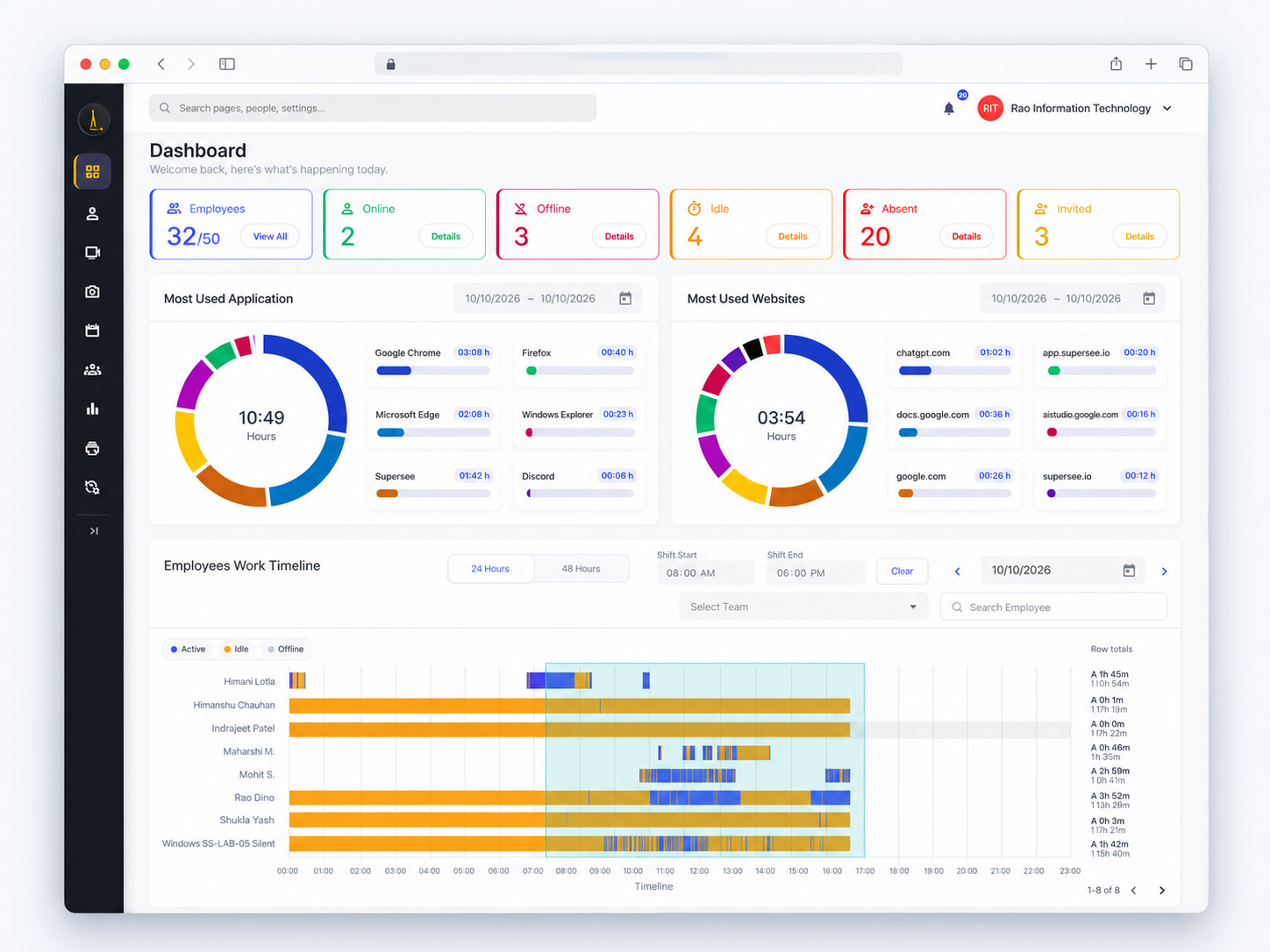
Trusted by growing service teams



“SuperSee helped us uncover the real problem: uneven work allocation. Now the team works more efficiently, and we’ve grown without overburdening anyone.”
They used work patterns to redistribute work more fairly as the firm grew, and to hold clearer management conversations about load.
Tasks, chats and timesheets tell part of the story. SuperSee complements them with workday context. It does not replace those tools or integrate with them automatically.
| You already have | Still missing | SuperSee fills the gap |
|---|---|---|
| Task tools | Assigned work and reported progress | Workday activity and screen context to review alongside updates |
| Timesheets | Logged hours | Active/idle patterns and application usage |
| Chats & meetings | Explanations and discussions | Historical context for more specific follow-up |
You already have Assigned work and reported progress
Still missing Workday context behind those updates
SuperSee fills the gap Activity and screen context to review alongside updates
You already have Logged hours
Still missing Where the day actually went
SuperSee fills the gap Active/idle patterns and application usage
You already have Explanations and discussions
Still missing Shared facts before the conversation
SuperSee fills the gap Historical context for more specific follow-up
Spend less time piecing together updates before 1:1s. SuperSee gives you the context behind the numbers, so you can focus on removing bottlenecks, not policing activity.
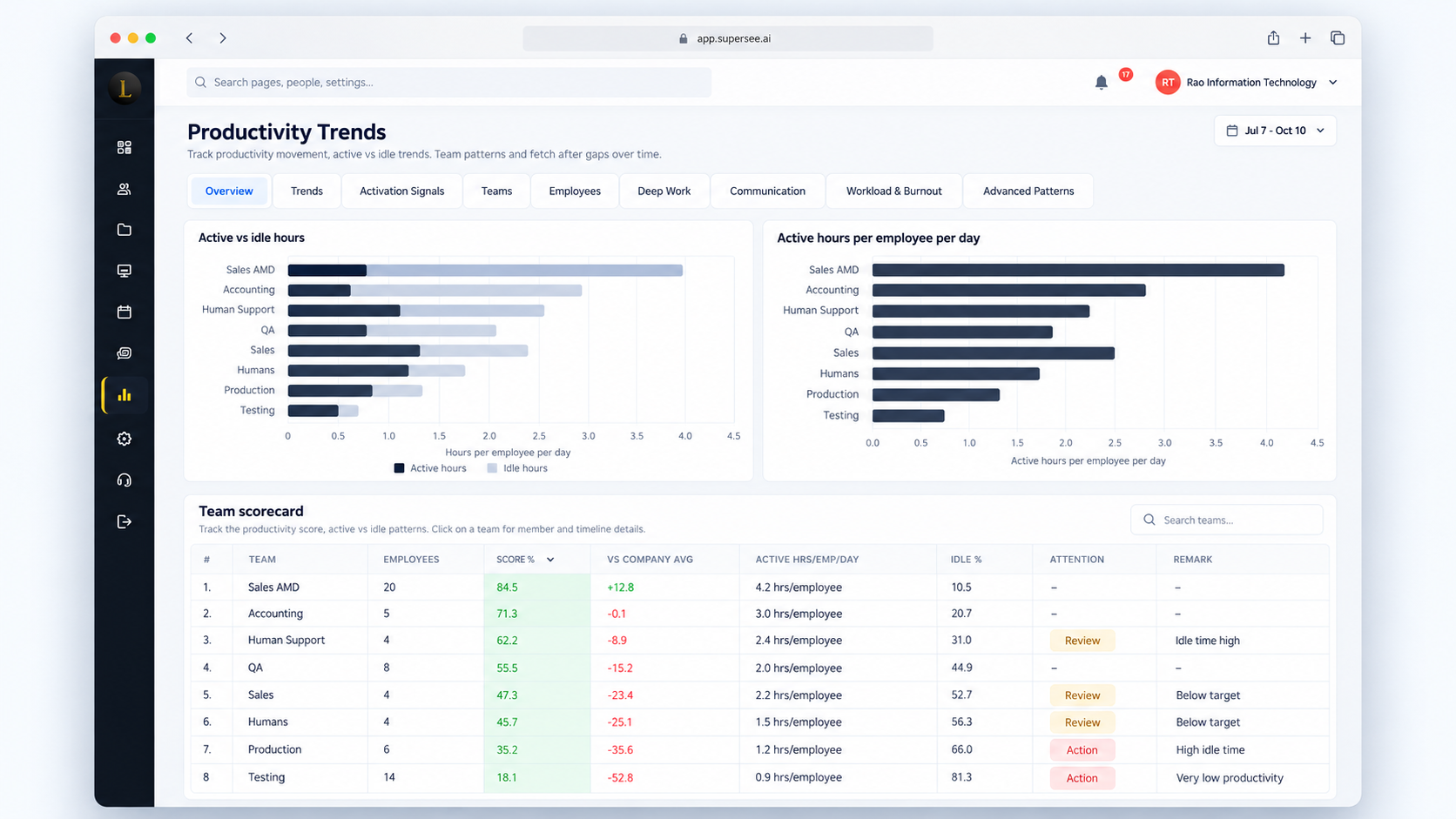
One review path: Trends → Apps → Screenshots, before you ask the next question.
Signal: The team scorecard ranks Active vs Idle hours and flags teams that need a closer look.
Follow-up: Open the flagged team, then ask about workload and handoffs before you decide what changed.
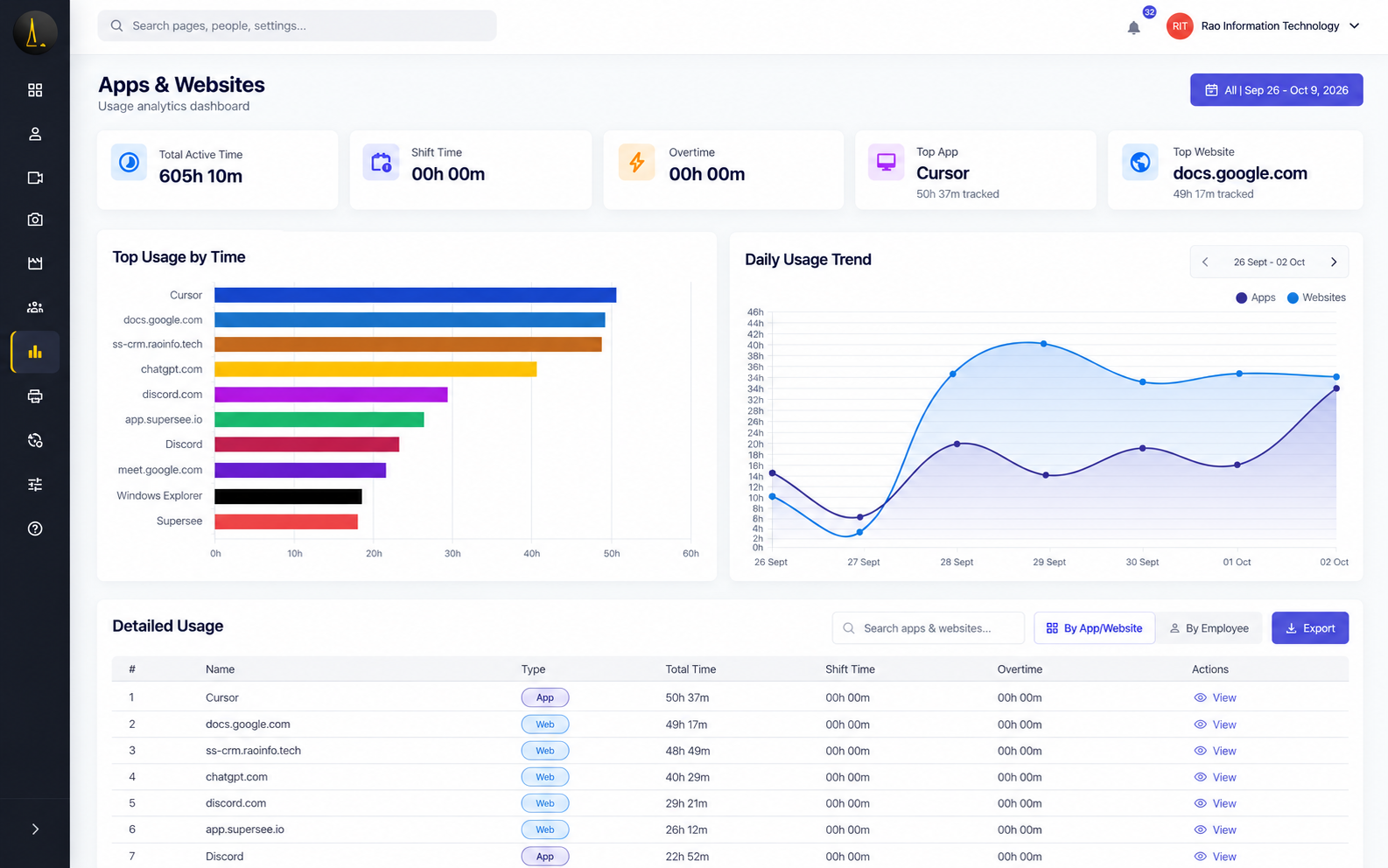
Signal: Top apps and sites show where attention clustered in the period.
Follow-up: Ask about workflow or tool adoption. Usage is not automatic client or project attribution.
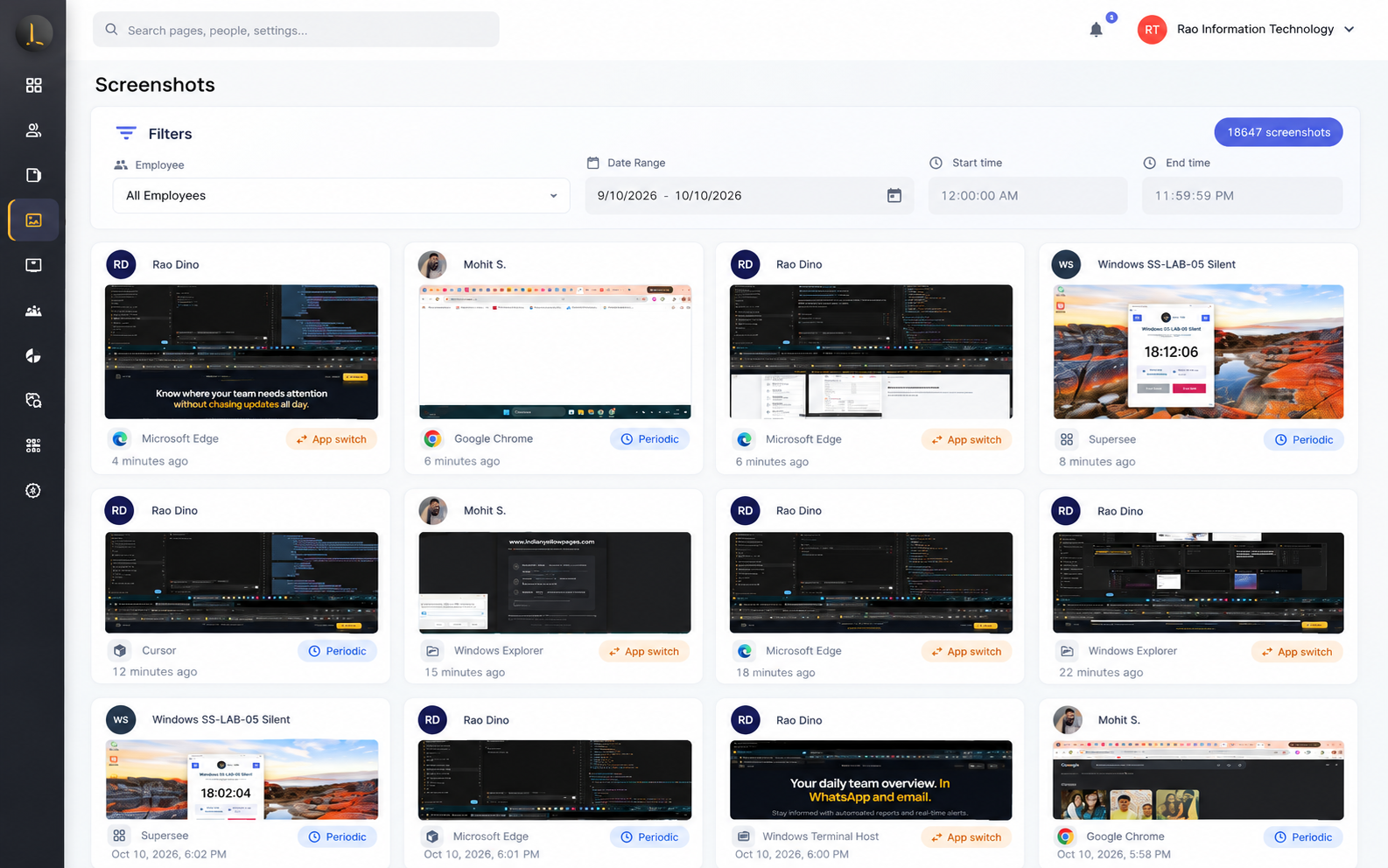
Signal: Status says “done,” but the afternoon sequence doesn’t match the deliverable.
Follow-up: Filter by person, date, and time, then review screenshot context beside each card. Configured moments, not continuous video.
Every morning: yesterday’s attendance, active and idle totals, and exceptions. A short version on WhatsApp, the details by email, so you know where to look before your first call.
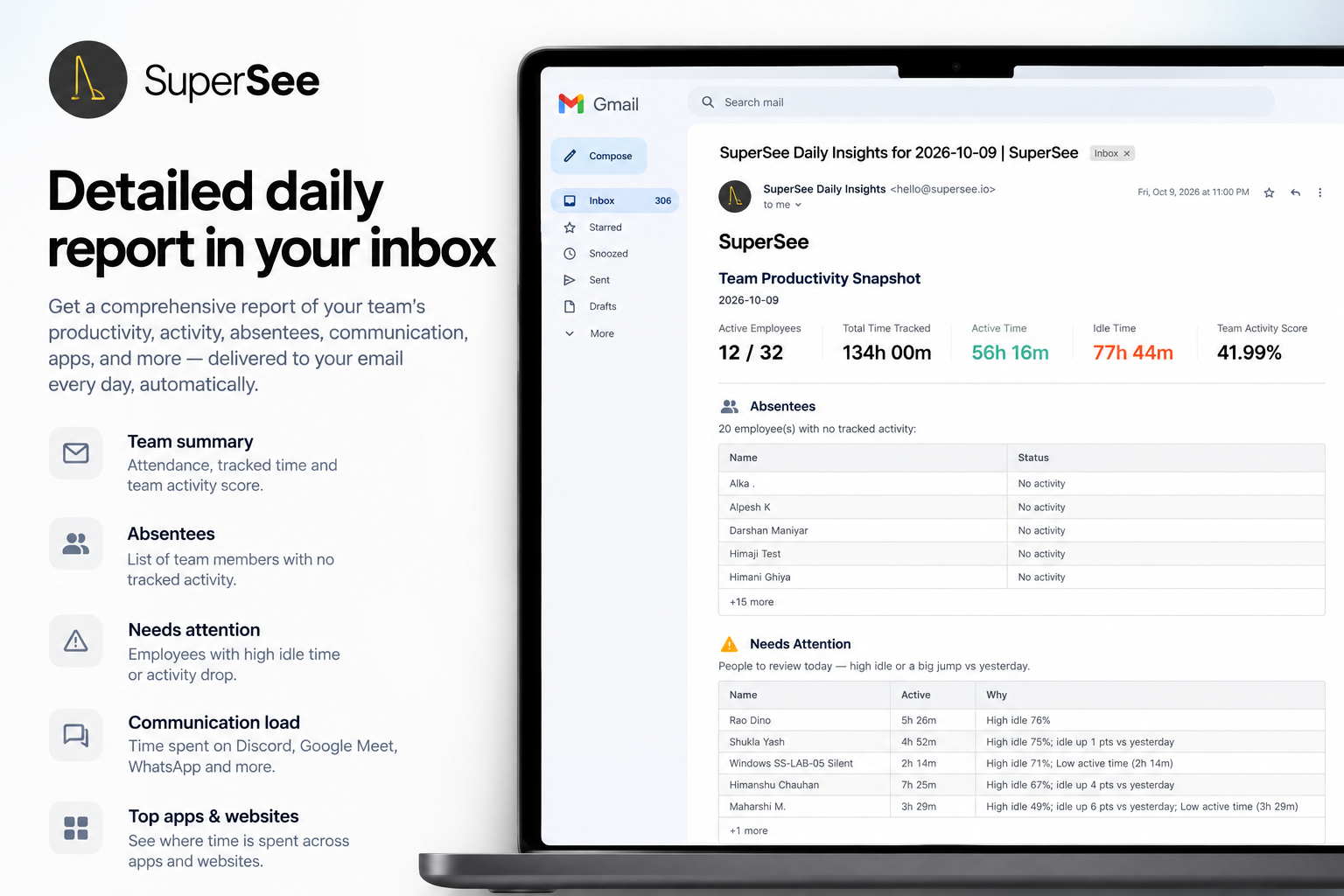
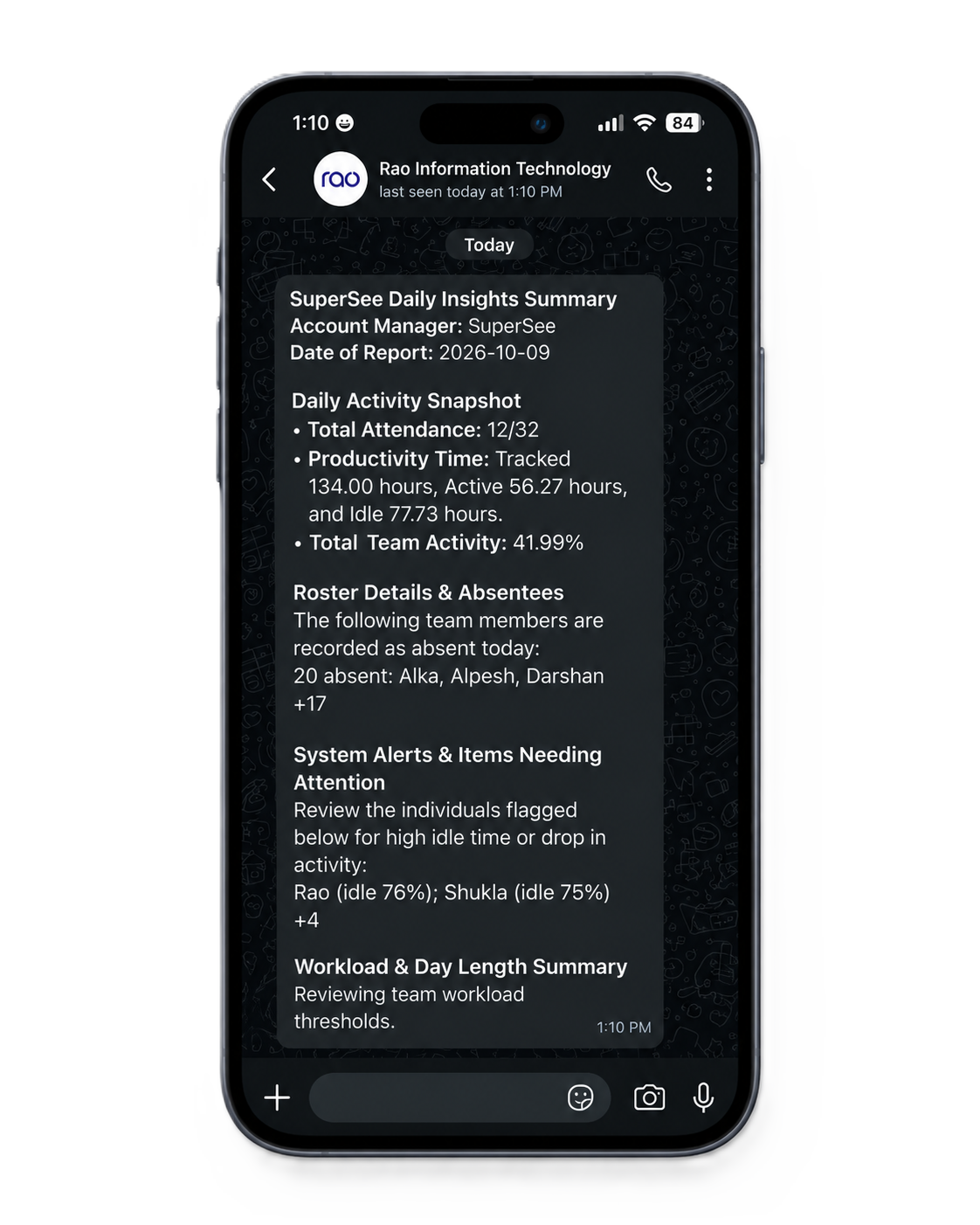
How founders use SuperSee before a follow-up, not instead of one.
A client update feels late and the status is vague.
Trends show a multi-day change; today’s timeline has an unusual gap.
Work Replay for that window shows waiting on assets, not idle guessing.
Ask about the blocker and rebalance the next handoff, with project context you already have.
SuperSee surfaces signals to investigate. Delivery judgment still needs project context.
Agencies, IT, and professional services: typically 15–100, founder- or delivery-led. BPOs: typically 100+, ops-led with Live Wall. Pick the page that matches how you operate.
The board is still green. Open the week before the status call and see who was in the file, who was in meetings, and who was online after 7.
IT services & dev teamsThe handover still slipped. Open Thursday before you message the engineer, and ask about the stall you can see.
Professional servicesCA, consulting, and law. Sit with the day on Monday and fill the sheet in the system you already bill from.
BPO & support teamsLive Wall, live screencast, then the recorded day — with every live view logged.
Remote & hybrid teamsA work-setup page for every industry above. Reliable view of the workday—not a “who is online” wall.
Not from a company rollout. From one person you already cannot see clearly.
See it on your own computer first. Install SuperSee here, open a work screen you are comfortable capturing, and look at your own screenshot. Nobody else is invited. If this is not something you would accept on your machine, you stop.
Then try one person. Pick the client team or seat where you have the least visibility. Tell them what is captured, when it runs, and who can look. One install, not the company.
Judge it on their first real workday. Ask one management question you already have. Use the day around it. Keep going only if that context, plus the daily email or WhatsApp, actually changes what you do next.
No keystrokes. No passwords. No microphone. Tracking mode is yours to choose.
During work sessions: screenshots at configured intervals, app and website usage, and active vs idle timelines. No keystrokes, typed passwords, microphone audio, or continuous video.
No. Idle can include calls, meetings, thinking, or work away from the keyboard. Treat it as a signal to check with role and day context, not as proof someone was not working.
Three separate choices:
A lightweight desktop app for Windows, macOS and Linux. You invite people by email, they install and log in themselves. OS permission prompts and antivirus may ask once. Most teams finish this in under 5 minutes.
Every trial starts on Professional with up to 5 seats, so you can evaluate full Work Replay, Productivity Trends and Live Wall. No credit card required.
This page is a chooser for growing service teams of about 15 to 100 people. That is who we designed it for, not a minimum to buy. You evaluate with a 5-seat pilot, then expand when the review routine works.
After the trial, pick a plan and carry on with the same account. If you don’t, nothing is charged, and captured data is deleted on its normal retention schedule. Choose the seats you need, or book a demo if you want help sizing the rollout.
Roll it out under clear company policy on work devices. We recommend leaving the tray indicator on for your pilot and sharing this FAQ with your team. SuperSee is for workday context to have fairer workload conversations, not for policing.
No. The agent is lightweight and caches locally if offline, then syncs when the connection returns.
“The dashboard is clean and easy to use, the productivity reports are insightful, and the real-time monitoring features provide excellent visibility into team performance.”
“The most helpful feature is the ability to monitor all systems in one place. It gives us better visibility, makes it easier to track everything, and helps ensure nothing is missed.”
You asked, we built it. Reviewers asked for the daily report on WhatsApp and a faster install. Both are live: WhatsApp summaries on every plan, and an agent under 10 MB that installs in under 2 minutes.
Start with a small pilot: 14-day free trial on Professional, up to 5 employees, no credit card.
Install today, and tomorrow morning you get yesterday’s full day: a short summary on WhatsApp, the details by email. Setup help is free: we call you and set it up together over screen share.
Pricing No credit card required