


ProHance Alternative for BPO & Support Teams | SuperSee
SuperSee vs ProHance For BPO, support and back-office operations leaders

Looking at ProHance? See your floor without walking it, and test it this week.

ProHance is built to measure big operations: output per agent, work allocation and cost of delivery. SuperSee is built for the people running the shift. When a desk looks stuck, open that screen. When a client escalates, replay the agent’s morning. Each day, get the team overview on WhatsApp. Prices are on the page, and there’s no enterprise rollout.

14-day free trial on Professional · Up to 5 employees · No credit card · Installs in under 2 minutes

First, which question are you answering? ↓

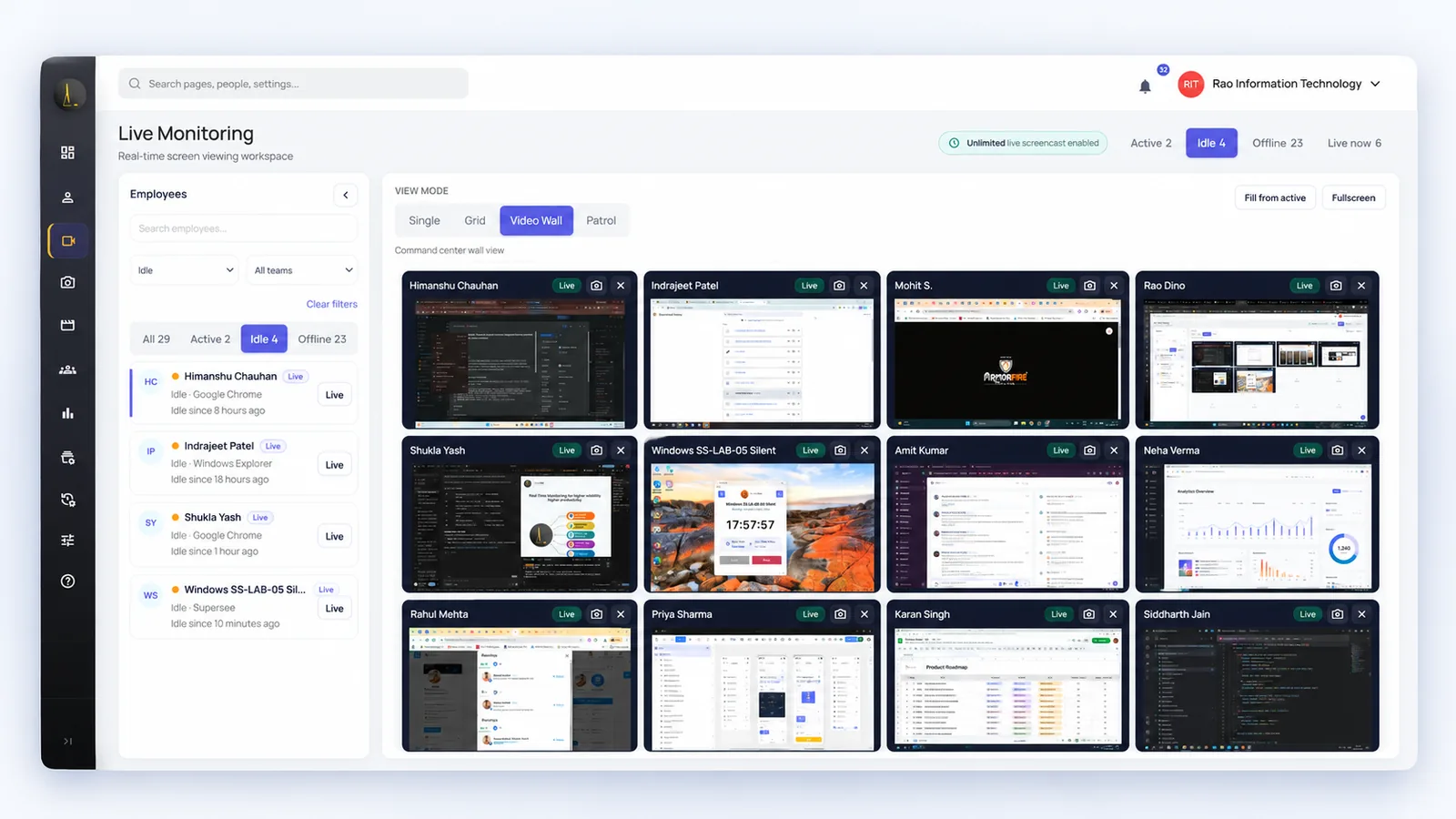
SuperSee Live Wall showing several employee screens at once
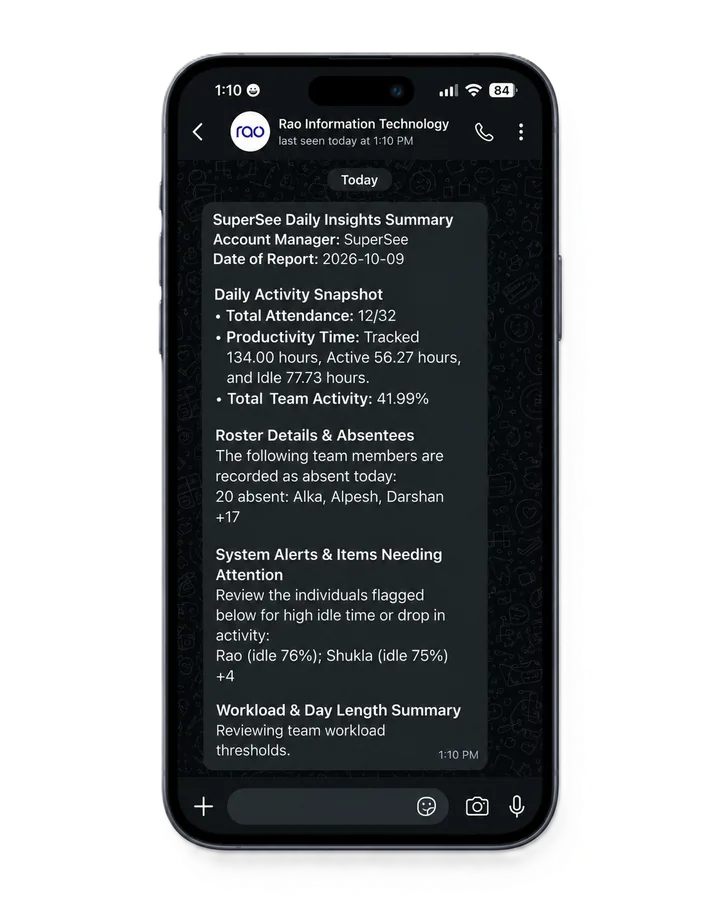
SuperSee daily team summary on WhatsApp

Used by teams at

  • BusinessLine
  • Praxis360
  • AtoZ Logistics
  • Capital Advisors

Rated 5.0 on Capterra · 4.7 on SoftwareSuggest

Start here

Two tools, two different questions

ProHance and SuperSee both record time and activity. Beyond that, they are built for different people and answer different questions.

The question ProHance is built for
“How much output are we getting per hour, and what is it costing us to deliver?”
Usually asked by
Operations excellence, workforce management and finance teams in large enterprises and captive centres
Answered with
Output against time and targets, job allocation, service-level adherence and average handling time[3][4]
Getting started
Demo request, pricing from ProHance, then deployment connected to your HR and work systems[5]
The question SuperSee is built for
“What is happening on the floor right now, and what happened in that shift?”
Usually asked by
Team leaders, supervisors, operations heads and owners who run the shift
Answered with
Live screens, Work Replay, app and website usage, Productivity Trends and a daily WhatsApp and email overview
Getting started
Sign up, then install in under 2 minutes on your own computer or a five-person pilot

Which sounds like your team?

Tap any that apply. Nothing is sent anywhere.

Your result appears here.

Choose the statements that describe what you need to know.

Getting started

From decision to first answer

The two products are bought differently. Here is each path, using what each company publishes.

SuperSeeSelf-serve · 14-day trial
  1. Today
    Sign up, with no card and no sales callProfessional access for up to five employees.
  2. Pilot
    Install on your own computer or a five-person pilotUnder 2 minutes per computer, less than 10 MB. Windows, macOS or Linux.
  3. After install
    Live screens and screenshots beginActivity is captured from installation while tracking runs.
  4. Daily
    Team overview on WhatsApp and emailThen open Work Replay for anything that needs a closer look.
  5. Day 14
    Decide with your own team’s dataChoose a plan and seat count, billed monthly, quarterly or annually.

Each computer installs in under 2 minutes. For a full floor, plan time to reach every desk. Setup help is free: we call you and set it up together over screen share.

ProHanceSales-led
  1. Step 1
    Request a demoDemo requests are the main route on its website. Its “14 Day Trial” button leads to the same demo form.[1][12]
  2. Step 2
    Contact ProHance for pricingPricing is not published on its website.
  3. Deployment
    Set up in your environmentProHance says it “can be up and running in less than 2 weeks”, depending on data availability.[5]
  4. Optional
    Consulting and adoption programmesProfessional services from Quick Launch (1 month) to Launch and Drive (up to 12 months), covering change management and adoption. These are not installation times.[6]

For a multi-site enterprise, a structured launch with adoption support is a strength, not a drawback.

Side by side

What each product publishes, row by row

Where ProHance’s current pages don’t describe something, we say so rather than guess.

What you need SuperSee ProHance
Running the shift
See a screen when a desk needs attention All plansOne live screen on every plan. Grid, Live Wall and Patrol on Professional and Business. A company-wide daily viewing pool applies. Not describedCurrent pages describe real-time activity analytics (“Current Activity”). We found no description of live screen viewing.[2]
Review what happened in a past shift Work ReplayCaptured screenshots in a timeline beside app usage and active or idle time Screen Recording ModuleDescribed in a 2023 ProHance whitepaper as capturing screen content remotely. It is not listed on current product pages, so confirm it is in your proposal.[13]
Record of who viewed whose screen Professional and BusinessSupervisor accountability logs: manager, employee, start, end and duration Not describedNot found in the materials we reviewed
Daily overview outside the dashboard All plansDaily summary on WhatsApp (up to 3 numbers) and email (up to 5 addresses) NotificationsAlerts and notifications to individuals and managers; WhatsApp delivery not described[4]
Measuring the operation
Time, attendance and application use IncludedApp and website usage, active and idle timeline, automated timesheets, shifts and absence views Work TimeLogged and idle hours, time on and away from the system, attendance, schedule adherence, 80+ reports and a report builder[2]
Output against time and targets Not offeredSuperSee shows activity, not completed output Work OutputBusiness metrics against time metrics, target vs achievement, adjusted for different kinds of work[3]
Job allocation, handling time and service levels Not offeredManagers decide follow-ups from what they see Workflow ManagementAllocation engine, priority scores, service-level adherence, average handling time, quality control[4]
Buying and governance
Certifications and HR-system integrations Not publicly listedThe website lists no certifications or HR-system integrations. Ask us your security questions before purchase. PublishedSOC 2 Type II and ISO 27001 credentials; states GDPR and HIPAA compliance. Integrations named include Workday, SAP, Oracle, Jira, Darwinbox and Rippling.[7][5]
Price and trial PublishedPrices in ₹ on the website. 14-day trial for 5 employees, with no credit card. Contact for pricingNo public pricing. A trial button exists, but it leads to the demo request form.[12]

Running the shift

See a screen when a desk needs attention

ProHanceNot described

Real-time activity analytics; no live screen viewing described[2]

SuperSeeAll plans

One screen on every plan. Live Wall on Pro and Business. Shared company-wide daily viewing pool

Review a past shift

ProHanceScreen Recording

In a 2023 whitepaper, not on current pages; confirm it is in your proposal[13]

SuperSeeWork Replay

Screenshot timeline with app usage

Who viewed whose screen

ProHanceNot described

Not found in what we reviewed

SuperSeePro and Business

Accountability logs: who viewed, whose screen, start, end, duration

Daily overview

ProHanceNotifications

Alerts to people and managers; WhatsApp not described[4]

SuperSeeAll plans

Daily WhatsApp (3 numbers) and email (5 addresses) summary

Measuring the operation

Time, attendance and app use

ProHanceWork Time

Hours, attendance, schedule adherence, 80+ reports[2]

SuperSeeIncluded

Usage, active and idle, timesheets, shifts

Output against targets

ProHanceWork Output

Business metrics against time and targets[3]

SuperSeeNot offered

Shows activity, not output

Job allocation and service levels

ProHanceWorkflow

Allocation, handling time, SLA adherence[4]

SuperSeeNot offered

Managers decide follow-ups

Buying and governance

Certifications and integrations

ProHancePublished

SOC 2 Type II, ISO 27001; states GDPR, HIPAA; Workday, SAP and more[7][5]

SuperSeeNot publicly listed

Ask us your security questions

Price and trial

ProHanceNot published

Contact ProHance; trial button leads to demo form[12]

SuperSeePublished

₹ prices online; 14-day trial, 5 employees, no card

OfferedNot offeredNot described in what we reviewed

Based on information published on each company’s website, checked 28 October 2026. Features vary by plan and proposal. View sources

“Tracking activities through screenshots, time activity and idle time are visible clearly.”
Keerthana · HR Manager (51–200 employees) · Verified review on SoftwareSuggest, June 2026
In practice

A team leader’s day with SuperSee

An example day on a support floor, showing what you can open at each moment.

09:40
Shift start

A desk has shown idle since the shift began.

Open that screen, or look across several desks on Live Wall, before you walk over or send a message. Then decide whether the agent needs help, access or a word.

Live screen · Live Wall
Live Wall with several employee screens

Live viewing draws on the company-wide daily pool.

13:15
After lunch

A client escalates a ticket handled this morning.

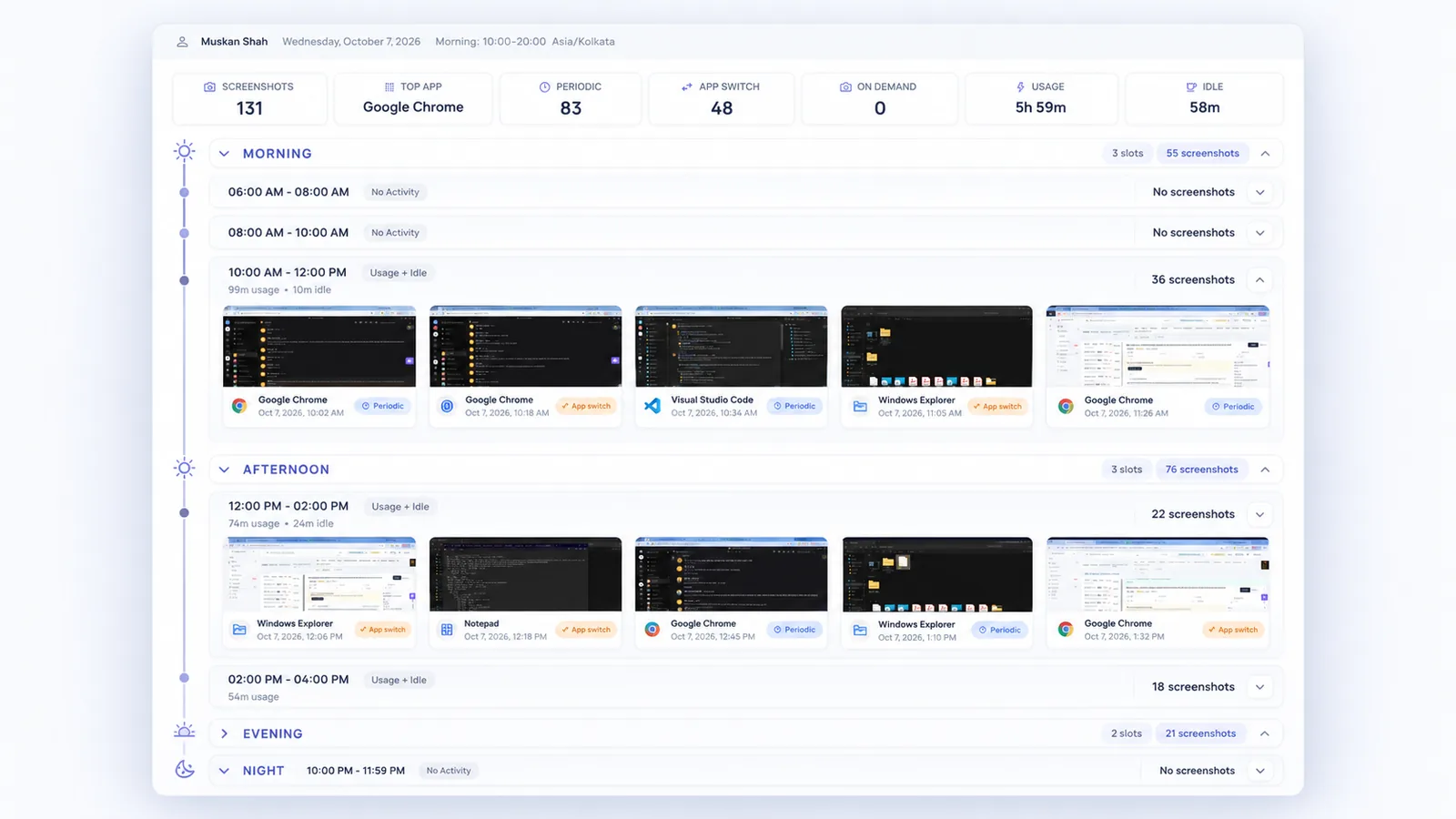
Open Work Replay for that agent and morning. Review the captured screenshots in order, beside the apps used, before you talk to the agent or the client.

Work Replay
Work Replay timeline with a selected stretch of captured screenshots

Captured screenshots in sequence, not continuous video.

17:00
End-of-week review

Is this one bad day, or a pattern?

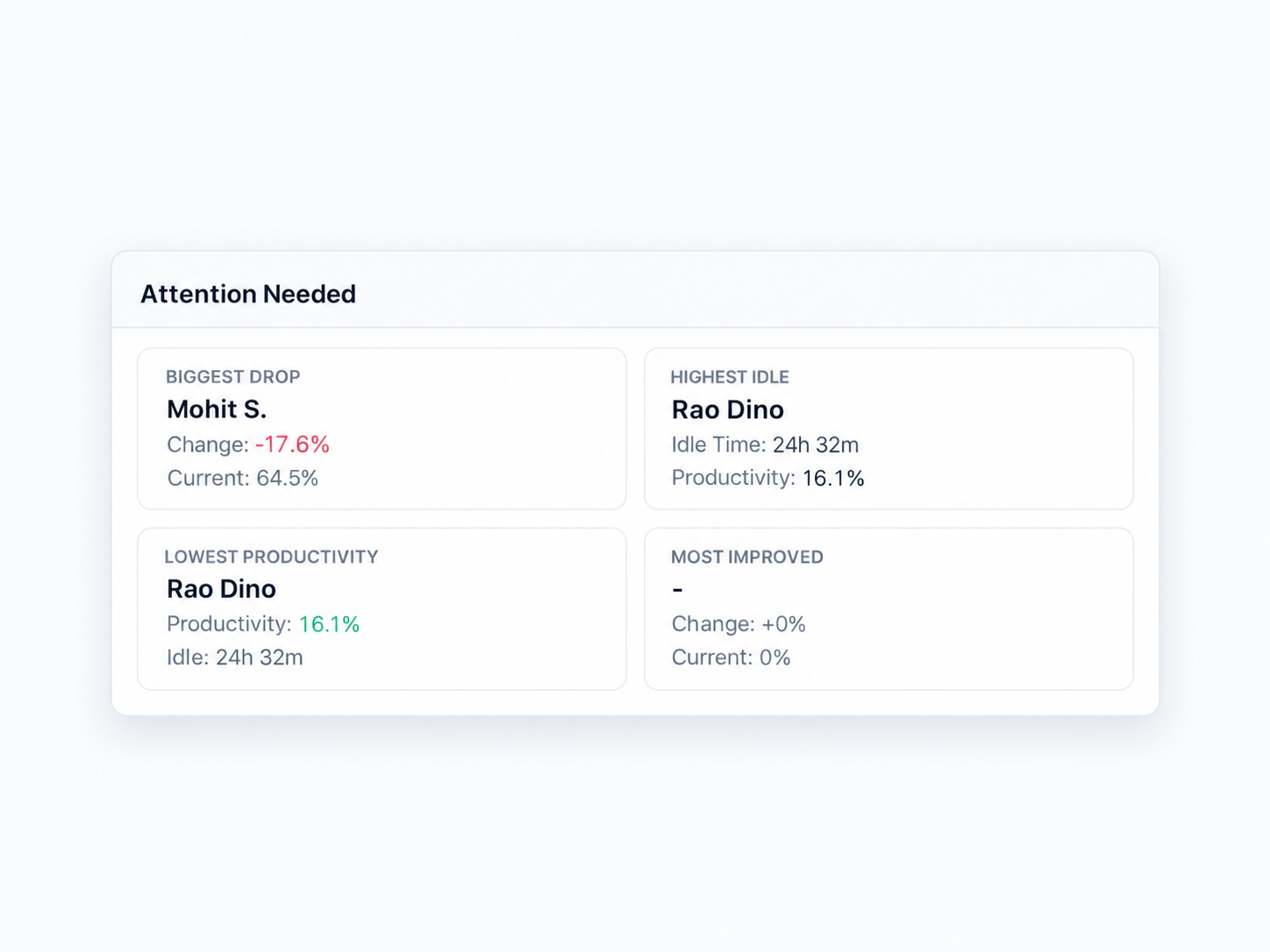
Productivity Trends shows the biggest drops, the highest idle time and repeated late finishes across days and weeks. Use it to decide who needs a conversation about workload, blockers or coaching.

Productivity Trends
Attention Needed cards showing biggest drop, highest idle and lowest productivity

A starting point for a conversation, not a verdict.

22:30
Night shift

The night shift runs without you.

You don’t need to be on site to check a desk. Open SuperSee from wherever you are and look at a screen or Live Wall when something needs attention. In the morning, replay any stretch of the night in Work Replay. The same works for a second site or hybrid agents.

Live Wall · Work Replay
Next day
Daily summary and accountability

The overview arrives on WhatsApp, and viewing is on record.

Leaders get the team summary without opening a dashboard. On Professional and Business, every live view is logged, so you can see how team leaders and supervisors use monitoring.

Daily summary · Accountability logs
SuperSee daily summary on WhatsApp

ProHance’s strengths sit elsewhere in the operation: measuring output, allocating work and tracking service levels. If those are the questions you need answered, see where each one earns its place below.

Pricing

Price your whole floor before any sales call

Set your employee count, and SuperSee’s annual price updates instantly. ProHance doesn’t publish pricing.

SuperSee Professional
₹289
per employee / month, billed annually ₹5,20,200 a year Live Wall · 90-min daily pool
SuperSee Business
₹506
per employee / month, billed annually ₹9,10,800 a year Live Wall · 180-min daily pool
ProHance Not published
Contact for pricing
Pricing is not published on its website Modules and services vary Questions to ask about any quote ↓

About live viewing on a large floor: live-viewing pools are company-wide, not per supervisor, and are sized for spot checks rather than watching every desk all day. If you want Live Wall on screen for a whole shift, ask us to quote extra viewing minutes for your floor.

Pricing details

Prices are SuperSee’s annual rates for 30 or more employees, before GST. Monthly billing is ₹399 (Professional) or ₹699 (Business) per employee/month. Business adds 5-minute screenshots, 60-day screenshot retention, 180 days of activity history, executive roll-ups across teams and optional extended retention. Basic (₹180 annual) includes a single live screen but not Live Wall. For fewer than 30 employees, see SuperSee pricing.

We don’t show a ProHance price because it doesn’t publish one, and third-party estimates conflict. Compare your actual proposal using the questions below.

14-day free trial on Professional · Up to 5 employees · No credit card · Installs in under 2 minutes

Evaluation checklist

Holding a ProHance proposal? Ask these eight questions.

They work for any vendor in this category. SuperSee’s answers are alongside, including the one where ProHance is stronger.

  1. Which modules are in this price, and which are add-ons?
    Three plans, with every feature listed on the public pricing page.
  2. Is there an implementation or professional-services fee?
    No implementation project is needed to start. You install the agent yourself, and setup help is free: we call you and set it up together over screen share.
  3. What is the minimum contract term?
    Billing is monthly, quarterly or annual. Annual is the lowest rate.
  4. Can team leaders see a live screen, and how much viewing is included?
    Yes. A company-wide daily pool of 45, 90 or 180 minutes by plan, with extra minutes quoted.
  5. How long is screen and activity data kept?
    Screenshots 15, 30 or 60 days; activity 90 to 180 days; up to 365 days on Business, quoted.
  6. Is every viewing of an employee’s screen logged, and who can see the log?
    Yes, on Professional and Business: who viewed, whose screen, start, end and duration.
  7. Can employees see that monitoring is running?
    A tray icon shows by default. It can be turned off on Professional and Business only where company policy allows.
  8. Does it measure completed output, or only time and activity?
    SuperSee measures time and activity, not output. If you need output tied to time, that is where ProHance is stronger.
The honest answer

Where each one earns its place

SuperSee is the better fit when…
  • Team leaders need to see a screen during the shift and replay the hours before an escalation.
  • You want to see the floor on the shifts you’re not on: nights, a second site or hybrid agents.
  • You want a log of which team leader viewed which screen, and for how long.
  • Your leaders want the daily overview on WhatsApp, not another dashboard login.
  • You want to see the price, test with five employees and decide within two weeks.
ProHance is the better fit when…
  • You need output per agent measured against time and targets, adjusted for different kinds of work.
  • You allocate jobs centrally and track handling time and service-level adherence.
  • Procurement requires SOC 2 Type II, ISO 27001 or HIPAA, plus HR-system integrations.
  • You run thousands of seats across sites and want the vendor’s team to run the rollout.

Some operations use both: one tool to measure output per agent, and SuperSee so team leaders can see the floor day to day. If you already measure output, check whether your current tool lets team leaders open a live screen and replay a shift.

Data and support

Questions procurement will ask

What SuperSee captures, how long it keeps it, and who stands behind it.

Encrypted in transit and at restCaptured data stays in your company account.
Deleted on a scheduleScreenshots are kept 15, 30 or 60 days by plan, then age out. You can delete captures sooner.
Never keystrokes or passwordsNo keystroke logging, no microphone audio, no typed passwords.
Viewing is on recordEvery live view is logged on Professional and Business: who, whose screen, start, end, duration.

SuperSee is built and supported by Rao Information Technology Pvt. Ltd., an Indian company. Indian customers pay in rupees with a GST invoice. Help: support@supersee.io

Straight answers before your next vendor call

It depends on what you use ProHance for. For time and activity visibility, live screens, replaying a shift and daily summaries, yes. For output measurement, job allocation, service-level tracking or asset optimisation, no. SuperSee doesn’t do those things.

ProHance’s August 2023 whitepaper describes a Screen Recording Module that captures screen content remotely. Its current product pages don’t list that module, and we found no description of live screen viewing. Ask ProHance whether screen recording is in your proposal, and how recordings are reviewed and retained.

No. SuperSee shows recorded workday activity: apps and websites, active and idle time, screenshots, live screens and trends. It does not turn activity into completed tasks, handling time, service-level adherence or output targets.

For spot checks, usually yes. Professional includes 90 minutes a day and Business 180 minutes, shared across all supervisors. It is not sized for keeping Live Wall on screen all shift. If that is how you want to work, we quote extra viewing minutes for your floor.

Yes. SuperSee shows what is happening and what happened. It works alongside your ticketing, workforce management and HR systems, and doesn’t replace them. Reports can be exported for internal reviews, with a longer date range per export on higher plans.

No. SuperSee does not log keystrokes, and typed passwords are not collected as keystroke data.

Yes. App and website reports, Productivity Trends and daily summaries remain available. Work Replay needs captured screenshots.

You get 14 days of Professional access for up to five employees, with no credit card. Test live screens and Live Wall within the 90-minute daily pool, plus Work Replay, Productivity Trends, accountability logs and the daily WhatsApp and email summary. SuperSee shows activity captured after installation while tracking is running.

Rated 5.0 on Capterra and 4.7 on SoftwareSuggest

“The dashboard is clean and easy to use, the productivity reports are insightful, and the real-time monitoring features provide excellent visibility into team performance.”
Vijay T. · IT Lead, event services (51–200 employees)Verified review on Capterra, July 2026
“The most helpful feature is the ability to monitor all systems in one place. It gives us better visibility, makes it easier to track everything, and helps ensure nothing is missed.”
Anbazhagaan A. · CEO, design company (11–50 employees)Verified review on Capterra, August 2026
“The daily summary is concise while still providing complete details of the day’s activities.”
New Raj I. · Sales executive, business supplies (2–10 employees)Verified review on Capterra, September 2026

Put SuperSee on five desks before your next vendor call.

See live screens, replay a shift and get tomorrow’s overview on WhatsApp. Then compare it with any proposal on your table.

Start free trial

Talk to us about a 100+ seat floor

14-day free trial on Professional · Up to 5 employees · No credit card · Installs in under 2 minutes

Install today, and tomorrow morning you get yesterday’s full day: a short summary on WhatsApp, the details by email. Setup help is free: we call you and set it up together over screen share.

Sources

Published information checked 28 October 2026. ProHance features, modules and terms may vary by proposal. SuperSee pricing, taxes and entitlements may change, so confirm current terms before purchase.

  1. ProHance home page
  2. ProHance Work Time module
  3. ProHance Work Output module
  4. ProHance Workflow Management
  5. ProHance FAQs
  6. ProHance Professional Services
  7. ProHance Trust Center
  8. ProHance for BPO and KPO
  9. SuperSee pricing
  10. SuperSee Live Monitoring
  11. SuperSee Work Replay
  12. ProHance modules page (its “Start 14 Day Trial Now” link redirects to the demo request form)
  13. ProHance Partnership Ecosystem Management whitepaper, August 2023 (section 6, Screen Recording Module)

ProHance is a trademark of its owner. SuperSee is not affiliated with ProHance.