


DeskTime Alternative with Live Screens | SuperSee
SuperSee vs DeskTime For agencies and small IT teams

DeskTime alternative with live screens, from ₹289.

DeskTime doesn’t stream or record screens, and its screenshots start on Premium at ₹513.33 per user. SuperSee Professional includes screenshots, live screens, Work Replay to play back any workday, and a daily WhatsApp summary at ₹289. For 30 people, that’s ₹80,759 a year less.

14-day free trial on Professional · Up to 5 employees · No credit card · Installs in under 2 minutes

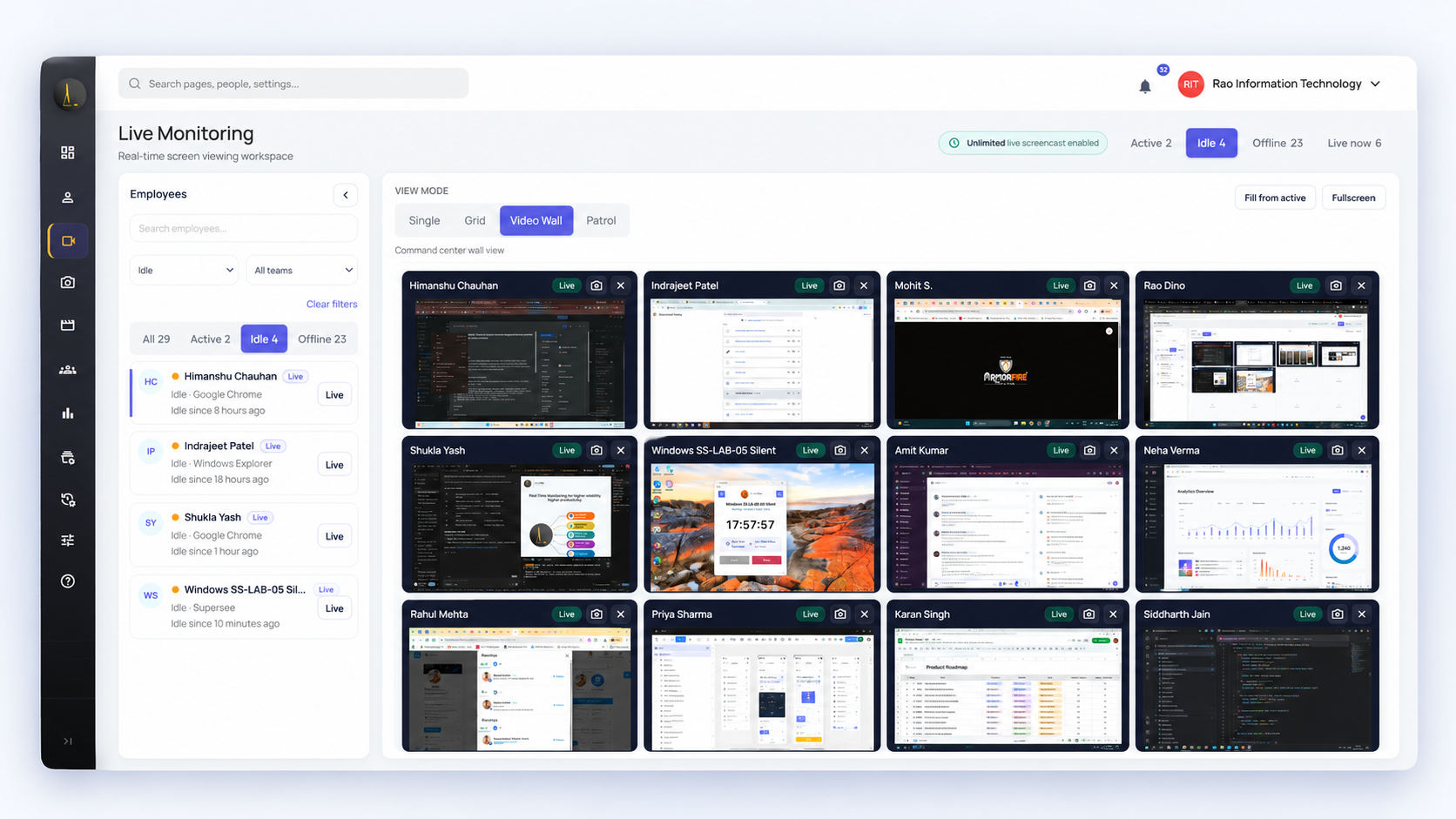
SuperSee Live Wall with several work screens in one view

Live Wall on Professional: several screens in one view.

Used by teams at

  • BusinessLine
  • Praxis360
  • AtoZ Logistics
  • Capital Advisors

Rated 5.0 on Capterra · 4.7 on SoftwareSuggest

See a screen liveOn every SuperSee plan. DeskTime doesn’t offer live screens.
Screenshots for ₹289, not ₹513SuperSee Professional vs DeskTime Premium, per user per month, annual
Replay any dayScreens, apps and idle time on one timeline, before you ask “what happened?”
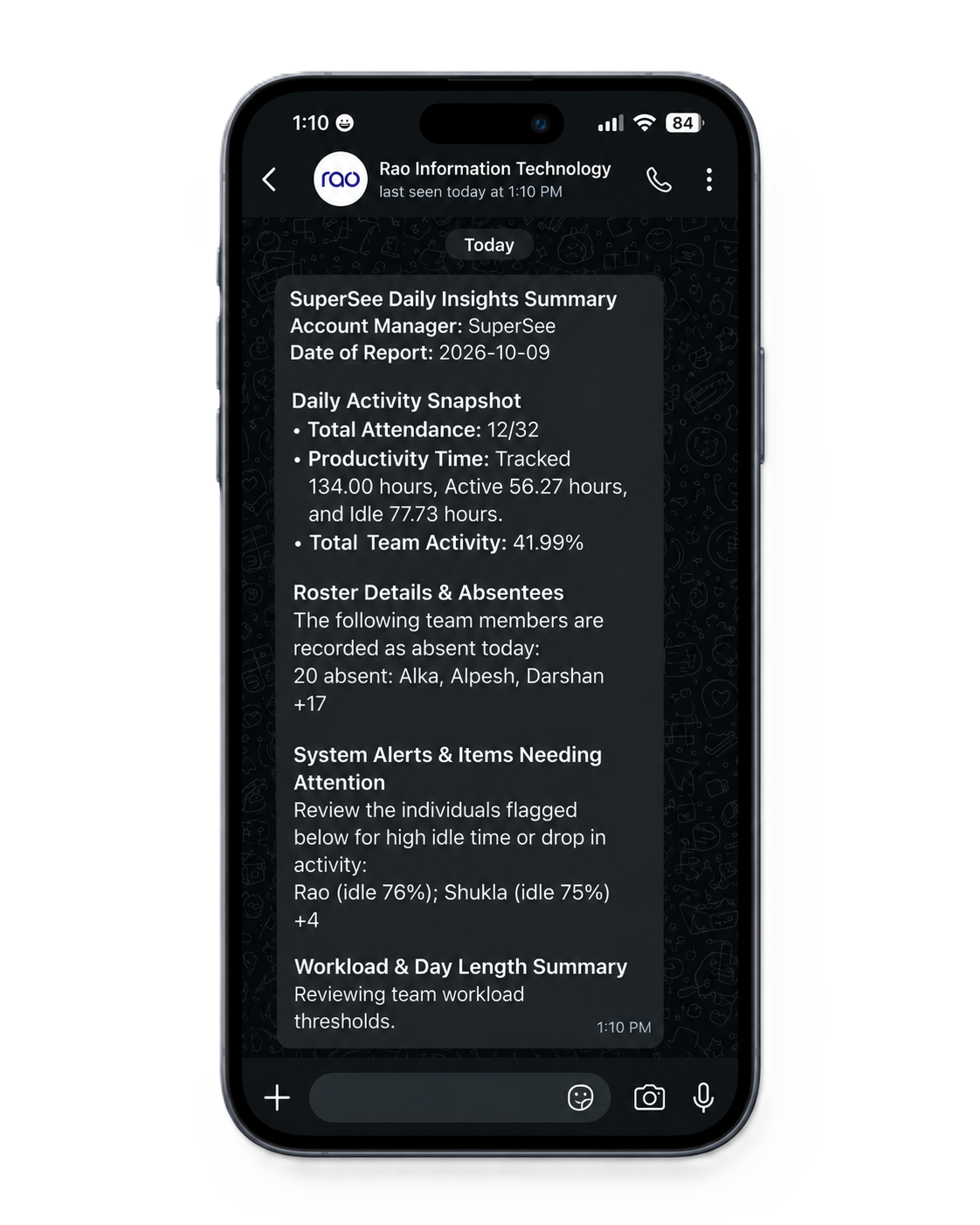
Daily summary on WhatsAppOn every plan. Read it before your first meeting.
Agency moments

When a timesheet isn’t enough

Four situations agency owners describe to us, and what you’d open in SuperSee.

Client call

The client asks where 40 hours went this month.

Pick the people and dates. See which apps and websites filled that time, then open the screens behind any stretch you need to explain.

App and website usage, then Work Replay
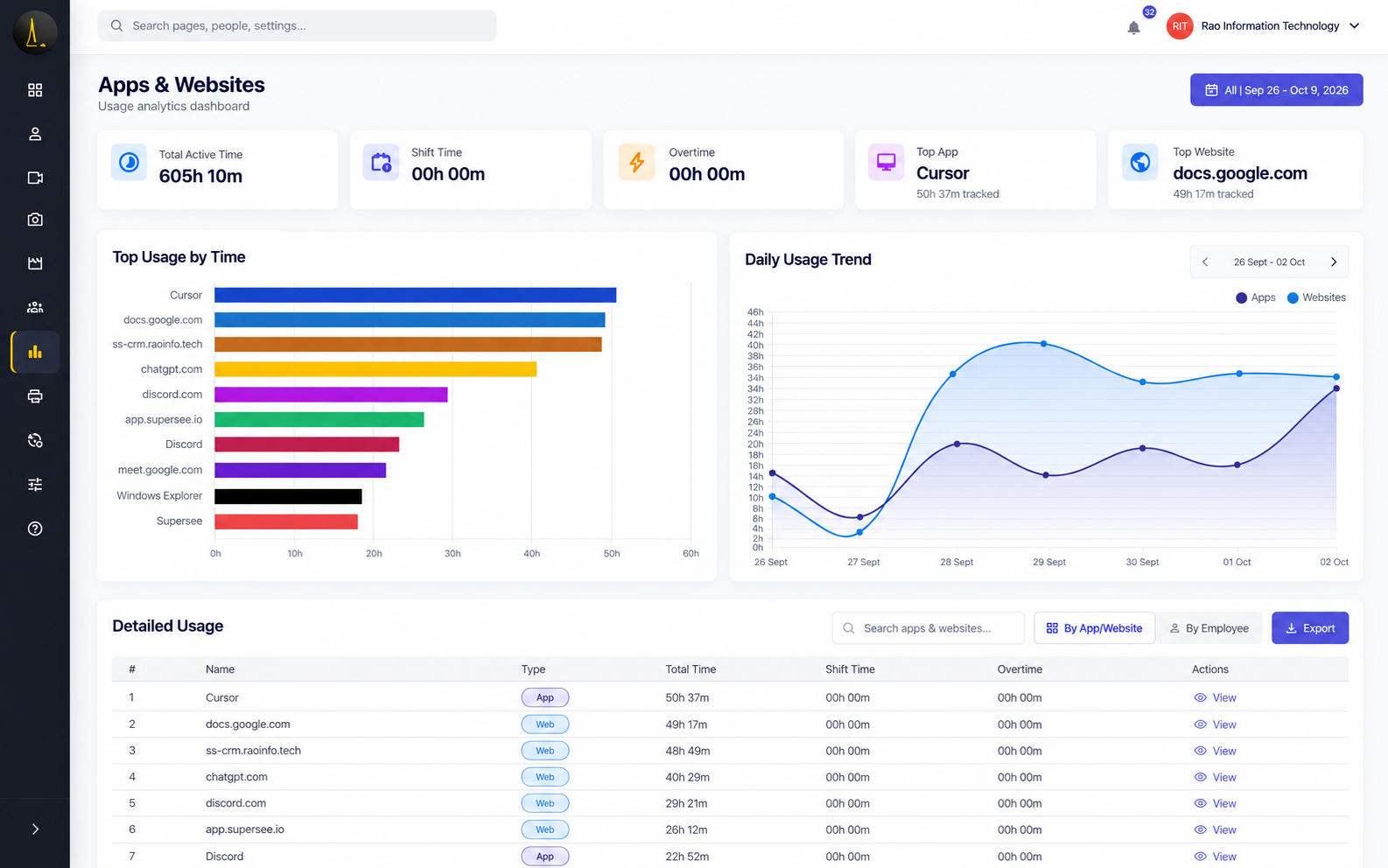
SuperSee app and website usage for a selected team and date range

Shows where time went by person and date range. It isn’t project billing.
Missed deadline

A designer has been “nearly done” since Tuesday.

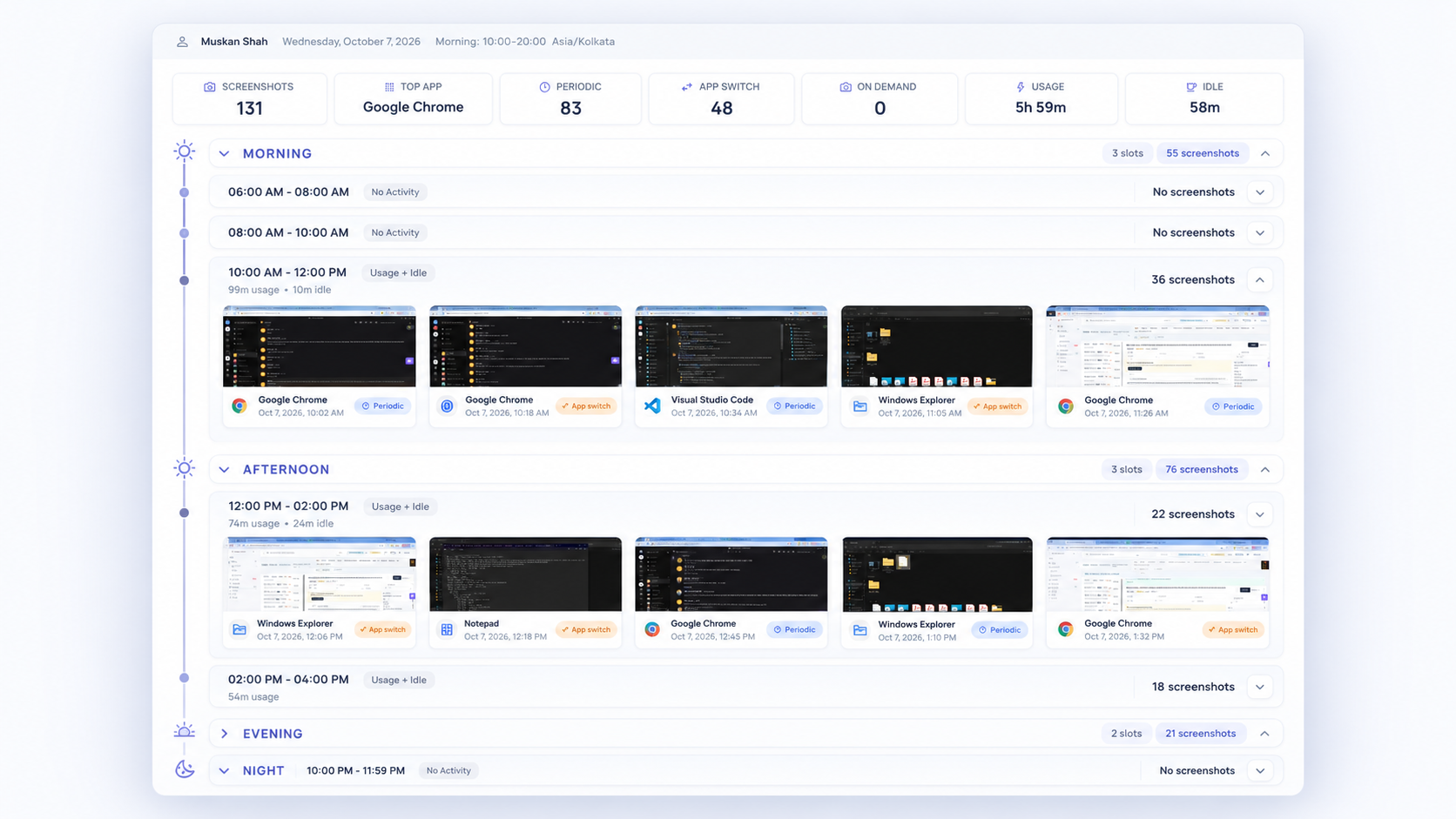
See Tuesday to Thursday in order: the captured screens, the apps used, and when work stopped and started. Then ask about the actual blocker.

Open Work Replay for that person and those days
SuperSee Work Replay focused on one part of the day

Captured screenshots in order, not continuous video.

Right now

Something looks off, and the deadline is today.

Open that one screen to see what’s happening, or several on Live Wall. Every view is logged on Professional and Business: who viewed, whose screen, start, end and duration.

Open a live screen. DeskTime has no equivalent.
SuperSee Live Wall with several employee screens

Professional includes 90 minutes a day of live viewing, shared across the company.

Monday, 9 a.m.

Who needs you this week?

Yesterday’s hours, attendance and activity arrive on WhatsApp and email. Decide who to check on before you open a dashboard. It’s a starting point, not a performance score.

Read the daily summary on your phone
SuperSee daily summary on WhatsApp
Side by side

What you get on each plan

DeskTime is built around timesheets and projects. SuperSee is built around seeing the day.

What you need SuperSee DeskTime
See a screen live Every planOne live screen on every plan. Live Wall, Grid and Patrol on Professional and Business. Shared daily viewing pool. Not offeredDeskTime states it does not record or stream screen video[1]
Screenshots Every planPeriodic screenshots, and on app switch from Professional. Can be switched off. Premium · ₹513.33Optional, with interval and blur settings[3][4]
Replay a past day Work ReplayScreens, apps and active or idle time on one timeline. Full on Professional; yesterday only on Basic. ScreenshotsCaptured screenshots on Premium and Enterprise[4]
Record of who viewed whose screen Professional and BusinessWho viewed, whose screen, start, end and duration No live viewingNo live screens to log
Automatic time and app tracking Professional and BusinessAdd-on on Basic. App and website usage on every plan. Pro and aboveAutomatic tracking with app and website usage[3]
Daily summary Every planWhatsApp (up to 3 numbers) and email (up to 5 addresses) AI SummarySummary of tracked activity[7]
Projects, tasks and calendars Not offeredActivity by person and date range, not project billing Core strengthNamed projects, calendar integrations and project-tool integrations on Premium[3]

See a screen live

DeskTimeNot offered

Doesn’t stream or record screens[1]

SuperSeeEvery plan

Live Wall on Professional; shared daily viewing pool

Screenshots

DeskTimePremium ₹513

Optional, with blur[3]

SuperSeeEvery plan

Can be switched off

Replay a past day

DeskTimeScreenshots

On Premium and Enterprise[4]

SuperSeeWork Replay

Full on Professional; yesterday only on Basic

Who viewed whose screen

DeskTimeNo live viewing

Nothing to log

SuperSeePro and Business

Who, whose screen, start, end, duration

Automatic tracking

DeskTimePro and above

With app and website usage[3]

SuperSeePro and Business

Add-on on Basic

Daily summary

DeskTimeAI Summary

Of tracked activity[7]

SuperSeeEvery plan

WhatsApp and email

Projects and calendars

DeskTimeCore strength

Projects and integrations[3]

SuperSeeNot offered

Not project billing

OfferedNot offered

Based on official product information and DeskTime’s India pricing page, checked 28 October 2026. Sources

“SuperSee is incredibly intuitive and easy to use from day one. Navigation through the different dashboards and modules is seamless, requiring no steep learning curve for new team members.”
Abhishek J. · Manager, marketing and advertising (2–10 employees) · Verified review on Capterra, August 2026

What screenshots cost for your team

The lowest plan on each side that includes screenshots. Set your team size. Annual billing, before taxes.

30 tracked employees · Annual billing · INR

Product / planPer employee / month
SuperSee Professional
₹289 per employee / month, billed annually ₹1,04,040 a year · GST extra Screenshots + live screens + Work Replay
DeskTime Premium
₹513 per employee / month, billed annually (₹513.33) ₹1,84,799 a year · excl. VAT Screenshots · no live screens

₹80,759 a year less with SuperSee for 30 people.

DeskTime Premium also includes projects, calendars and project-tool integrations that SuperSee doesn’t offer. If you only need timesheets and projects without screenshots, DeskTime Pro is ₹366.67.

Prices and comparison details

SuperSee Professional for 30 or more employees is ₹289 per seat on annual billing: ₹1,04,040 for the year, GST extra. Basic on the same terms is ₹180 per seat (₹64,800 a year), with screenshots, one live screen and yesterday-only Work Replay. Live viewing draws on a company-wide daily pool: 45 minutes on Basic, 90 on Professional, 180 on Business.

DeskTime’s India pricing page showed Premium at ₹513.33 and Pro at ₹366.67 per user/month, billed annually, excluding VAT, on 28 October 2026. The Premium yearly total is 30 × ₹513.33 × 12, rounded to the rupee. Pro includes projects and calendars but no screenshots. DeskTime pricing

14-day free trial on Professional · Up to 5 employees · No credit card · Installs in under 2 minutes

Before you buy

Before you choose DeskTime, ask these five questions

What agency owners wish they’d checked first. SuperSee’s answers are alongside.

  1. Which plan do we need for screenshots?
    Screenshots are on every SuperSee plan.
  2. Can a manager see a screen live when something’s wrong today?
    Yes, one live screen on every plan, and Live Wall on Professional.
  3. Can we replay a past day with screens and apps together?
    Yes, Work Replay puts captured screens, apps and idle time on one timeline.
  4. Is there a daily summary on WhatsApp?
    Yes, on every plan, to up to 3 numbers.
  5. Do we need named projects for client billing?
    SuperSee doesn’t do project billing. If you need it, DeskTime is stronger there.
Straight answer

Timesheets, or seeing the day?

SuperSee

Pick SuperSee if you want to…

  • See a screen live when something looks off, with every view logged.
  • Replay the days behind a slipped deadline before the client call.
  • Get screenshots without paying for Premium.
  • Read the team’s day on WhatsApp every morning.
DeskTime

Pick DeskTime if you need to…

  • Bill clients by named project and task, with project-tool integrations.
  • Pull calendar events and meetings into tracking.
  • Track time without screen capture on its Pro plan.
Try it

Watch one real project for two weeks

Pick a project that’s at risk, or a team that always runs late. Put SuperSee on those people and see what you learn.

Install on your own computer, then invite up to four people

Under 2 minutes each, on Windows, macOS or Linux. Tell them what’s captured and keep the tray icon on.

Read the WhatsApp summary each morning

Open Work Replay or a live screen only when something needs a closer look.

Decide on your own data

Capture starts from installation. After 14 days, choose a plan or walk away.

Start free trial

14-day free trial on Professional · Up to 5 employees · No credit card · Installs in under 2 minutes

Data and support

What happens to your team’s data

Clients and staff will ask. Here are the plain answers, and who stands behind them.

Encrypted in transit and at restCaptured data stays in your company account.
Deleted on a scheduleScreenshots are kept 15, 30 or 60 days by plan, then age out. You can delete captures sooner.
Never keystrokes or passwordsNo keystroke logging, no microphone audio, no typed passwords.
Viewing is on recordEvery live view is logged on Professional and Business: who, whose screen, start, end, duration.

SuperSee is built and supported by Rao Information Technology Pvt. Ltd., an Indian company. Indian customers pay in rupees with a GST invoice. Help: support@supersee.io

DeskTime or SuperSee: what agency owners ask

No. DeskTime’s documentation states that it does not record or stream screen video. Its dashboard does update activity throughout the day.[1][2]

Each plan has a company-wide daily pool: 45 minutes on Basic, 90 on Professional and 180 on Business. It’s for spot checks when a question needs the screen, not for watching a full shift. Extra viewing is quoted separately. The trial uses the Professional pool.

No. SuperSee shows where time went by person and date range, but it doesn’t assign hours to named projects or create invoices. If project billing is essential, DeskTime’s projects and integrations are built for it, and some agencies keep a billing tool alongside SuperSee.

Yes. App and website reports, Productivity Trends and the daily summary stay available on your plan. Work Replay needs screenshots on.

Idle means the computer was inactive. That can include a call, a meeting, sketching on paper or thinking. It’s not a verdict about effort, so read it with the work in front of you.

The tray icon stays on by default so people know the agent is running. Access is limited to the teams you set up. SuperSee doesn’t collect keystrokes, microphone audio or passwords. On Professional and Business, every live view is logged with who viewed, whose screen, start, end and duration.

We don’t promise a history import. Keep the DeskTime records you need, and ask our team about your transition before you switch. SuperSee shows activity from installation onward.

The trial runs for 14 days on Professional with up to five employees and no credit card. After the trial, pick a plan and carry on with the same account. If you don’t, nothing is charged, and captured data is deleted on its normal retention schedule.

Rated 5.0 on Capterra and 4.7 on SoftwareSuggest

“SuperSee helped us uncover the real problem: uneven work allocation. Now the team works more efficiently, and we’ve grown without overburdening anyone.”
Ronak Modi · Founder, Capital AdvisorsSuperSee customer
“The timing record of the employees was very useful to check their number of hours they worked.”
Shaik N. · Team of 1–10 employeesVerified review on SoftwareSuggest, July 2026
“The dashboard is clean and easy to use, the productivity reports are insightful, and the real-time monitoring features provide excellent visibility into team performance.”
Vijay T. · IT Lead, event services (51–200 employees)Verified review on Capterra, July 2026

See the screen, not just the timesheet.

Try live screens, Work Replay and the daily WhatsApp summary with five people, free for 14 days.

Start free trial

Book a 15-min demo

14-day free trial on Professional · Up to 5 employees · No credit card · Installs in under 2 minutes

Install today, and tomorrow morning you get yesterday’s full day: a short summary on WhatsApp, the details by email. Setup help is free: we call you and set it up together over screen share.

Sources

Written by SuperSee from public product pages, reviewed on 20 October 2026. Pricing re-checked 28 October 2026. This is our comparison, not an independent test, and prices and features can change.

  1. What DeskTime tracks
  2. DeskTime dashboard
  3. DeskTime plan differences
  4. DeskTime screenshots
  5. SuperSee plans
  6. SuperSee overview
  7. DeskTime AI Summary
  8. DeskTime India pricing (displayed rates)

DeskTime is a trademark of its owner. SuperSee is not affiliated with DeskTime.