Employee Monitoring Software Pricing Plans | SuperSee

For agency founders and delivery leaders · 15–100 employees

See what you’ll pay. Start on Professional.

Pick a plan for your seat count. Trial is 5 evaluation seats for 14 days — no card. The numbers below are what you pay after you buy.

14-day Professional trial · Up to 5 evaluation seats · No credit card · Try on your own computer first
How many employees?
Presets:

Optimized for 15–100. Smaller team?

Volume Discount Unlocked: ₹289/seat

Per employee / month. Quarterly and annual billed upfront. GST extra. GST invoice on paid plans. Cancel renewal anytime.

Essential Visibility

Basic

For one shift, up to two teams, yesterday-only replay.

See daily app usage, recorded activity and periodic screenshots for a straightforward view of a single-shift team.

₹249 ₹180 / seat / mo

Billed annually at ₹2,160 / seat / yr · Total: ₹64,800/yr for 30 seats

About ₹6.00 per seat per day.*

*Daily equivalent uses a 30-day month. GST extra.

Start 14-day trial

All 14-day trials start on Professional so you can test full features. Choose Basic after if it fits.

  • App and website usage reports
  • Screenshots every 15 minutes
  • Work Replay preview: yesterday’s workday only, plus lite Productivity Trends
  • Single live screencast · 45-minute company-wide daily poolShared across supervisors for spot checks, not per person. Extra floor viewing is quoted separately.
  • 15-day screenshot history · 90-day activity history
  • Tray icon on · 1 active shift · Up to 2 teams
  • Daily WhatsApp & Email summaries — live on all plans (up to 5 emails, 3 WhatsApp numbers)

Try Professional first. Choose Basic after your trial if it meets your needs.

Deeper team visibility Recommended for agencies

Professional

For patterns across the month, full replay, and managers.

Understand recurring patterns and review what happened before deciding where your team needs help.

₹399 ₹289 / seat / mo

Billed annually at ₹3,468 / seat / yr · Total: ₹1,04,040/yr for 30 seats

About ₹9.63 per seat per day.*

Pays for itself if it saves 18 mins of unbilled rework per month.

*Daily equivalent uses a 30-day month. GST extra.

Professional access · Up to 5 evaluation seats · No credit card required

Trial is 5 seats for 14 days. The billed total above is what your team costs after you buy.

  • Full Work Replay & Productivity Trends — Spot What Repeats: know what normal looks like, then notice when it changes
  • Live Wall: Grid, multi-screen and patrol · 90-minute company-wide daily poolShared across supervisors for spot checks, not per person. Extra floor viewing is quoted separately.
  • Screenshots for context behind unclear updates · App-switch + 10-minute captures
  • Client NDA floor? Run insights-only — screenshots off; Trends, reports and digests stay. Same plan, same price
  • 30-day screenshot history · 90-day activity history
  • Daily WhatsApp & Email summaries — live on all plans (up to 5 emails, 3 WhatsApp numbers)
  • Up to 10 teams · Unlimited shifts · Manager/Team Lead roles (visibility matches how you operate)
  • Device Management, supervisor accountability logs and advanced controls

Test on your own computer, then invite a small group when you’re ready.

More Detail & Longer History

Business

For denser capture, longer history, and leadership roll-ups.

Everything in Professional, with denser capture, longer history and executive roll-ups—one operational view across teams for leadership reviews, not individual rankings.

₹699 ₹506 / seat / mo

Billed annually at ₹6,072 / seat / yr · Total: ₹1,82,160/yr for 30 seats

About ₹16.87 per seat per day.*

*Daily equivalent uses a 30-day month. GST extra.

Additional live-viewing mins and extended-retention terms are confirmed separately.

  • Everything in Professional
  • Screenshots every 5 minutes
  • 60-day screenshot history · 180-day activity history
  • 180-minute company-wide daily live-view poolShared across supervisors for spot checks, not per person. Extra floor viewing is quoted separately.
  • Unlimited teams · Executive roll-ups across teams · Broader export windows
  • Daily WhatsApp & Email summaries — live on all plans (same company limits)
  • Extended retention option up to 365 days
  • Priority onboarding support

Service benefit: priority onboarding support. Extended-retention terms confirmed separately.

BusinessLine Praxis360 AtoZ Logistics Capital Advisors
“SuperSee helped us uncover the real problem: uneven work allocation. Now the team works more efficiently, and we’ve grown without overburdening anyone.”
Ronak Modi · Founder, Capital Advisors

Managing 100+ seats or multi-shift floors?

Tell us your employee count, supervisor setup, concurrent screens, viewing hours and retention needs. We’ll help you choose a plan and quote additional live-viewing mins.

All plans Daily WhatsApp & Email summaries

Live on Basic, Professional and Business. Your team overview where you already live — decide where to look closer before opening the dashboard.

Product story

See now. Replay the day. Spot what repeats.

Capture → open → review gives you the moment. Spot What Repeats adds the missing beat: know what normal looks like.

See Now

What is happening?

Open a live screen when an issue needs attention.

Replay the Day

What happened?

Capture → open → review the sequence behind an unclear update.

Spot What Repeats

Know what normal looks like

Productivity Trends compare patterns over time — notice when the workday shape changes.

Find the Way

Where should we act next?

Step in with context — not another status chase.

See it in SuperSee

From an unclear update to a better conversation.

Reports show where to look. Work Replay adds captured context. Productivity Trends show what keeps repeating — so you know what normal looks like before you act.

Spot What Repeats · Productivity Trends

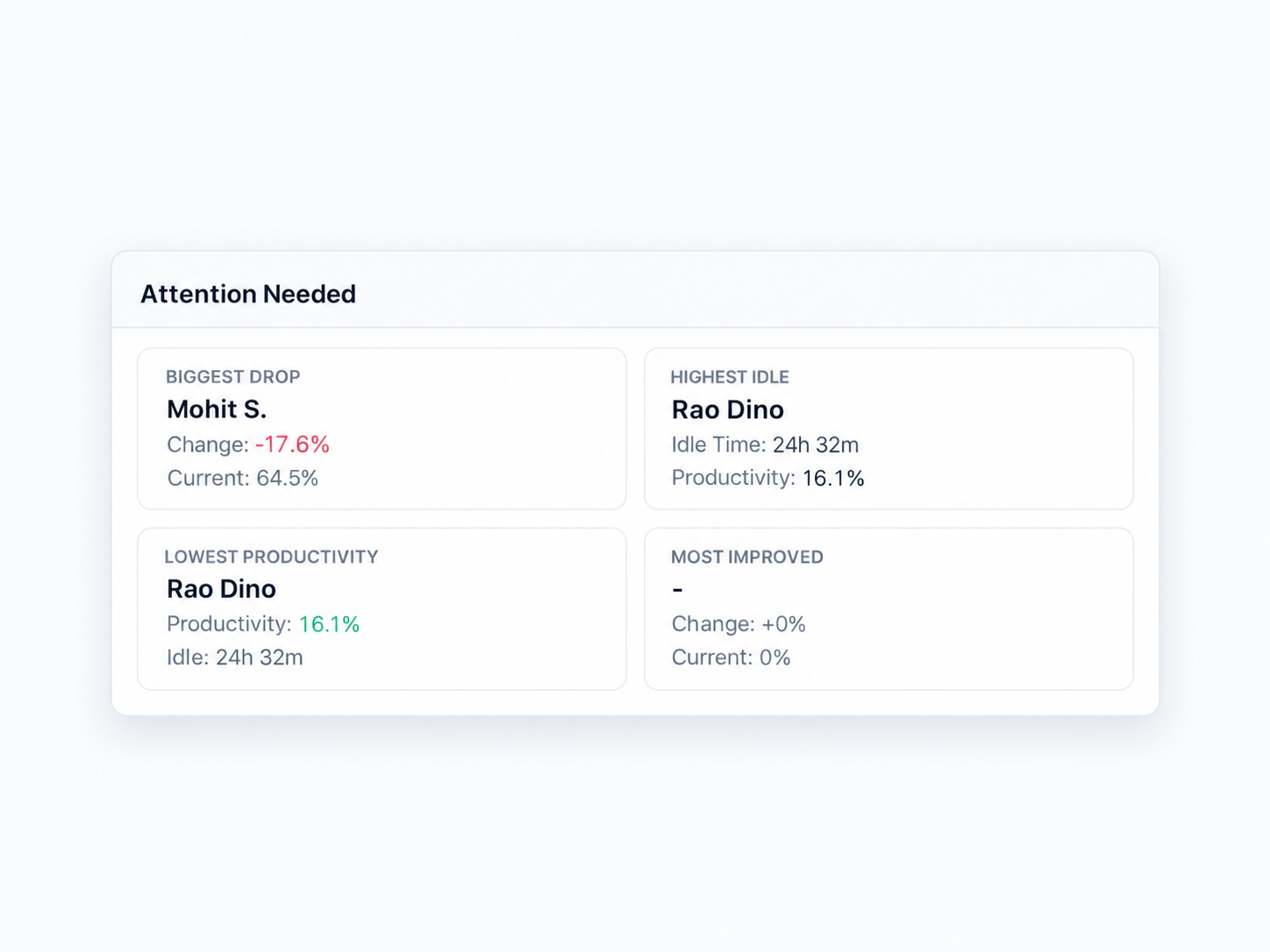
Know what normal looks like. Notice when it changes — and who needs a closer look before you assign the next deadline.

SuperSee Attention Needed — biggest drop, highest idle, and productivity callouts.
Know what normal looks like. Notice when it changes.

Work Replay ⓘ

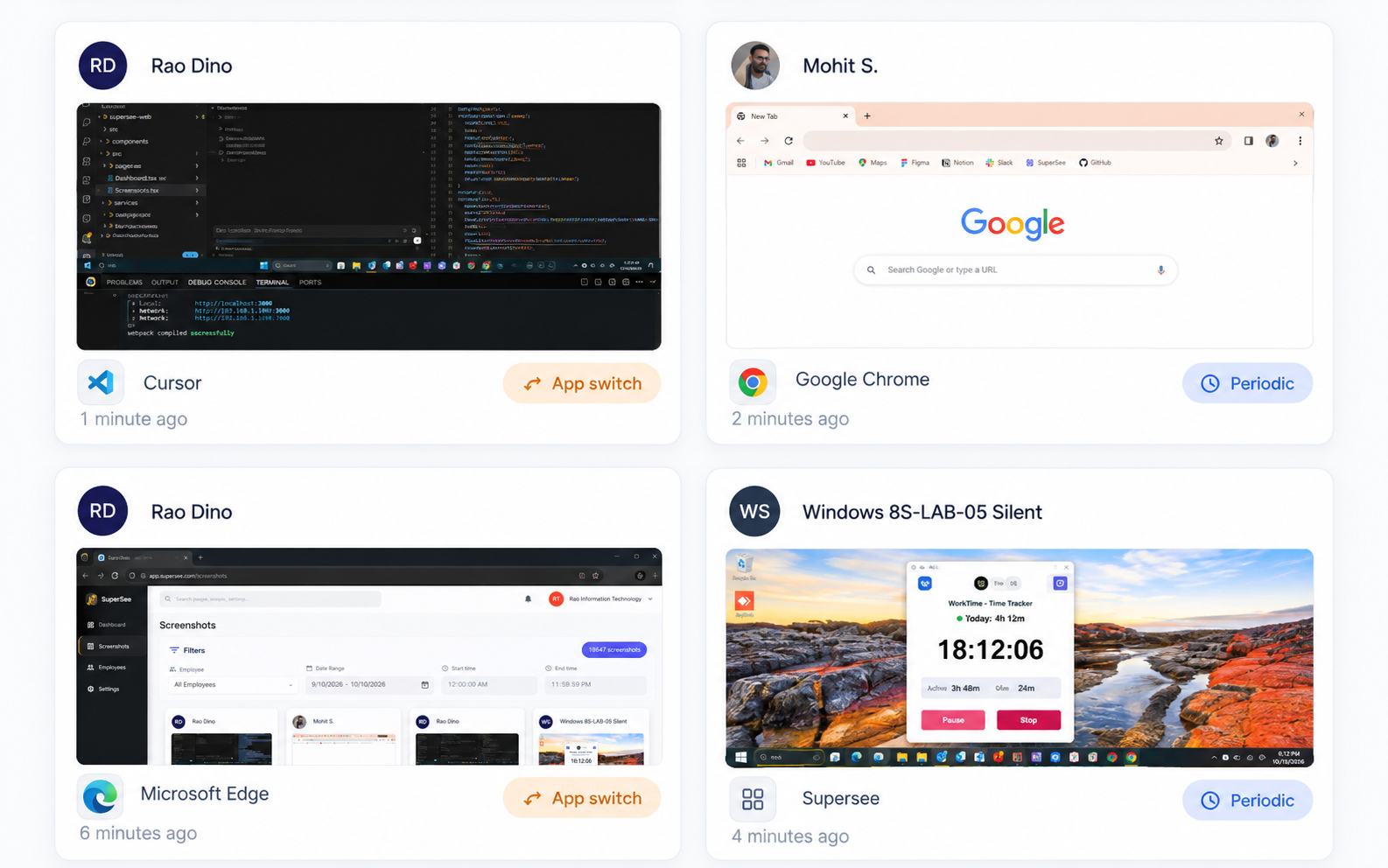
Capture → open → review the sequence behind an unclear update — app and screen context, then a better conversation.

SuperSee screenshot cards with Periodic and App switch triggers.
Review the sequence behind an unclear update
Compare plans

Choose the detail, history and access you need.

Compare capture frequency, live-viewing allowances, retention and team controls.

Capability Basic Professional Business
Screens & live viewing
Insights-only mode — disable screenshots, keep Trends, reports & daily digest Included Included Included
Single live screencast Included Included Included
Live Wall: grid, multi-screen & patrol — Included Included
Company-wide daily live-view pool 45 min 90 min 180 min
Periodic screenshot interval 15 min 10 min 5 min
App-switch screenshots — Included Included
Screenshot retention 15 days 30 days 60 days
Activity history 90 days 90 days 180 days
Extended retention option — — Up to 365 days
Analysis & history
Work Replay Yesterday’s workday only Full Full
Productivity Trends Lite / preview Full Full
App & website usage reports Included Included Included
Daily email team overview Included · up to 5 IDs Included · up to 5 IDs Included · up to 5 IDs
Daily WhatsApp team overview Included · up to 3 numbers Included · up to 3 numbers Included · up to 3 numbers
Executive roll-ups (across teams) — — Included
Date range per export request Preview · Approx. 7 days Full · Approx. 14 days Full · Approx. 31 days
Teams & management
Agent visibility Tray icon on Tray on, or off where policy allows* Tray on, or off where policy allows*
Active shifts 1 Unlimited Unlimited
Teams Up to 2 Up to 10 Unlimited
Manager / Team Lead roles — Included Included
Admin-controlled / automatic tracking Add-on Included Included
Device Management — Included Included
Period timesheet / absence views — Included Included
Bulk settings & advanced report filters — Included Included
Supervisor accountability logs — Included Included
Optional extras
Additional live-viewing mins Quoted separately Quoted separately Quoted separately
  • Live-viewing pools are company-wide, not per manager. Shared pool mins are for targeted spot checks, not continuous per-person viewing. Sustained floor viewing needs extra mins.
  • Extended retention is optional on Business—eligible data, duration and charges are confirmed separately.
  • Agent visibility usually updates on the employee computer in 5–10 minutes. On, people see a system-tray icon. Off, there is no tray icon. Turn it off only where company policy allows it.
  • Daily email and WhatsApp summaries are live on all plans (up to 5 emails and 3 WhatsApp numbers). Plan-based limits may apply later.

Need a different setup?

Ask about additional live-viewing mins, longer retention, more frequent screenshots and supported monitoring options.

Buying questions

Clear answers before you choose.

Need help matching a plan to your team? Talk to us.

Talk to us
What does the free trial include?

Professional access for 14 days with up to five evaluation seats, including Live Wall, full Work Replay, full Productivity Trends and a 90-minute company-wide daily live-view pool. No credit card is required. Evaluation seats are for testing, not the purchase seat count you set in the calculator.

Can I test before inviting employees?

Yes. Install the agent on your own computer and review the data in the admin panel before introducing SuperSee to a small group.

What happens after day 14?

Trial access ends. Start a paid plan to keep the dashboard.

Can I choose Basic after testing Professional?

Yes. Choose Basic if it covers your needs. Features and limits then follow the Basic plan, including preview access to Replay and Trends.

Are taxes included in the calculator totals?

No. Prices shown are before tax. GST (or local tax) is added at checkout. Paid plans include a GST invoice where applicable.

Does low activity mean poor performance?

No. Recorded activity and idle time need role, task and work context—meetings, calls, thinking time and offline work can all look quiet. Use patterns to ask better questions alongside delivered results, not as a productivity score.

Can screenshots contain sensitive information?

Yes. They can capture information visible on the monitored screen. Use them as context behind an unclear update or report—not as “proof someone was working.” Define who has access and how monitoring is used. Ask our team about current security and data-handling information. Client NDA floor? Turn screenshots off and run insights-only on the same plan.

Can we run without screenshots?

Yes. Turn off screenshots in Admin Panel and keep Productivity Trends, app/website reports, and daily email/WhatsApp overview. Same price, same plans. Client NDA floor? Run insights-only—many teams do for compliance without changing tier.

What does agent visibility mean?

It controls the system-tray icon on the work computer. On, people see the icon. Off, there is no tray icon. Basic keeps the icon on. Professional and Business can turn it off only where company policy allows it. The change usually reaches the employee computer in about 5–10 minutes. Start with the icon on and a clear policy.

Do discounts change with team size and billing term?

Yes. Professional for 5–29 employees is ₹399 monthly, ₹349 quarterly, and ₹299 annual. For 30 or more it is ₹399, ₹329, and ₹289. Teams of 1–4 can buy annual only (Professional ₹319). Basic and Business use the same team-size bands and billing terms. The calculator shows each plan’s rate.

Can we change seats or plans later?

Contact us about your required change. The billing impact depends on your subscription and when the change takes effect. Cancelling renewal does not automatically refund prepaid time.

Which operating systems are supported?

Windows, macOS and Linux. Check current system requirements for your devices before rollout.

Do you send a daily team overview?

Yes. Daily email and WhatsApp summaries are live on all plans—a quick team overview in channels leaders already check, so you can decide where to look deeper without opening the dashboard first. Currently up to 5 email IDs and 3 WhatsApp numbers per company.

Will I have to watch everyone all day?

No. Know what normal looks like, then notice when it changes. Review Trends and reports first; open Replay, screenshots or a live screen only when you need more context—not as a wall of surveillance.

Can we check whether a new tool is being used?

App and website reports show where recorded time goes after a CRM, AI or project-tool rollout. Follow up on fading adoption; usage alone does not prove a process was completed correctly.


See one real workday before you commit.

Install on your computer first, or invite a small group. You’ll know quickly whether SuperSee fits how your team already works.

Professional trial · 14 days · Up to 5 evaluation seats · No card required