Computer screen monitoring software

Know what work is actually happening across your team.

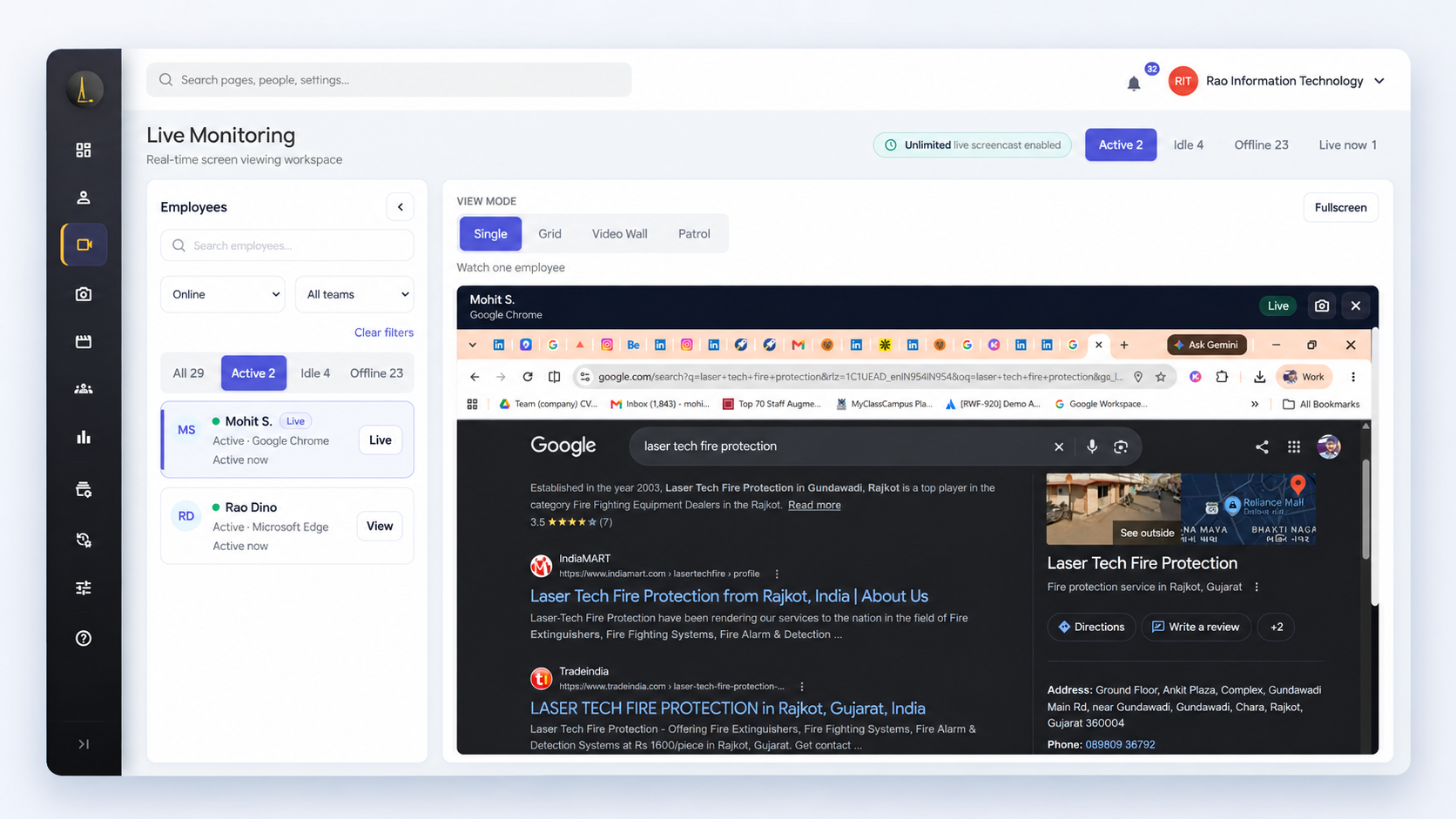
SuperSee turns screenshots, activity, applications, websites, and automated timesheets into clear productivity insights—so managers can support better performance without relying on guesswork.

Lightweight setup for Windows, macOS, and Linux
SuperSee workforce analytics dashboard showing employee status, application usage, working hours, and activity timelines
Windows, macOS, Linux
AES-256 encrypted storage
Privacy-conscious monitoring
Flexible monitoring modes
Team-level access controls
Business challenges & solutions

Replace uncertainty with operational clarity.

When work is distributed across people, tools, and locations, leaders need reliable signals—not more manual reporting.

Challenge

Limited visibility

Managers struggle to see how work progresses between updates and completed deliverables.

SuperSee Solution

Clear Activity Context

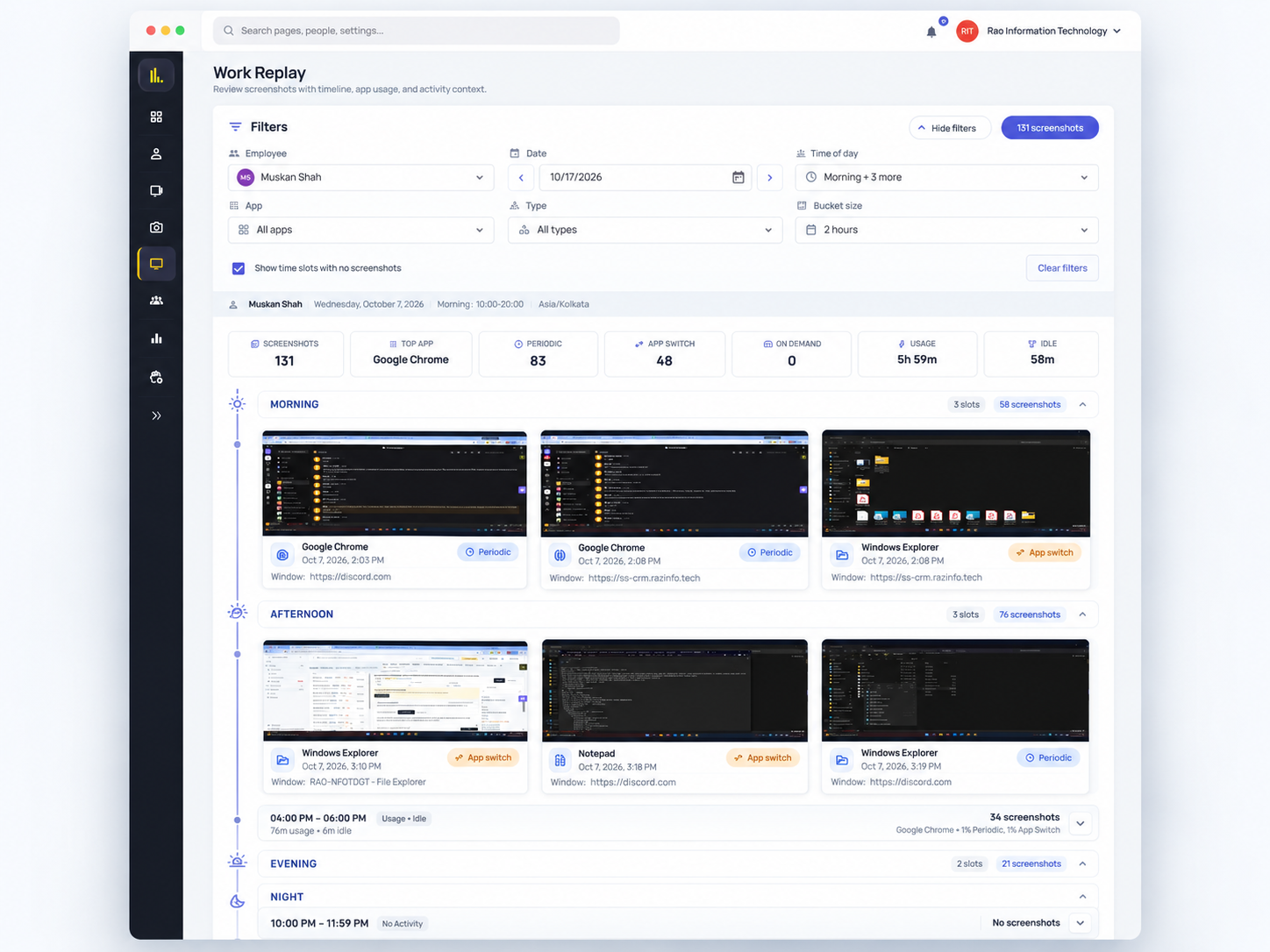
Review screenshots, activity timelines, applications, websites, and daily summaries in one place.

Challenge

Remote and hybrid management

Distance can make support, workload balancing, and timely intervention harder.

SuperSee Solution

Shared Operational View

Give authorized managers consistent visibility across office, remote, and hybrid teams.

Challenge

Manual timesheets

Reconstructed time entries depend on memory and add administrative work.

SuperSee Solution

Automated Time Records

Turn captured activity into objective daily timesheets and work summaries.

Challenge

Productivity guesswork

Hours alone do not explain work patterns, focus, or where time is going.

SuperSee Solution

Actionable Trends

Use productivity trends and usage analysis to ask better questions and coach with context.

Challenge

Employee trust concerns

Poorly explained monitoring can create anxiety and undermine its purpose.

SuperSee Solution

Transparent, Policy-Led Monitoring

Choose a suitable monitoring mode, communicate clearly, collect relevant data, and give employees visibility where applicable.

Platform capabilities

Everything you need to understand how work gets done.

One connected platform for evidence, time, usage, and productivity insight.

Capability 01

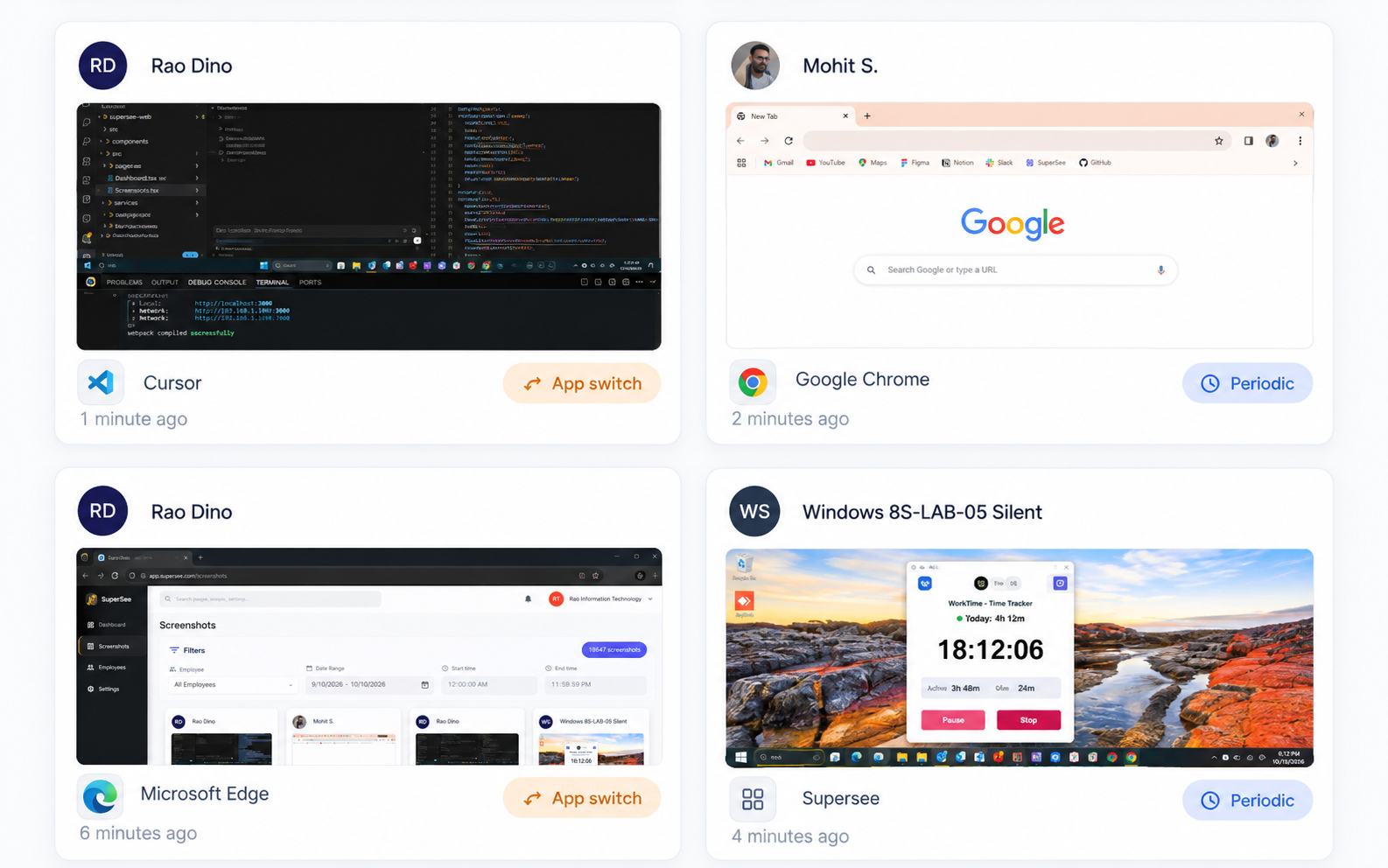
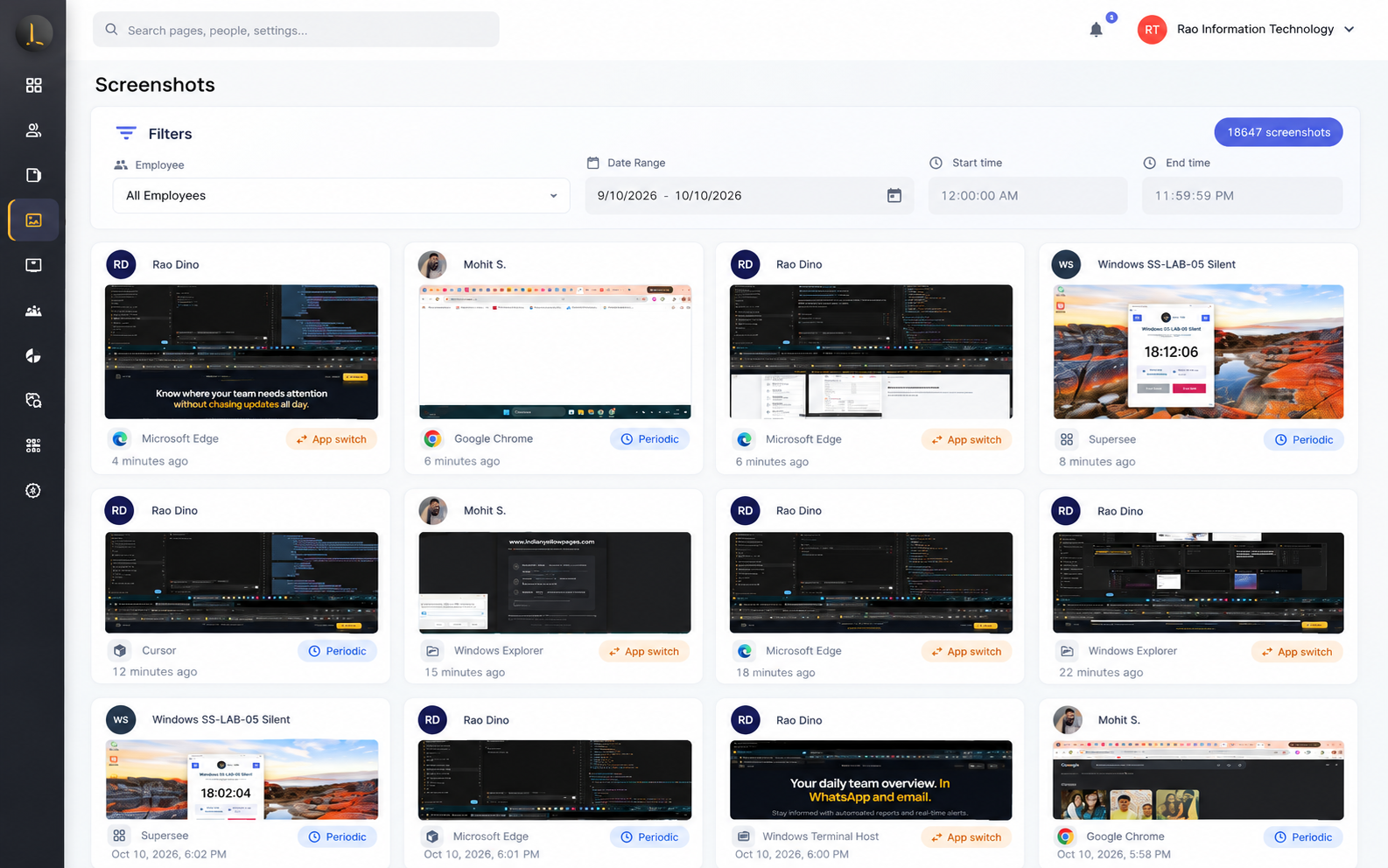
Monitoring with ScreenShots

Ensure progress and visual proof of work. SuperSee captures screen evidence automatically based on your team's settings, helping you coordinate projects transparently.

  • Flexible Interval Settings: Capture screens every 5, 10, or 15 minutes, or customize intervals by department.
  • Intelligent App-Switch Capture: Automatically trigger screenshots when employees open new applications.
  • Employee-First Privacy Controls: Let team members pause tracking or delete screenshots containing personal data.
Try Screen Monitoring Free
SuperSee screenshot monitoring interface
One connected workflow

From activity to better decisions.

1Employee works
2Activity captured
3Screenshots, apps & websites
4Automated timesheets
5Productivity analytics
6Better business decisions
Insights that drive better decisions

Turn employee activity into business context.

Explore outcomes—not isolated metrics—using a single, consistent view of work.

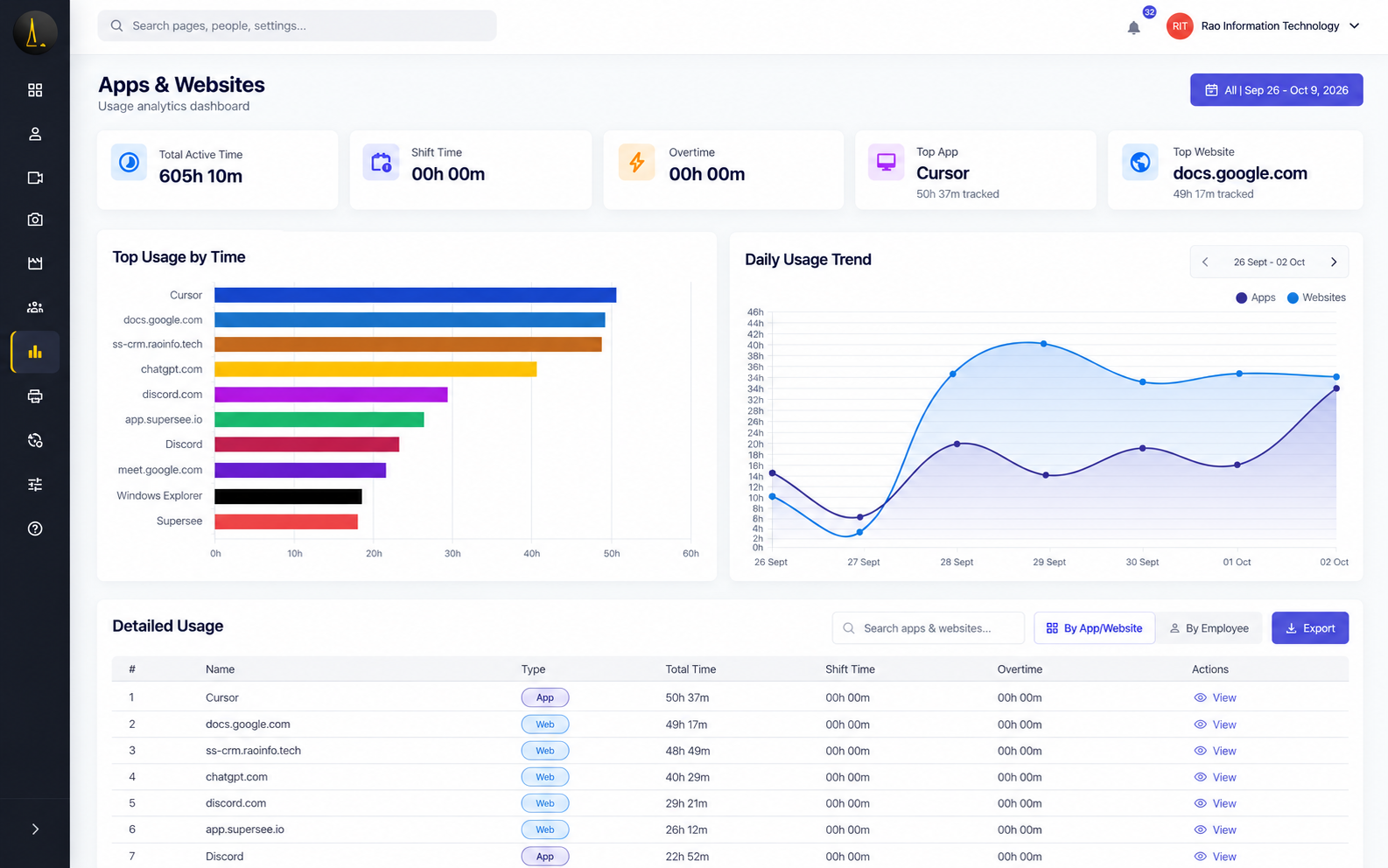
Analyze overall team productivity trends

Compare productivity patterns across weeks and departments. See active hours, neutral time, and focus ratios to understand overall progress and build data-backed project plans.

SuperSee employee productivity trends chart interface Outcome: data-backed weekly reviews and resource planning
Dashboard showcase

360° workforce visibility in one dashboard.

Move from overview to evidence without jumping between disconnected tools.

SuperSee dashboard showing 360° productivity and activity analytics
Monitoring modes

Choose how monitoring works for your team.

Match visibility and control to your workplace policy and operational needs.

Employee Controlled Mode

  • Employees can start and stop monitoring
  • Employees can view daily analytics
  • Employees can review productivity insights

Recommended for transparent workplaces where employees manage the monitored session.

Comparison of monitoring modes
CapabilityEmployee ControlledAdmin ControlledHidden Mode
Employee starts/stopsYesNoNo
Daily analytics visibilityYesYesTo confirm
Runs in backgroundNoAdmin managedYes
Best suited toTransparent teamsManaged operationsPolicy-led use cases
Monitor work to support better performance—not to create pressure.
Transparent & responsible monitoring

Make clarity part of the process.

Clear communication

Explain what is monitored, why it matters, and how the information is used.

Relevant data collection

Collect the information needed for a defined business purpose.

Responsible review

Interpret activity in context and avoid treating one metric as the full story.

Employee visibility

Give employees access to appropriate daily analytics where the selected mode allows it.

Enterprise security & governance

Enterprise-Grade Security Without Enterprise Complexity

Protect monitoring data with layered controls across storage, access, review, and export.

AES-256 Encrypted Storage

Protect stored monitoring data with strong encryption.

Role-Based Permissions

Match platform access to each user’s responsibilities.

Team-Level Access Controls

Limit visibility to relevant teams and reporting lines.

Audit Logs

Maintain a reviewable record of important platform activity.

Secure Backups

Support continuity through protected backup processes.

Controlled Data Export

Keep exports available to authorized roles and workflows.

Industries

Visibility adapted to the way your teams work.

IT and Software

Challenge

Distributed project work across many tools.

Benefit

Understand focus and application usage patterns.

BPO and Customer Support

Challenge

High-volume, shift-based workflows.

Benefit

Review daily activity and support consistent operations.

Digital Agencies

Challenge

Time distributed across clients and creative tools.

Benefit

Connect time records with real work context.

Finance and Accounting

Challenge

Detailed work that depends on controlled processes.

Benefit

Support accountable, reviewable workflows.

Manufacturing and Engineering

Challenge

Office and operational teams working across systems.

Benefit

Bring activity context into one management view.

Hybrid and Remote Teams

Challenge

Limited shared visibility across locations.

Benefit

Use consistent insights without relying on constant check-ins.

Installation & onboarding

From workspace to first insight in five steps.

1

Create workspace

Set up your organization.

2

Choose mode

Select how monitoring works.

3

Install app

Deploy the desktop agent.

4

First screenshot

Confirm activity capture.

5

Explore insights

Review productivity context.

Windows macOS Linux
Employee monitoring laws

Is employee monitoring legal?

Yes. Monitoring is fully legal in most countries if done transparently. A clear policy ensures legal compliance and builds employee trust.

Read Employee Monitoring Laws Guide
1Notify TeamDisclose plans openly.
2Clear PolicyDefine what is tracked.
3Work Hours OnlyPause tracking after shifts.
4Limit AccessRestrict who sees data.
5Support GrowthUse data to coach.

This information is general guidance and is not legal advice. SuperSee does not claim that using the product alone ensures compliance.

Customer success

Operational outcomes teams can work toward.

Verified testimonial quotes can be added here when approved. Until then, these cards describe product-supported outcomes without attributing invented claims.

Faster answers

Faster answers

Move from “what happened?” to a shared view of activity, time, and tool usage.

Better coaching

Better coaching conversations

Discuss recurring work patterns with context instead of relying on assumptions.

Efficiency gains

More efficient operations

Find workflow friction and administrative effort that can be reduced.

Customer logos and verified quotes should be added only after approval and source confirmation.

FAQ

Common questions about computer screen monitoring.

That depends on the selected monitoring mode and your workplace policy. Employee Controlled and Admin Controlled modes can provide employees with daily analytics, while Hidden Mode is designed for administrator-managed use cases. Communicate clearly and follow applicable laws.

SuperSee can provide screenshots, active and idle time, application usage, website usage, automated timesheets, productivity trends, daily summaries, and real-time activity visibility based on configuration and permissions.

Yes. SuperSee is designed to give authorized managers a consistent operational view across office, remote, and hybrid work arrangements.

The SuperSee desktop application is available for Windows, macOS, and Linux.

Employee monitoring laws vary by jurisdiction. Organizations should define a legitimate purpose, communicate a clear policy, limit access, collect relevant data, and obtain qualified legal advice for their specific locations and workforce.

SuperSee uses security and governance controls including AES-256 encrypted storage, role-based permissions, team-level access controls, audit logs, secure backups, and controlled data export.

Get started

Ready for Complete Workforce Visibility?

Understand how work gets done across your organization without relying on guesswork.

Windows • macOS • Linux
Enterprise Security • Flexible Monitoring Modes
Start Free Trial