DeskTime Alternative with Live Screens | SuperSee
SuperSee vs DeskTime

Which fits the way you manage your team?

Where did the workday go? How much time goes into communication tools? Can you check a live screen — and see who viewed whom? Compare those answers, and the plan costs, side by side.

14 days · Professional · Up to 5 employees · No credit card

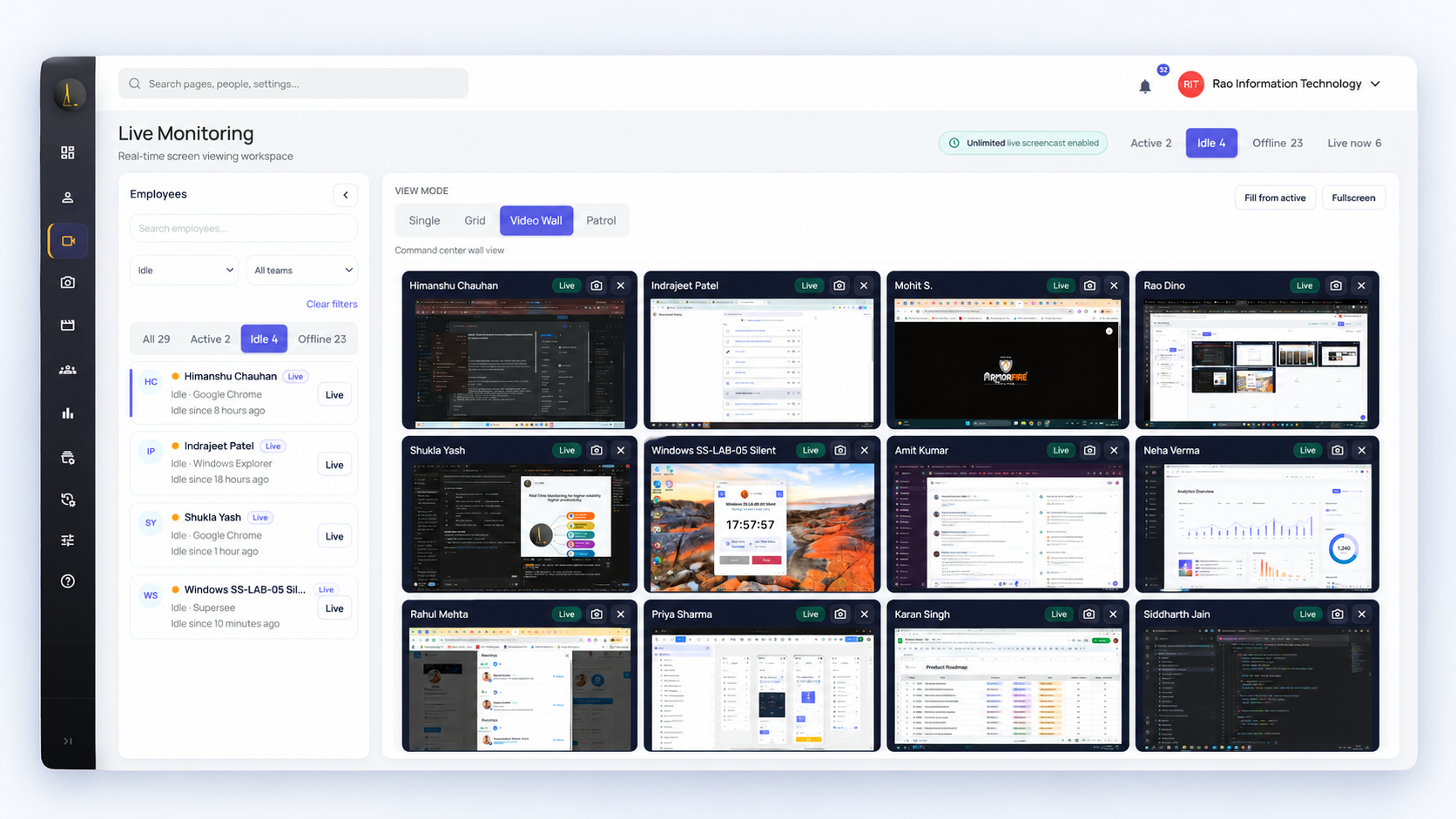
SuperSee Live Wall with several work screens in one view

SuperSee Live Wall — view multiple employee screens in one place.

Professional includes 90 shared minutes of live viewing a day. That covers spot checks. It is not a full shift of Live Wall.

Choose

Which should you consider?

SuperSee

Choose SuperSee when you want to…

  • See where the workday went — by person, team, and period — without another written update.
  • Compare how communication tools fill the day across your team.
  • Check live screens when needed, with audit logs of who viewed whom.
DeskTime

Choose DeskTime when you want to…

  • Bill and organise time around named projects, tasks, and project-tool integrations.
  • Pull calendar events and meeting time into tracking as a core part of the day.
  • Rely on activity and screenshots without live viewing or manager viewing logs.
Comparison

Compare the features and plans

What you need DeskTime SuperSee
Where did tracked time go? Pro and aboveAutomatic tracking with app and website usage All plansAutomatic tracking with app and website usage
Can I see today’s activity without waiting for tomorrow? IncludedDashboard updates throughout the workday IncludedActivity views and workday reports during the day
Do I get periodic screenshots? Premium · EnterpriseOptional; configurable intervals and blur All plansPeriodic screenshots; can be switched off
Can I check a live screen — and who viewed it? Not availableDoes not record or stream screen video Professional · BusinessLive Wall + shared daily pool; audit log shows who viewed whom. Single live screen on all plans.
Can I investigate a past stretch without asking people to reconstruct it? Premium · EnterpriseOptional screenshots Professional · BusinessFull Work Replay from activity after install; yesterday only on Basic
How do I get a daily signal of who to open next? AI SummaryAfter tracked activity All plansWhatsApp and email summary
Named projects and calendars vs reviewing a selected period Core strengthNamed projects, calendars, and Premium project-tool integrations Activity reviewPerson or team over a selected period; confirm project-tool integrations with our team
Trial 14 daysStandard product trial 14 days · ProfessionalUp to 5 employees · No credit card

Where did tracked time go?

DeskTimePro and above

Automatic tracking with app and website usage

SuperSeeAll plans

Automatic tracking with app and website usage

Can I see today’s activity without waiting for tomorrow?

DeskTimeIncluded

Dashboard updates throughout the workday

SuperSeeIncluded

Activity views and workday reports during the day

Do I get periodic screenshots?

DeskTimePremium · Enterprise

Optional; configurable intervals and blur

SuperSeeAll plans

Periodic screenshots; can be switched off

Can I check a live screen — and who viewed it?

DeskTimeNot available

Does not record or stream screen video

SuperSeeProfessional · Business

Live Wall + shared daily pool; audit log shows who viewed whom. Single live screen on all plans.

Can I investigate a past stretch without asking people to reconstruct it?

DeskTimePremium · Enterprise

Optional screenshots

SuperSeeProfessional · Business

Full Work Replay from activity after install; yesterday only on Basic

How do I get a daily signal of who to open next?

DeskTimeAI Summary

After tracked activity

SuperSeeAll plans

WhatsApp and email summary

Named projects and calendars vs reviewing a selected period

DeskTimeCore strength

Named projects, calendars, and Premium project-tool integrations

SuperSeeActivity review

Person or team over a selected period; confirm project-tool integrations with our team

Trial

DeskTime14 days

Standard product trial

SuperSee14 days · Professional

Up to 5 employees · No credit card

Official product information reviewed 20 October 2026. Sources

Workflow

How a manager can use SuperSee

Start with who needs a closer look, investigate the days behind a stuck project, and open a live screen when you need more context.

1

Who needs a closer look today?

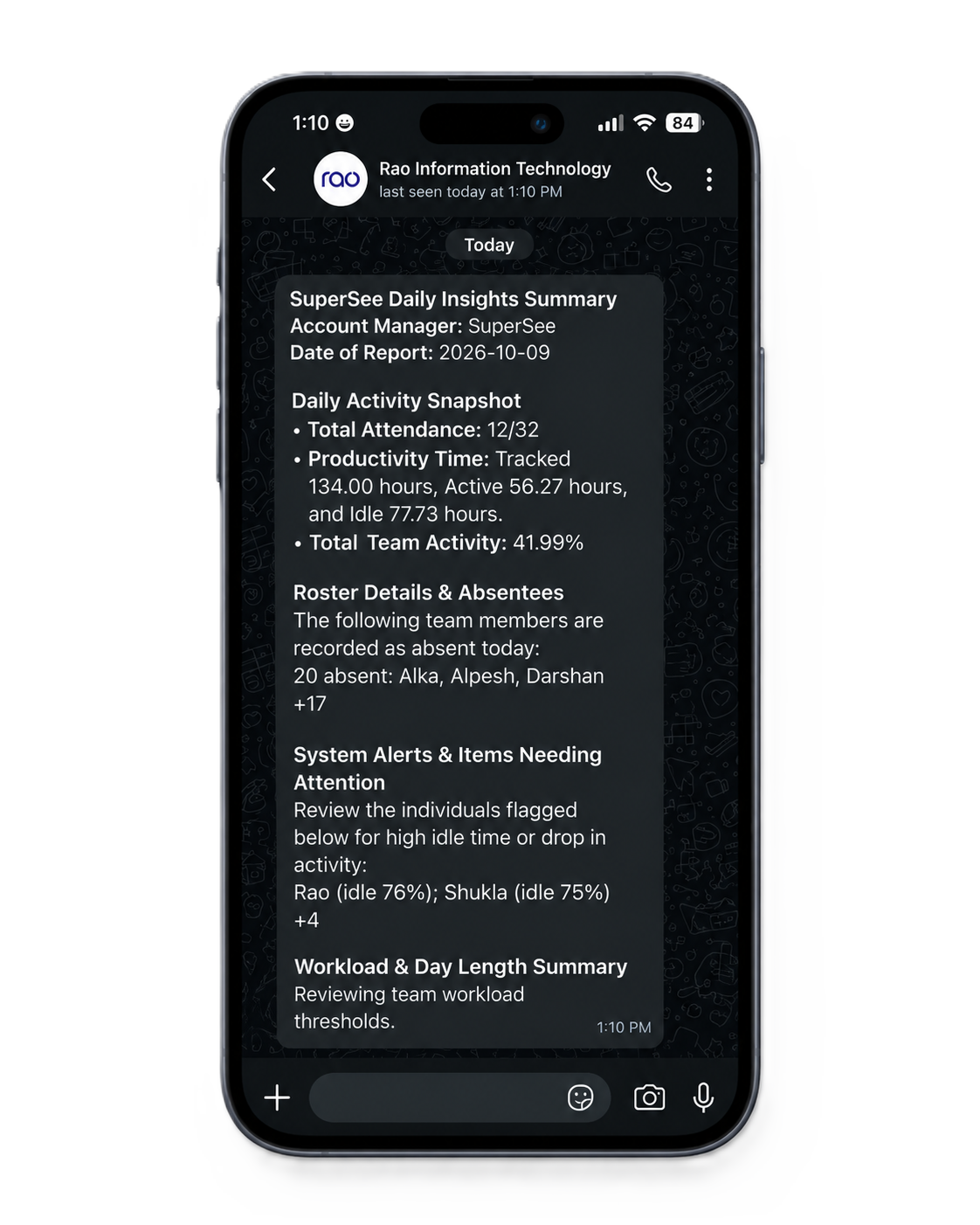
WhatsApp or email shows attendance, tracked time, and people you may want to open next. Use it as a starting point — not a performance score.

  • Attendance Who was in
  • Tracked time How the day was recorded
  • People to review Who to open next
SuperSee daily summary on WhatsApp

Daily summary fields. Enlarge to read the full sample.

2

A project took longer than expected. Review the days behind it.

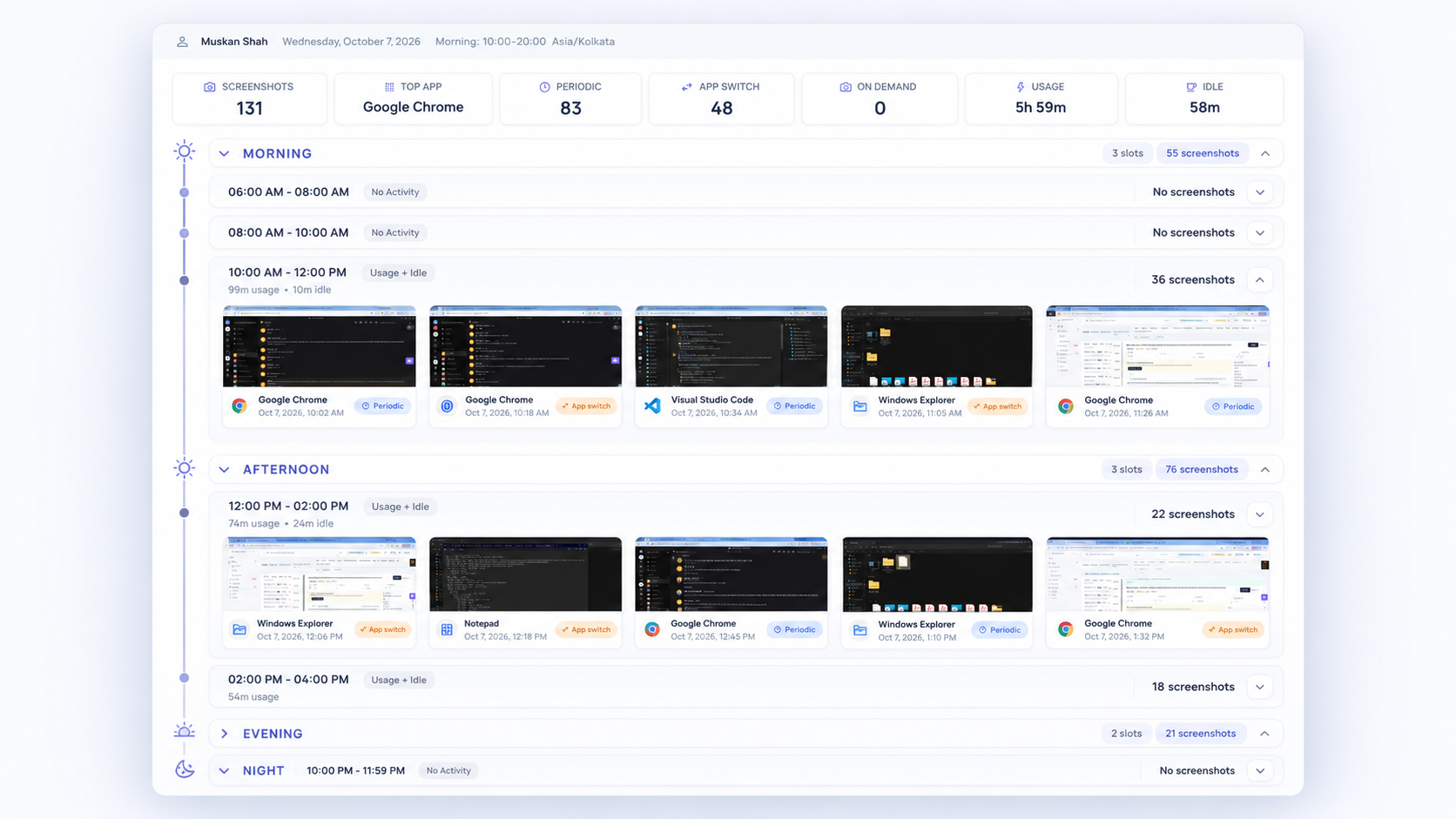
Select the people and dates, then review app usage and captured activity before your next follow-up. That shows what filled the period — not automatic project billing if several ran in parallel. Capture starts after install.

“Can you walk me through where this task got stuck?”

SuperSee Work Replay focused on one part of the day

Captured activity for the period you select. Not continuous video.

3

Something looks off right now — check the screen.

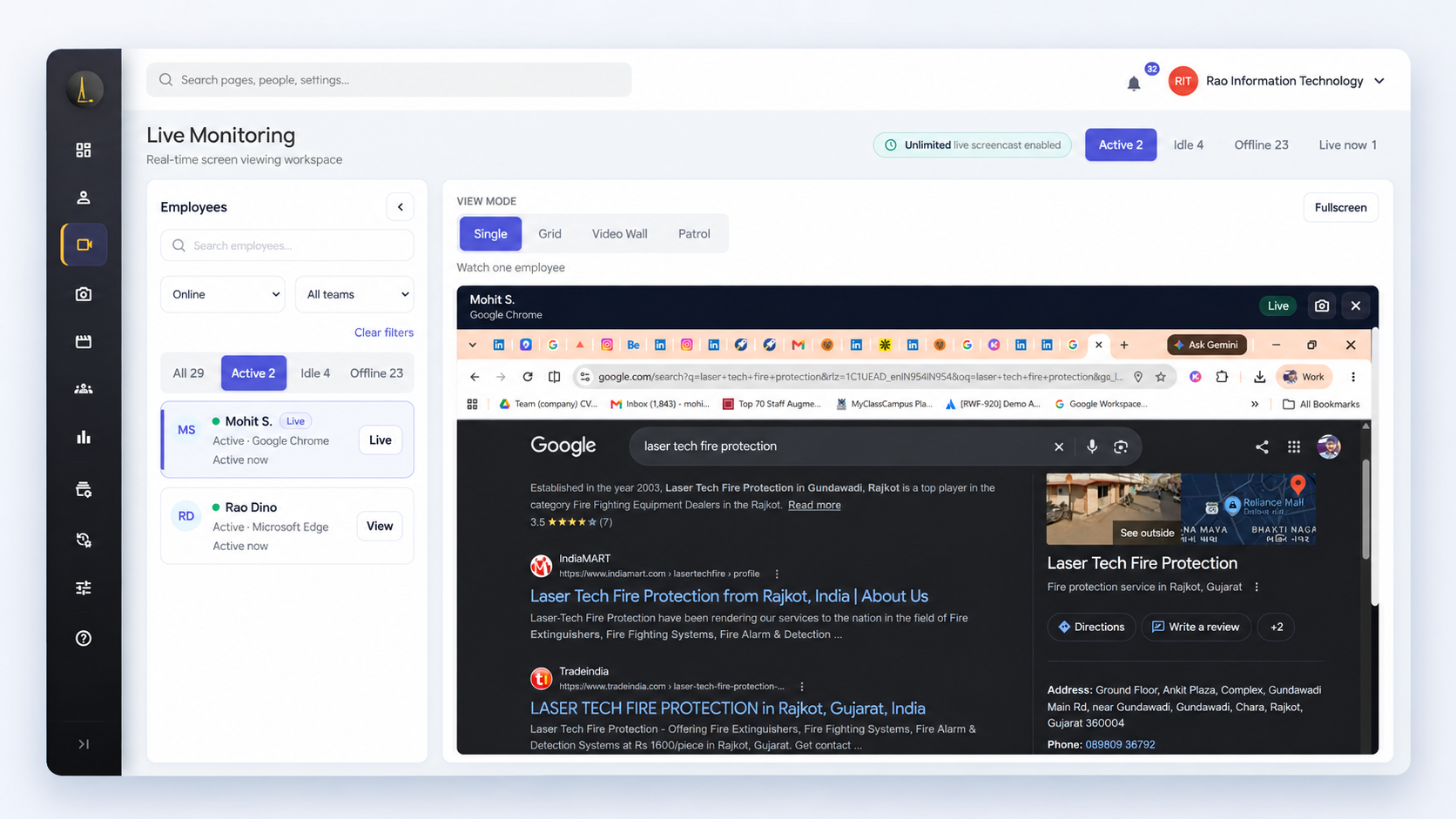
Open that one live screen when you need the current context. Use Live Wall if several desks are part of the same question. On Professional and Business, audit logs show which manager opened which employee, when, and for how long.

Professional: 90 shared minutes of live viewing per company per day. Basic 45 · Business 180. Extra viewing is quoted separately.

One live SuperSee screen of a work computer

One live screen for the moment you need it.

What would your team pay?

Same team size. Different feature sets. Taxes extra.

30 tracked employees · Annual billing · INR

Product / planMonthly equivalent
SuperSee Professional
₹289 per employee / month, billed annually ₹1,04,040 for 30 people / year · GST extra Live Wall · 90-min pool / day
DeskTime Premium
₹513.33 per employee / month, billed annually ₹1,84,799 for 30 people / year · excl. VAT Screenshots · no live screen

Less per employee / monthBefore taxes · Different feature sets

₹224.33

Why these plans? Both include screenshots. SuperSee Professional also includes Live Wall, full Work Replay, and a shared 90-minute daily live-view pool.

Prices and comparison details

SuperSee Professional for 30 or more employees is ₹289 per seat on annual billing: ₹1,04,040 for the year, GST extra. Basic on the same terms is ₹180 per seat, ₹64,800 for the year, with screenshots, one live screen, and yesterday-only Work Replay.

DeskTime’s India page showed Premium at ₹513.33 and Pro at ₹366.67 per user/month, billed annually, excluding VAT, on 20 October 2026. The Premium yearly total above is 30 × ₹513.33 × 12, rounded to the rupee. Pro includes projects and calendars, and does not include screenshots or a live screen. DeskTime pricing

14 days · Professional · Up to 5 employees · No credit card

Trial

Test SuperSee on one real management question

Start with a small group. Review newly captured activity and see whether SuperSee gives you useful context for your next follow-up.

Choose what you want to evaluate

For example: where a person’s day went, how much time communication tools take across the team, or a live check with viewing accountability.

Install SuperSee and invite your test group

Explain what will be captured and who can access it. Leave the tray icon on. Windows, macOS, and Linux.

Review the results against your question

Only activity after install is available. Decide whether the information improves your management workflow.

Start free trial

14 days · Professional · Up to 5 employees · No credit card

Questions before you choose

No. DeskTime’s documentation states that it does not record or stream screen video. Its dashboard does update activity throughout the day.[1][2]

Each plan has a shared company-wide daily pool: 45 minutes on Basic, 90 on Professional, and 180 on Business. Use it for spot checks when a question needs the screen. It is not sized for watching a full shift. Additional viewing is quoted separately. The trial uses the Professional pool.

Yes. App and website reports, Productivity Trends, and the daily summary stay available on your plan. Work Replay’s screen context needs screenshots on.

Idle means the computer was inactive. That can include a call, a meeting, reading, or thinking. It is not a verdict about effort. Use it with the work in front of you.

The tray icon stays on by default so people know the agent is running. Access is scoped to the teams you configure. SuperSee does not collect keystrokes, microphone audio, or passwords. Live views can be limited to supervisors with the right role. On Professional and Business, monitoring audit logs record which manager opened which employee, when, and for how long.

No. Capture starts after the desktop app is installed. Review what is recorded during the trial, then decide if it helps your next follow-up.

The trial runs for 14 days on Professional with up to five employees and no credit card. After that, choose a plan if you want to continue.

This page does not promise a history import. Keep the records you need, and ask our team about your transition before you switch.

See whether SuperSee fits your team

Try it with a small group. Pick one question — where a workday went, how communication tools fill the day, or a live check with viewing logs — and see whether the answer helps your next follow-up.

Start free trial

Book a demo

14 days · Professional · Up to 5 employees · No credit card

Sources

Written by SuperSee from public product pages reviewed on 20 October 2026. This is our comparison, not an independent test. Prices and features can change.

  1. What DeskTime tracks
  2. DeskTime dashboard
  3. DeskTime plan differences
  4. DeskTime screenshots
  5. SuperSee plans
  6. SuperSee overview
  7. DeskTime AI Summary
  8. DeskTime India pricing (displayed rates)

DeskTime is a trademark of its owner. SuperSee is not affiliated with DeskTime.