Typed content
EmpMonitorIncluded
Keystroke monitoring
SuperSeeNot collected
No keystroke logging

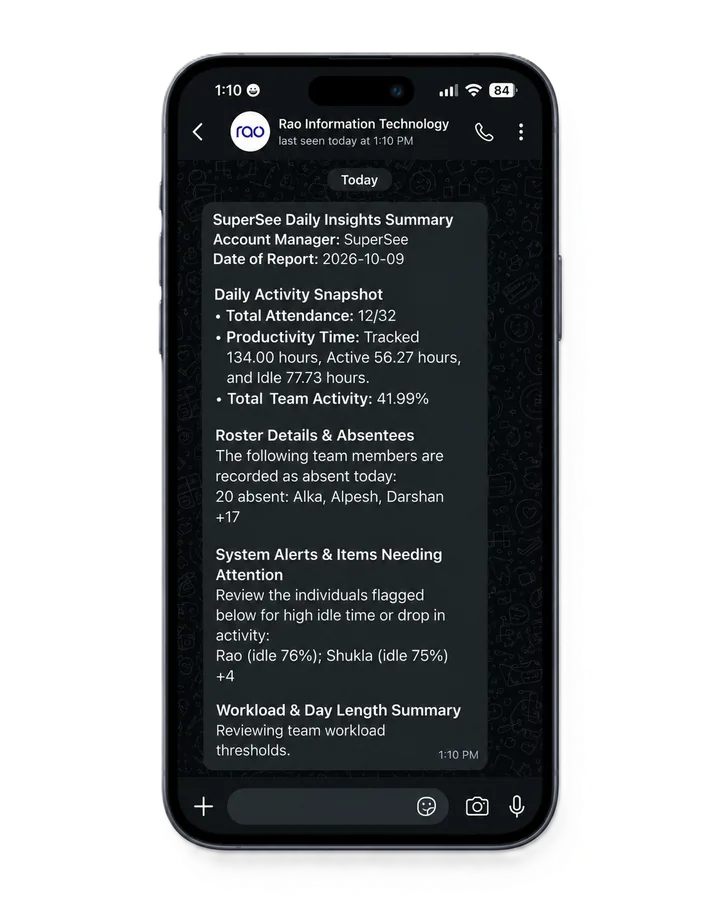
Review screenshots, live screens, app usage and automated timesheets in one place. Get the daily overview on WhatsApp and email, with no keystroke logging and a log of who viewed whom.
14-day Professional trial · Up to 5 employees · No credit card
Both products track computer activity and offer screenshots, live viewing, and reports. EmpMonitor adds deeper controls. SuperSee focuses on reviewing the day and keeping monitoring accountable.
| What you need | SuperSee | EmpMonitor |
|---|---|---|
| Typed content | Not collectedNo keystroke logging | IncludedKeystroke monitoring listed on every plan |
| Accountability for managers | Professional and BusinessLog of which manager viewed which employee’s screen, and for how long | Admin activity logIts FAQ says admin activity is tracked. What each record shows is not published.[8] |
| Live screen viewing | All plansSingle screen on every plan. Multi-screen views (Grid, Live Wall, Patrol) on Professional and Business. Shared daily allowance applies. | Live screencastingStreamed from the dashboard, with remote control for troubleshooting |
| Reviewing earlier work | Work ReplayCaptured screenshots in a timeline beside app usage and active or idle time | Screenshots and recordingsTimestamped video in 5-minute segments, stored in the cloud |
| Summaries outside the dashboard | IncludedDaily WhatsApp and email summaries | EmailAutomatic email reports |
| Patterns across days and teams | ProfessionalFull Productivity Trends: after-hours work, focused time, communication-tool time | ReportsProductivity calculation and custom reports |
| Device controls and deployment | Cloud serviceVisibility tool. Not a device-blocking tool. | Broader controlsUSB detection; app and USB blocking on yearly plans; on-premise option offered |
Keystroke monitoring
No keystroke logging
Details not published
Log of who viewed whose screen
Streamed, with remote control
One screen on every plan. Live Wall on Pro and Business
5-minute recordings in the cloud
Screenshot timeline with app usage
Automatic email reports
Daily team summary
USB and app blocking on yearly plans; on-premise offered
Visibility tool, not a blocker
OfferedNot offered
Comparison based on published information checked 22 October 2026. Features and allowances vary by plan. View sources
SuperSee is priced in rupees. EmpMonitor bills in US dollars, so its rupee amounts below are approximate.
About ₹26,700 lower annual subscription with SuperSee at today’s exchange rate. EmpMonitor includes keystroke monitoring and other features SuperSee does not offer, so the plans are not equivalent.
SuperSee Professional includes 90 minutes of live viewing per day, shared across your company. Additional viewing is available at a separate price. EmpMonitor’s pricing page lists no live-viewing limit.
SuperSee Professional is ₹399 per employee/month (₹11,970 for 30). EmpMonitor Silver is $5 per user/month (about ₹474, or about ₹14,200 for 30). EmpMonitor’s monthly plans do not include app blocking, HRMS, or USB blocking.
₹289 is SuperSee’s 30+ employee annual rate. Smaller teams see different rates on SuperSee pricing. GST extra.
EmpMonitor lists Bronze (1–10 users), Silver (11–50), and Gold (51–200) with the same features at each size, and a custom quote above 200. For 51–200 users, Gold is $3 per user/month paid yearly (about ₹284), close to SuperSee Professional’s ₹289. The $1,379 annual total is calculated from the per-month rate on its pricing page. Rupee amounts use ₹94.79 per US dollar (Google currency converter, 22 October 2026). EmpMonitor bills in US dollars, so the rupee cost changes with the exchange rate and may include card or foreign-exchange fees. Taxes extra.
14-day Professional trial · Up to 5 employees · No credit card
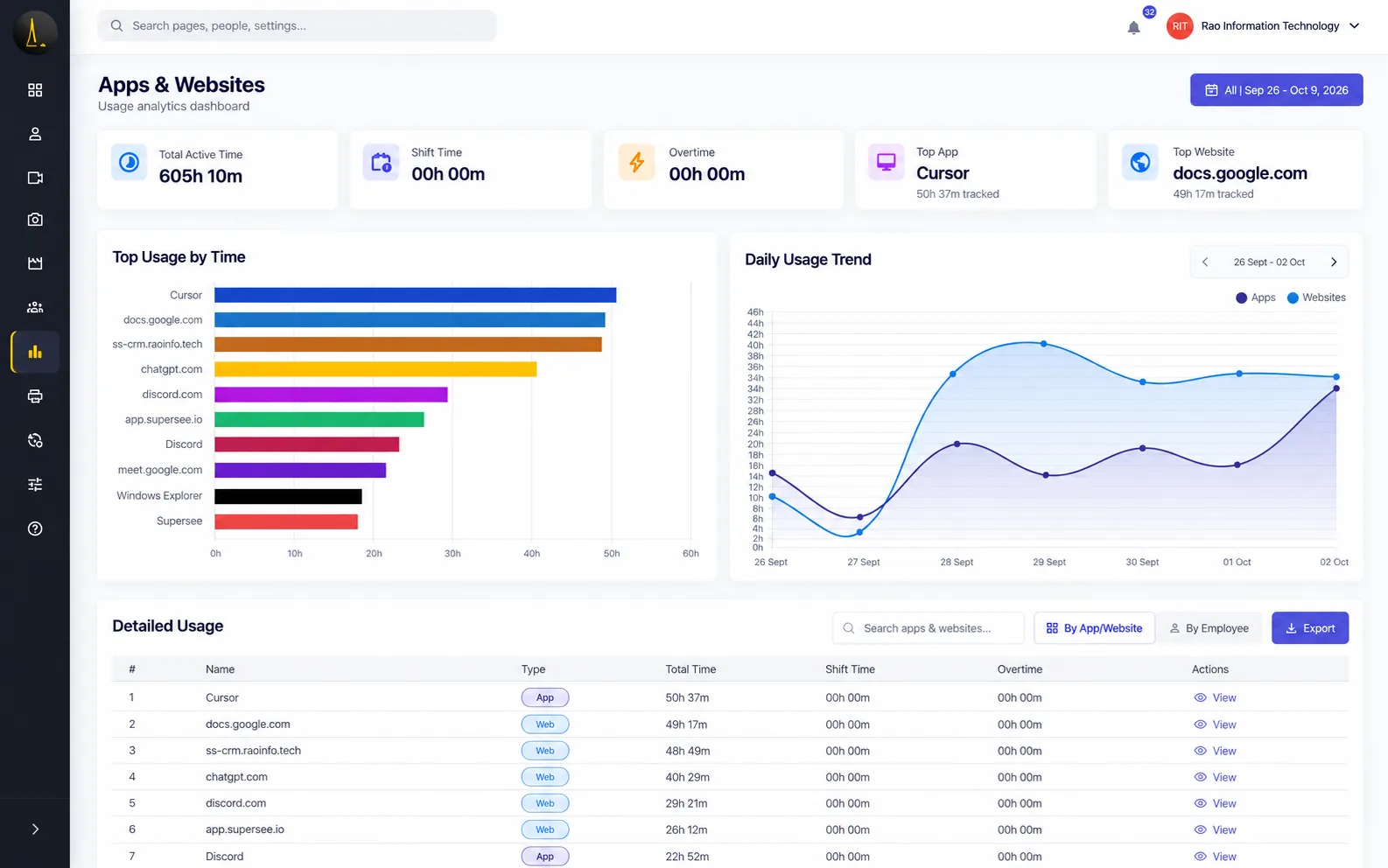
Choose a person, team, and period. See which apps and websites took up the day—without asking for another activity report.
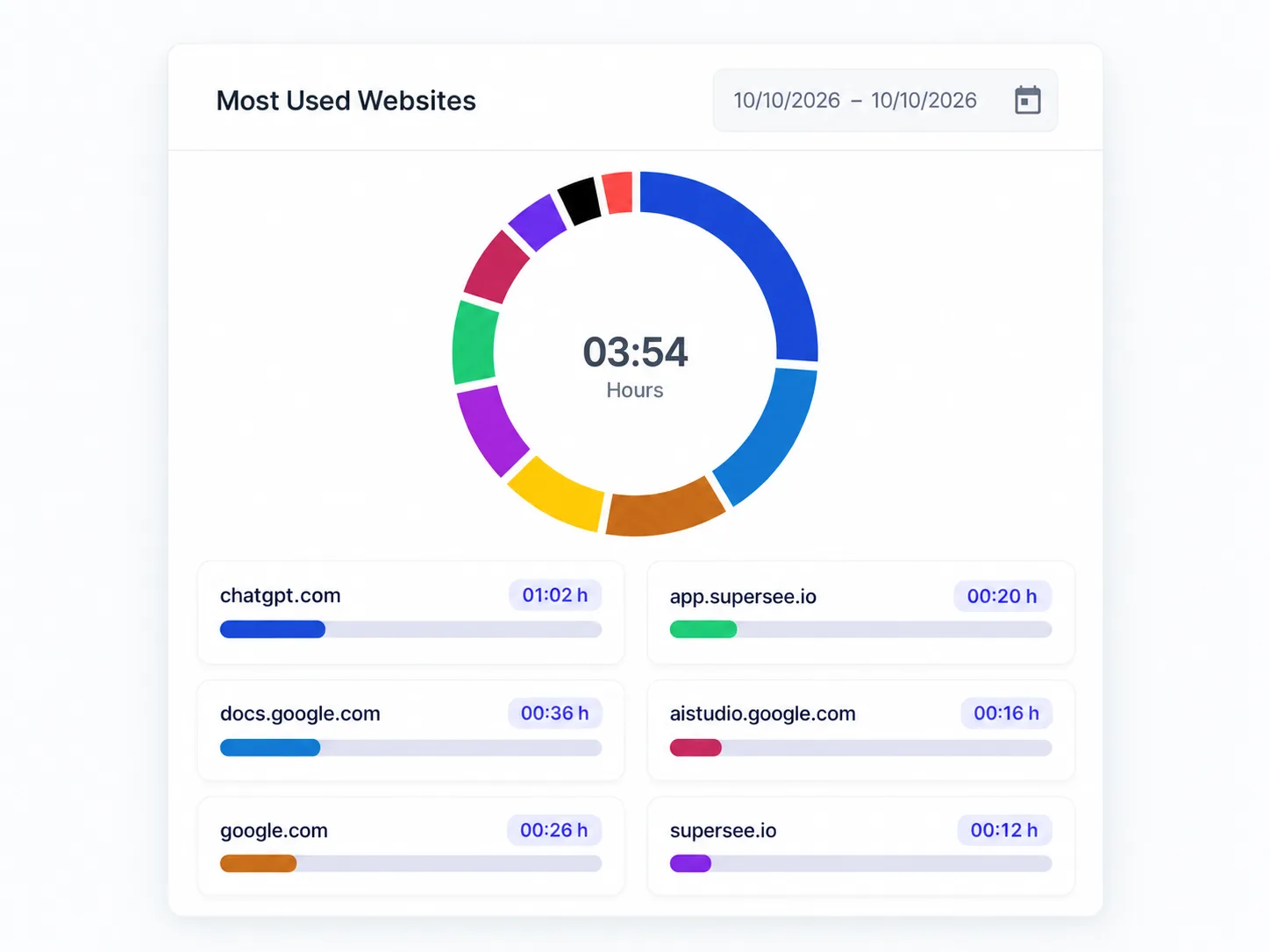
Tool usage and durations for the period you select.
Compare time in calls and chat tools across people and teams, and see repeated late finishes, before you decide who needs a closer look.
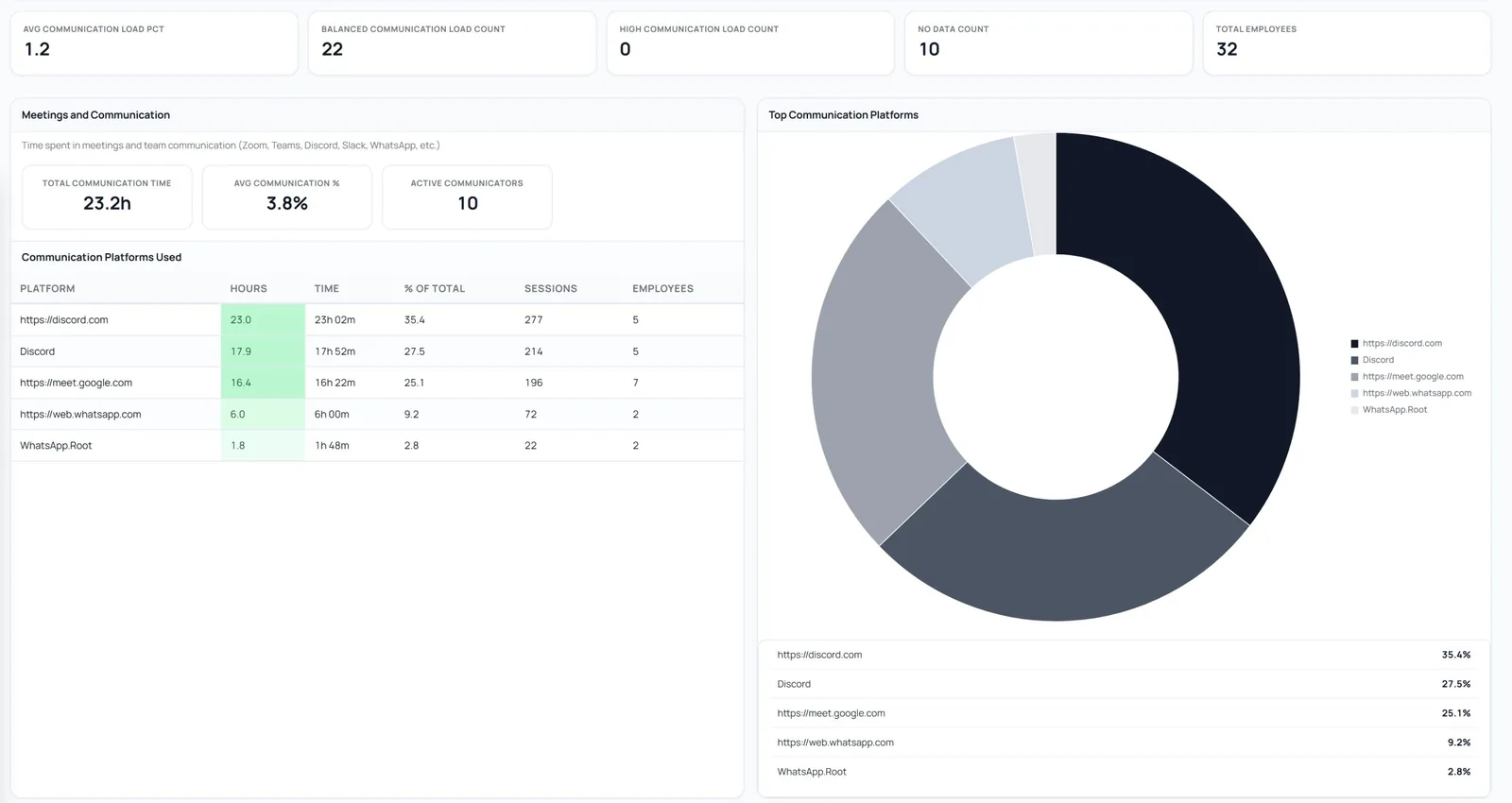
Platform names, share, and time in Productivity Trends.
Open Work Replay for the person and day. Review captured screenshots in time order beside app usage to see the stretch behind the update—then ask a more specific question. If you need video of the screen, EmpMonitor records it; Work Replay does not.
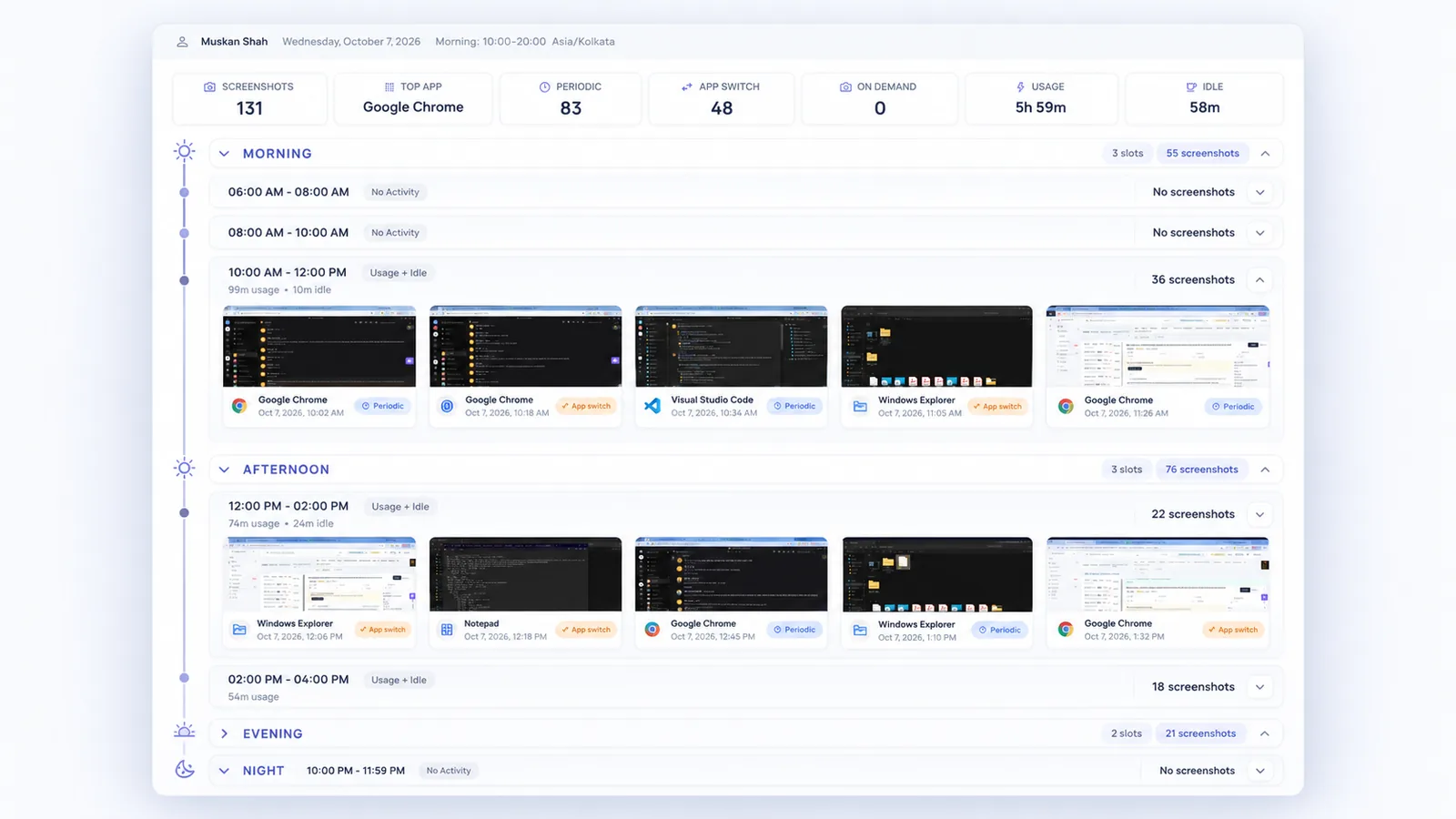
Selected stretch of the day. Captured screenshots—not continuous video.
Open one screen for a closer look, or use Live Wall to view several. Professional includes a 90-minute company-wide daily live-viewing pool, shared across supervisors. Extra viewing is quoted separately. On Professional and Business, every live view is logged.
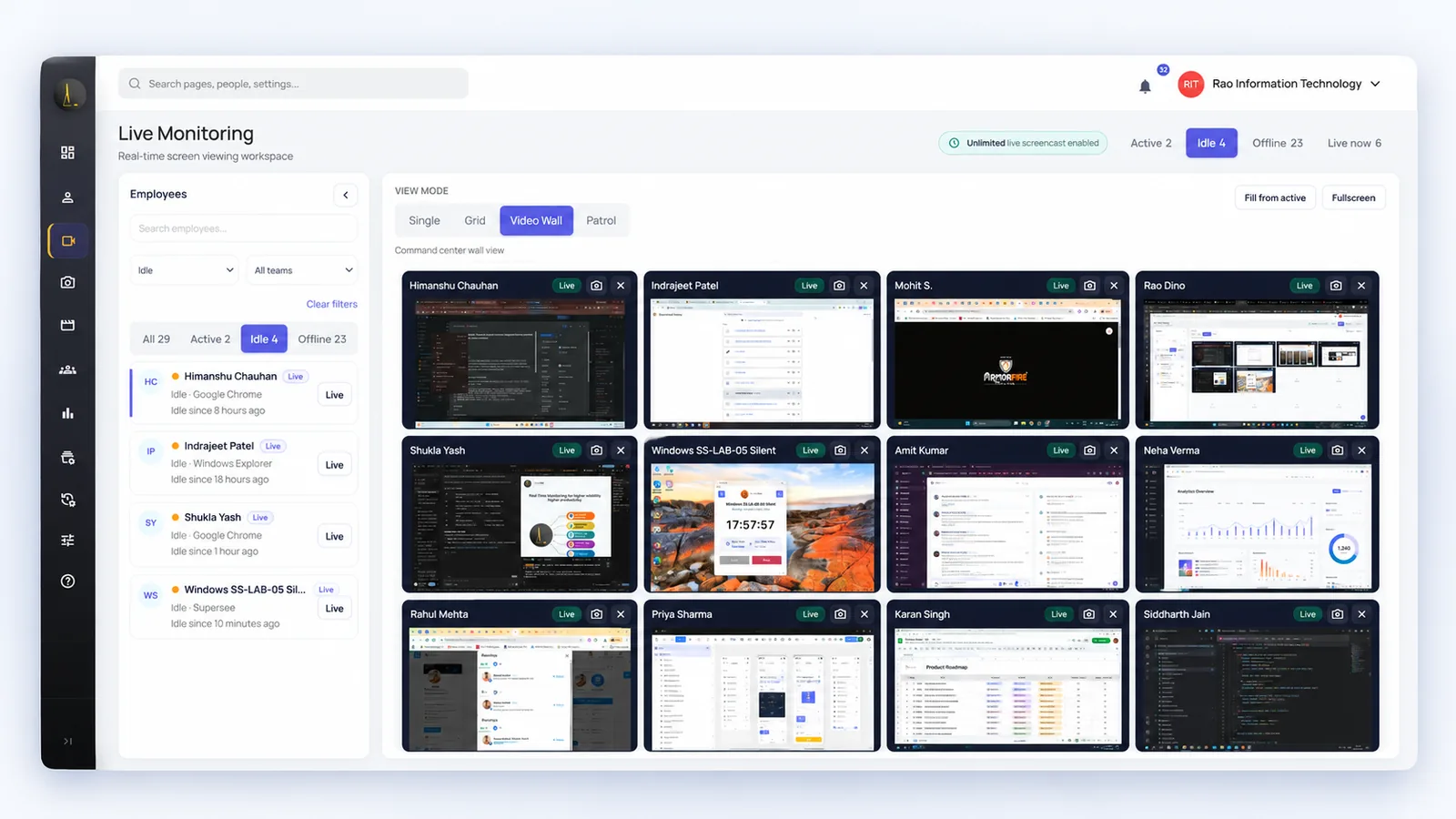
Live Wall when you need screen context now.
Start with your own computer or a small group. Pick one question: where time went, what happened during a particular work period, or whether a pattern keeps repeating.
Capture starts after install while tracking is running.
See whether the information answers the question you chose.
Then choose a paid plan for the employee count and features you need.
14 days · Professional access · Up to 5 employees · No credit card
No. SuperSee does not log keystrokes, and typed passwords are not collected as keystroke data. EmpMonitor lists keystroke monitoring in its plans.[1]
Yes. EmpMonitor streams employee screens live from its dashboard and describes remote control for troubleshooting. SuperSee offers a single live screen on every plan, with multi-screen views (Grid, Live Wall, Patrol) on Professional and Business, subject to its shared daily allowance.[2]
No. Work Replay organizes captured screenshots into a timeline beside app usage and active or idle time. It does not record every moment between captures. EmpMonitor records timestamped video in 5-minute segments. Choose based on the detail you need.[2]
Yes. SuperSee’s agent can run visibly or Hidden, and EmpMonitor documents a stealth mode.[4] We recommend introducing monitoring openly under a written policy, and using Hidden only where the law allows and the policy is disclosed.
Professional includes a 90-minute company-wide daily pool, shared across supervisors for spot checks. It is not sized for watching a full shift. Additional viewing is quoted separately. The trial uses the Professional pool.
EmpMonitor lists $6 per user/month for 1–10 users, $5 for 11–50, and $4 for 51–200 when paid monthly. Paid yearly, those are $4.66, $3.83, and $3 per user/month. Above 200 users it is a custom quote. For 30 users on Silver, that is $150 a month or about $1,379 a year, priced in USD. At ₹94.79 per dollar that is roughly ₹14,200 a month or ₹1,30,700 a year.[1]
As context, not a verdict. The active and idle timeline shows when there was activity, and quiet periods can mean a meeting, a call, or thinking time. SuperSee does not score keystrokes or mouse movement, so a manager interprets the timeline with the role in mind and checks Work Replay when something looks unusual.
Yes. Reports, Productivity Trends, and daily summaries remain available. Work Replay needs captured screenshots.
Yes. The trial is 14 days of Professional access with up to five employees and no credit card. Review newly captured activity, Work Replay, daily summaries, and Live Wall within the shared daily pool. SuperSee can only show activity captured after installation while tracking is running.
“The most helpful feature is the ability to monitor all systems in one place. It gives us better visibility, makes it easier to track everything, and helps ensure nothing is missed.”
Try the reports, daily summaries, Work Replay, and live screens with up to five employees.
Published information checked 22 October 2026. Pricing, taxes, offers, and entitlements may change; confirm current terms before purchase.
Also see Live Monitoring, Work Replay, SuperSee vs DeskTime, SuperSee vs Time Champ, agencies, IT services, and screen monitoring.
EmpMonitor is a trademark of its owner. SuperSee is not affiliated with EmpMonitor.