Key Takeaways
Live screencast is not for all-day watching, it is for critical moments.
76% of companies now use some form of employee monitoring, but 61% of heavily monitored staff actively oppose being tracked.
1 in 9 employees have quit due to extreme accountability or monitoring.
35-to-40% of remote workers are more productive when they are not being tracked.
When surveillance is used for development and communicated transparently, employees do not resist.
The difference between visibility and surveillance is intent.
Trust is the cornerstone of any successful employer-employee relationship.
Building trust can cut employee turnover by half.
The solution is not coming. It is here. SuperSee is live and ready.
The Question Every Founder Is Afraid to Ask
We need visibility. But what if my best people quit?
This is the fear that keeps BPO founders up at night.
You know you need to see what is happening on your agents’ screens. Attendance tells you they logged in. Timesheets tell you the clock is running. Task tools tell you tickets are “In Progress.”
But none of these tell you:
Is the agent staring at a frozen loading screen?
Did the system auto-logout due to a SAML token expiry?
Is the agent working in the wrong CRM view while a client waits?
You need real-time visibility. You need to see the screen.
But you are terrified.
You have heard the horror stories. Managers who watch their employees all day. Tools that track every keystroke. Agents who feel like prisoners. Trust destroyed. The best employees quit.
You don’t want to be that founder.
So you do nothing. You stay blind. You keep pinging. You keep interrupting. Your agents keep losing focus. SLAs keep slipping. Clients complain. Revenue drops.
This is the Live Screencast Dilemma.
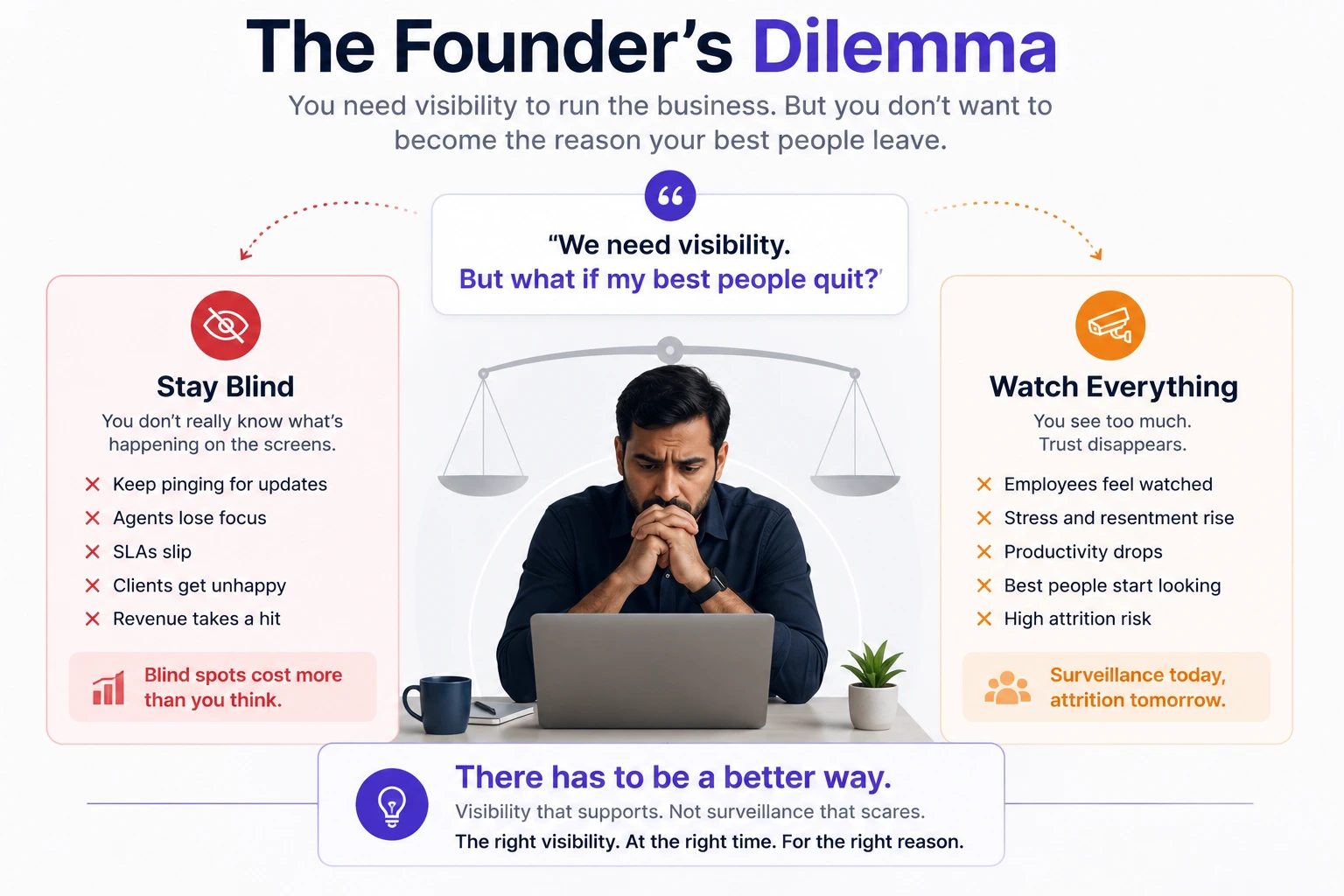
You need visibility. You don’t want to be intrusive. You don’t know where the line is. You fear that if you install a live screencast, your best employees will quit.
Here is the truth: Live screencast is not inherently intrusive. How and when you use it determines whether it is visibility or surveillance.
The difference is not the tool. The difference is the intent and the implementation.
And the good news? There IS a way to get visibility without breaking trust. It exists. It works. And it is available right now.
The Data: Why Managers Are Turning to Live Screencast
The shift to remote work has changed everything.
76% of companies in North America now use at least one form of employee monitoring. 78% of American companies deploy algorithmic employee monitoring tools. 42% of U.S. workers say they are being monitored on the job.
Why?
Managers lost the ability to see who was at their desk. They turned to software for visibility into productivity and work patterns. 85% of leaders say hybrid work makes it hard to judge productivity.
The result: A massive surge in monitoring tools. But most of these tools were designed for surveillance, not support.
And the data shows they are backfiring.
When Live Screencast Becomes Intrusive
1. It Destroys Trust
Overuse of employee-monitoring tools can lead to serious outcomes, including mistrust, privacy concerns, low morale, and an exodus of staff.
79% of managers opposed to surveillance say it undermines trust.
“Any form of surveillance and monitoring can signal a lack of trust in employees and a lack of empowerment, as well as eroding morale”.
The Hard Truth: When you watch your agents constantly, you are telling them: “I don’t trust you.” And when they don’t feel trusted, they disengage.
2. It Kills Productivity
Employees who felt they were being watched were nearly three times less likely to report a high level of productivity.
35-to-40% of remote workers are more productive when they are not being tracked.
Surveillance not only increased stress and resistance but actively harmed productivity.
The Irony: The tool you install to increase productivity is decreasing it.
3. It Increases Stress and Burnout
Intensive electronic performance monitoring elevates stress, lowers job satisfaction, reduces trust in management, and increases turnover intentions.
Constant surveillance can amplify workers’ stress and anxiety levels, making them feel like they are under a microscope.
“More stress tends to align with lower productivity and higher turnover”.
4. It Drives Away Your Best Employees
1 in 9 employees have quit due to extreme accountability or monitoring.
1 in 6 have considered quitting due to monitoring practices.
One in six workers consider monitoring technology usage a good reason to quit a job.
Tracked employees are twice as likely to feel disloyal to their company.
More than one-third of employees who are tracked said they are looking for a new job, double those who are not tracked.
The Result: Your best agents,the ones who value autonomy and trust, leave first. You are left with the ones who tolerate surveillance. And your productivity collapses.
5. It Creates a Culture of Fear
90% of employees say strict reporting negatively impacts the workplace.
The impacts include:
- Decreased job satisfaction (22%)
- A culture of fear (22%)
- Increased burnout (18%)
“Extreme monitoring tactics, such as keystroke tracking, webcam surveillance, and excessive screen monitoring, can often heighten stress and undermine psychological safety”.
The Founder’s Fear: “What If My Best People Quit?”
Here is the fear that keeps BPO founders up at night.
“I know I need visibility. But what if I install a live screencast and my best employees quit? What if they see it as surveillance? What if I become ‘that founder’, the one who doesn’t trust his team?”
This fear is valid. And the data proves it is not irrational.
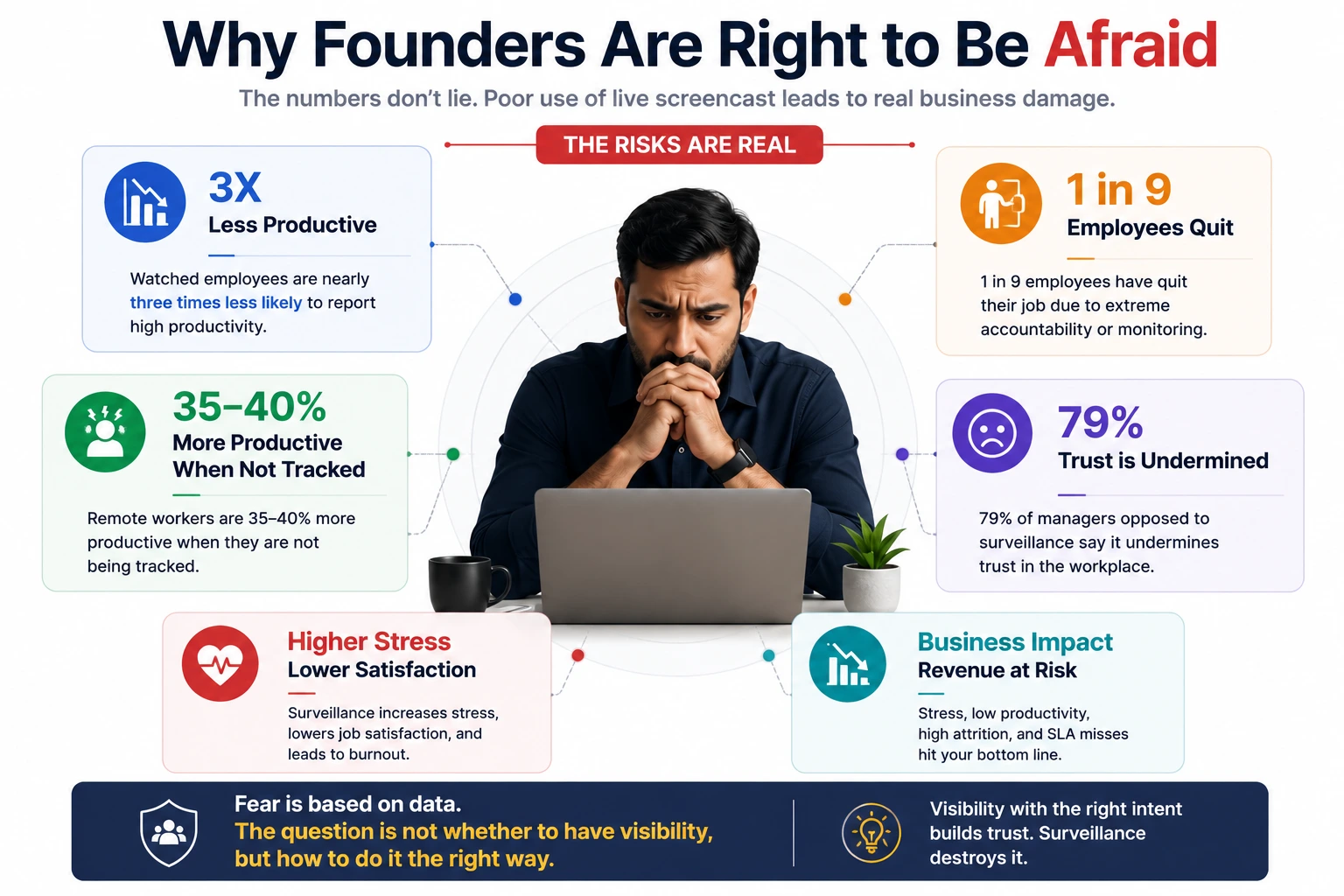
1 in 9 employees have quit due to extreme accountability or monitoring.
1 in 6 have considered quitting due to monitoring practices.
90% of employees say strict reporting negatively impacts the workplace, leading to lower job satisfaction (22%), a culture of fear (22%), and increased burnout (18%).
63% of workers consider the use of tracking software a reason to quit.
9% of workers say they would quit immediately over strict monitoring policies.
62% of employees oppose Musk-style monitoring, and 30% would actively look for a new job if their company implemented similar policies.
80% of workers feel they are being monitored by their employers to a moderate or high degree.
35-to-40% of remote workers are more productive when they are not being tracked.
Electronic monitoring erodes productivity because it negatively impacts the trust between managers and subordinates.
Surveilling employees erodes trust, and puts managers in a bind.
AI surveillance in particular leads to more dissatisfaction and greater resistance, with employees perceiving less autonomy and engaging in more resistance behaviors, complaining more, performing worse, and intending to quit.
The Hard Truth: Your fear is not paranoia. It is backed by data. When you install live screencasts the wrong way, you will lose your best people. High performers don’t tolerate being surveilled. They leave first.
Why Founders Are Right to Be Afraid
1. The Trust Deficit
83% of employers realize the ethical issues with employee surveillance, but 78% nonetheless use monitoring tools due to fear their people aren’t doing enough.
“It’s not the frustration of being monitored per se, but it’s more like a resentment about not being trusted”.
“Any form of surveillance and monitoring can signal a lack of trust in employees and a lack of empowerment, as well as eroding morale”.
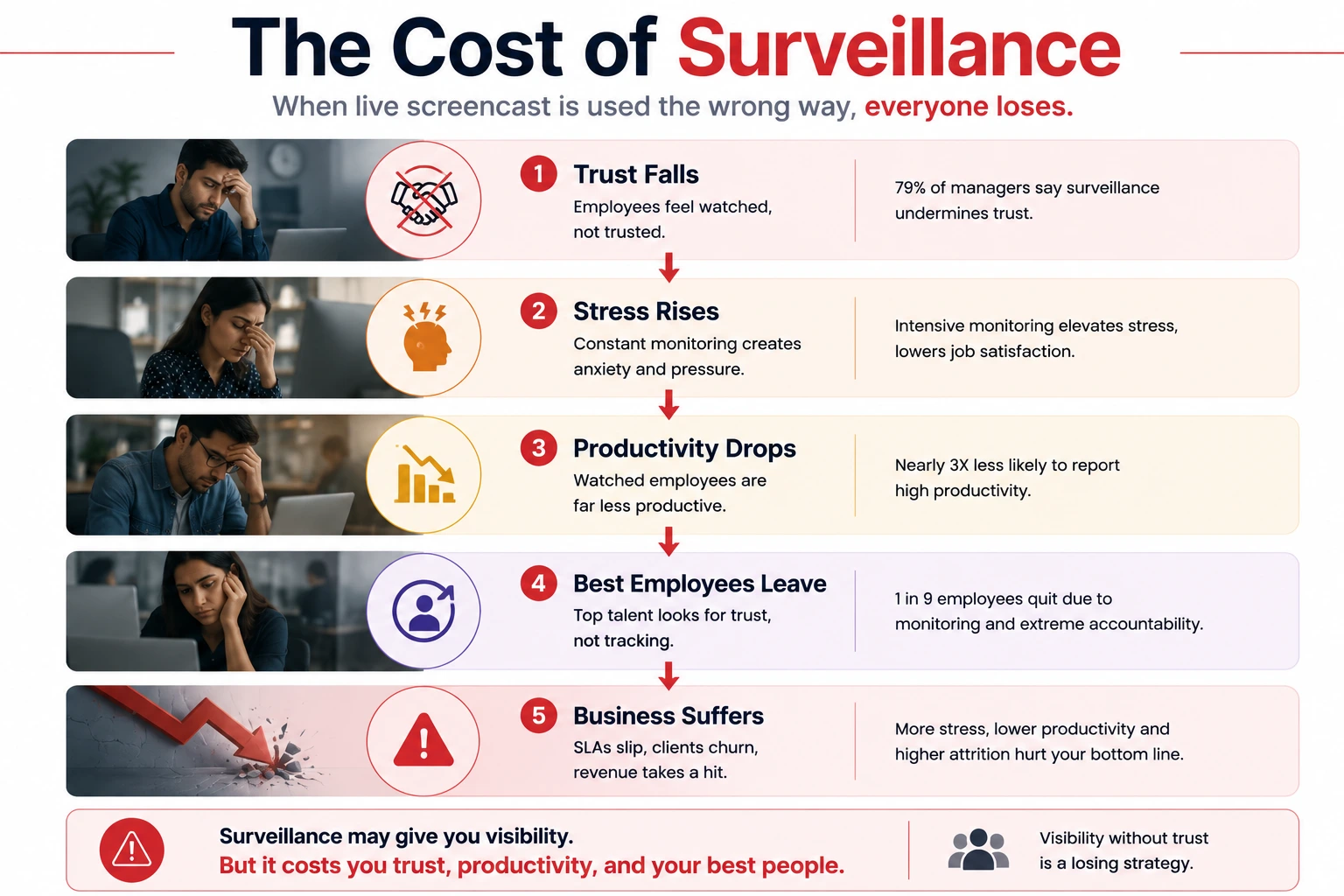
Trust is the cornerstone of any successful employer-employee relationship. When you install surveillance tools, you are sending a clear message: “I don’t trust you.”
2. The Productivity Paradox
Employees who felt they were being watched were nearly three times less likely to report a high level of productivity.
Electronic monitoring erodes workers’ productivity because it negatively impacts the trust between managers and subordinates.
The tool you install to fix productivity is decreasing it.
3. The Attrition Risk
1 in 9 employees have quit due to extreme accountability or monitoring.
1 in 6 have considered quitting due to monitoring practices.
Tracked employees are twice as likely to feel disloyal to their company.
More than one-third of employees who are tracked said they are looking for a new job, double those who are not tracked.
BPO sector turnover already ranges between 30% and 45% annually. Adding surveillance to the mix accelerates this exodus.
The Result: Your best agents, the ones who value autonomy and trust, leave first. You are left with the ones who tolerate surveillance. And your productivity collapses.
The Good News: It Doesn’t Have to Be This Way
Here is what the research also tells us:
When surveillance information was used for conversations about career development, the monitored employees were no less productive than their unmonitored peers.
When participants were told that an AI tool would be used to provide developmental feedback, they resisted less.
“Algorithmic surveillance will not necessarily lead to adverse outcomes for individuals, it just depends on how it is implemented”.
“How these tools are communicated and used is crucial”.
The difference is not the tool. The difference is the intent and the implementation.
And here is the even better news: A solution that implements live screencast the right way already exists. It is not a concept. It is not a promise. It is live, it works, and founders are already using it.
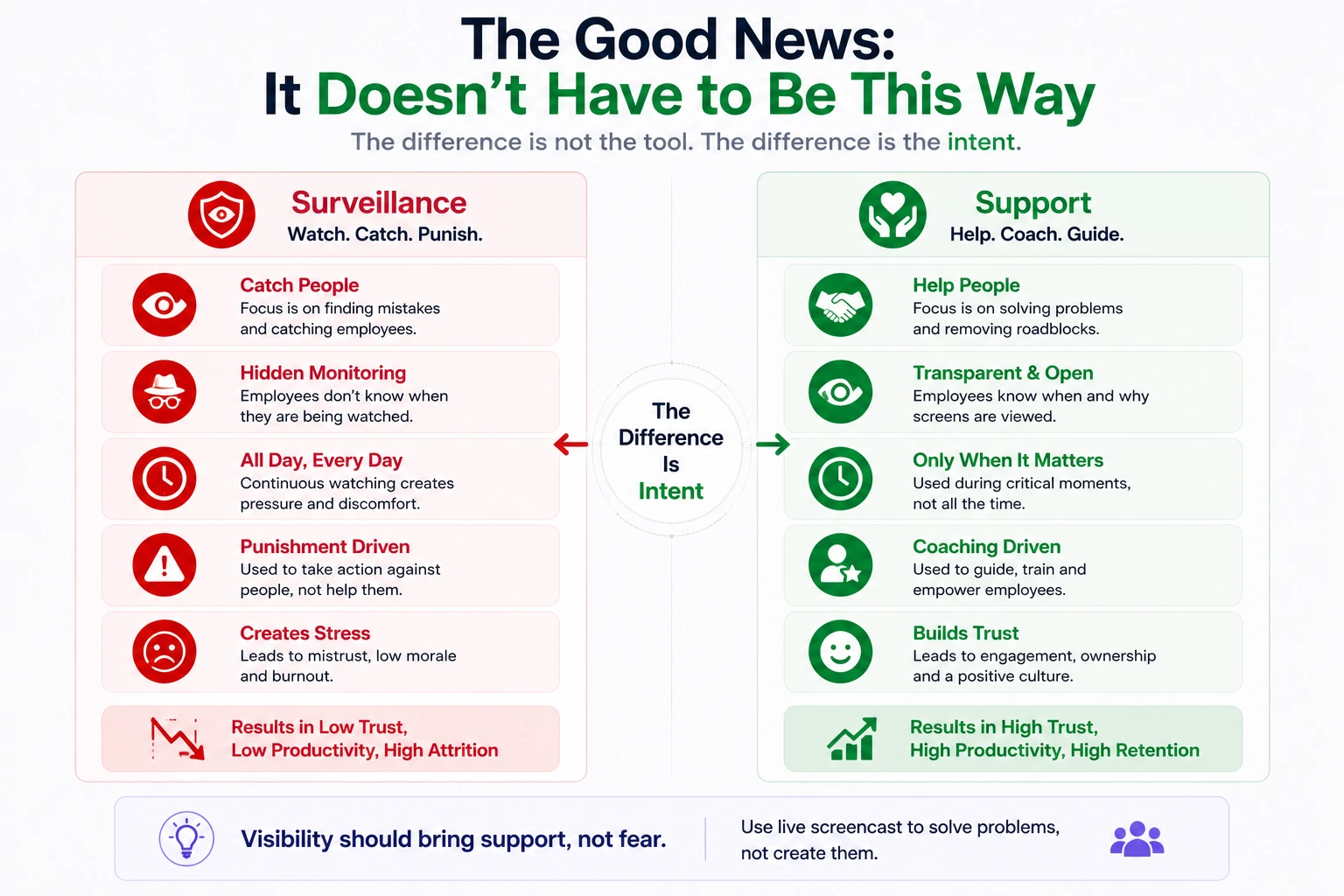
So, When Should Managers Use Live Screencasts?
Here is the short answer:
Live screencast is for critical moments, not constant watching.
The Right Time to Use Live Screencast
1. When an SLA is about to breach
A high-priority ticket is minutes away from breaching. You need to see if the agent is stuck, waiting, or actively working. Silently view the screen. Diagnose the problem. Offer help. Close the ticket.
2. When a system is down
The VPN crashed. The CRM is offline. Half your team is staring at error screens. View their screens to see who is affected. Escalate to IT. Tell the team to take a break.
3. When an agent is stuck and doesn’t know how to ask
A new hire is drowning. They don’t know which macro to use. They are too embarrassed to ask. Silently view their screen. See where they are stuck. Offer guidance without making them feel stupid.
4. When an agent requests help
“Can you look at my screen?” Instead of a 30-second screen-share setup, you already have visibility. You see the problem instantly. You fix it together.
5. During training and coaching
A trainer watches a new agent’s screen to see where they get confused. Feedback is immediate. Onboarding accelerates. The agent feels supported, not watched.
6. When you need to spot system failures
You are not watching individuals. You are scanning for system failures, frozen screens, auto-logouts, error messages. Patrol mode lets you rotate through active screens silently. You find the friction. You fix the system.
The Wrong Time to Use Live Screencast
1. All day, every day
Constant watching is surveillance. It destroys trust. It kills productivity. It drives away your best people.
2. Without transparency
If agents don’t know when and why they are being viewed, they feel spied on. Transparency is non-negotiable.
3. To “catch” people doing something wrong
If your goal is to find mistakes, you have already lost. The goal is to help, not to punish.
4. Without limits
No daily caps. No audit trails. No accountability. This is a recipe for abuse.
5. To replace management
Live screencast is a tool for support, not a substitute for leadership. If you are watching screens instead of coaching your team, you are doing it wrong.
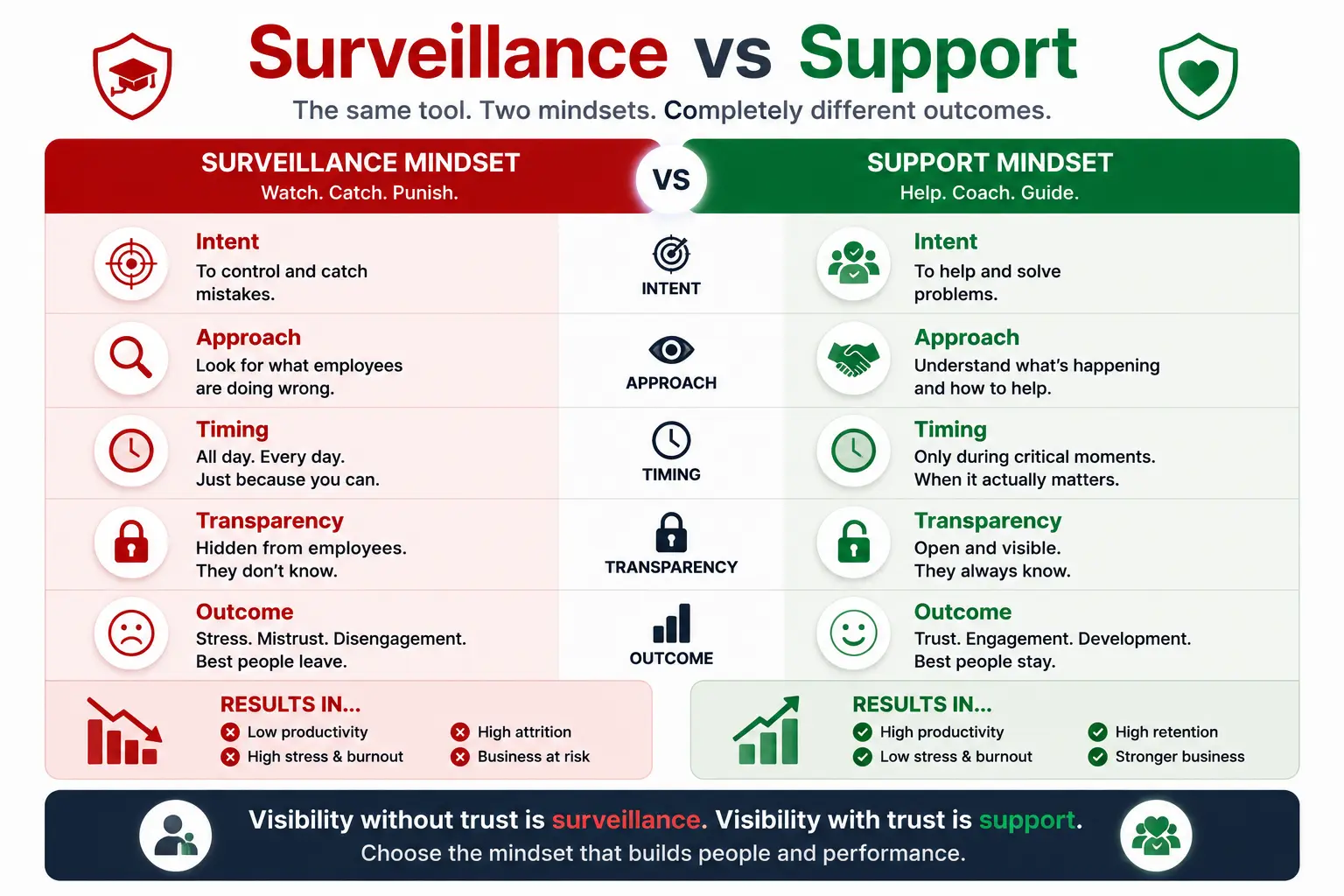
The Framework: Surveillance vs. Support
Surveillance says: “I need to watch you to catch you being slow.”
Support says: “I need to see your screen so I can unblock you faster.”
The difference is intent. And intent is a choice.
How to Implement Live Screencast Without Losing Your Best People
1. Be Transparent
Tell your team what you are using and why. Explain that the live screencast is for critical moments, not for all-day watching.
Template: “We are introducing a live screencast to help us support you better. We will only use it when SLAs are at risk, systems are down, or you are stuck. We will never use it to watch you constantly or to catch you doing something wrong.”
Employees don’t always oppose monitoring, but they will always reject secrecy. If you track activity, own it.
2. Use It for Development, Not Punishment
When surveillance information was used for conversations about career development, the monitored employees were no less productive than their unmonitored peers.
Use live screencast for:
- Coaching and training
- Identifying system failures
- Offering real-time assistance
- Improving workflows
Never use it for:
- Punitive performance reviews
- Catching mistakes
- All-day watching
- Replacing management
3. Set Clear Limits
- Critical moments only – SLA at risk, system outage, agent stuck.
- No all-day watching – Daily limits prevent abuse.
- Audit trails – Every view is logged and accountable.
4. Focus on System Failures, Not People
- The goal is to find friction points, not to catch people doing something wrong.
- Auto-logout = System failure, not behavioral problem.
- Idle = Could be stuck or on a break—check the screen to find out.
- Frozen screen = System issue, not laziness.
5. Build Trust Through Transparency
Trust is the cornerstone of any successful employer-employee relationship.
Building trust can cut employee turnover by half.
When your agents trust you, they stay. When they stay, productivity increases. When productivity increases, SLAs improve. When SLAs improve, clients stay.
Trust is not the opposite of visibility. Trust is the enabler of visibility.
What BPO Founders Actually Need
The goal is not more surveillance. The goal is better visibility.
1. Real-Time Context, Not Constant Watching
Founders need to know if an agent is stuck, if the system is broken, or if the agent is waiting. They don’t need to watch every moment of every day.
2. Silent Assistance, Not Silent Surveillance
Founders need to see what is happening without interrupting. They need to diagnose the problem without sending a single ping.
3. System-Level Scanning, Not Individual Watching
Founders need to scan the whole team for system failures—not watch individuals for behavioral issues.
4. Trust-First Design
Tools must be designed with trust as the default. That means:
- Transparency – Agents know when and why they are being viewed.
- Limits – No all-day surveillance. Only critical moments.
- Audit trails – Every view is logged and accountable.
- Privacy – Personal content is never captured.
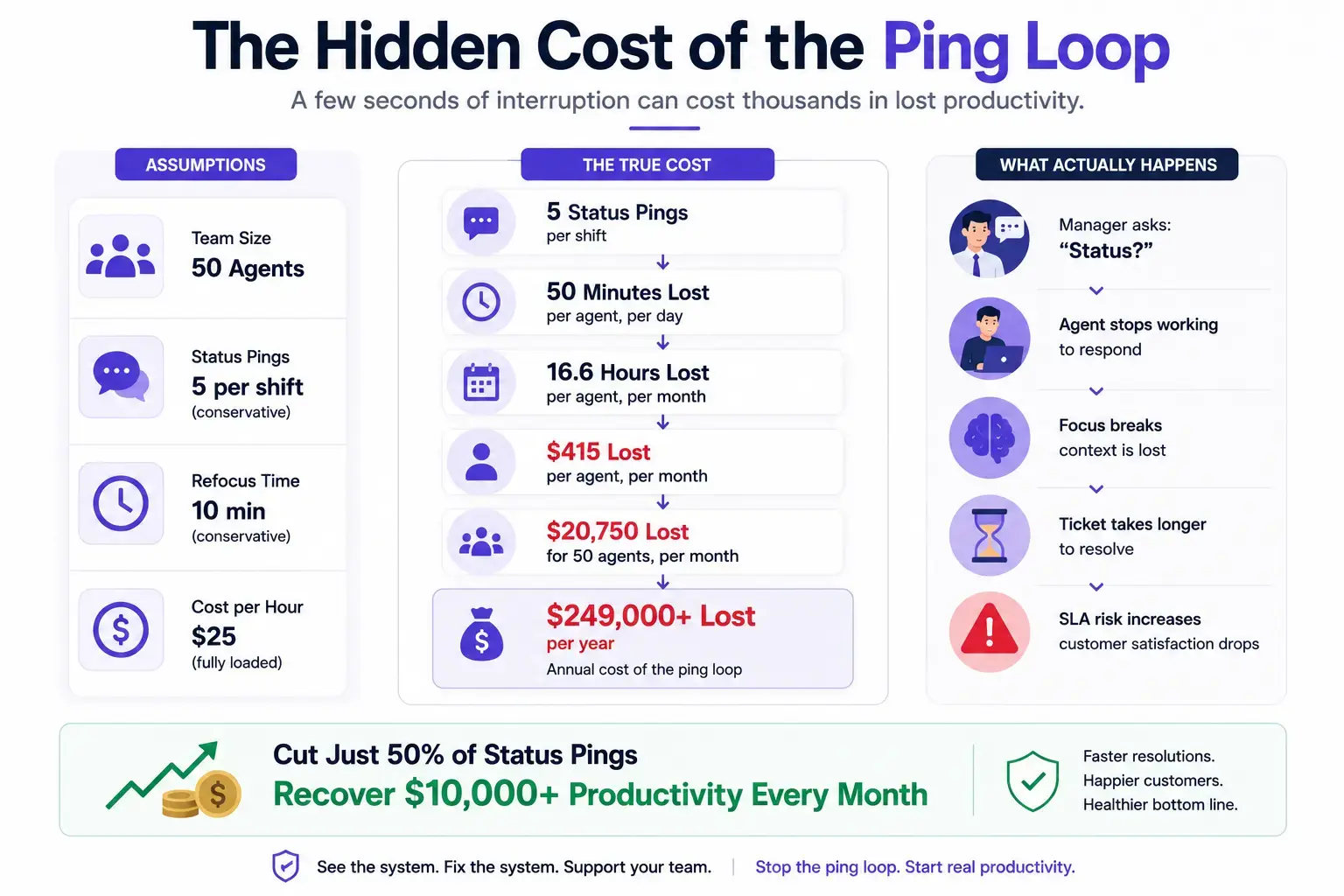
5. Breaking the Interruption Loop
Founders need to eliminate the status pings that destroy 40% of their team’s productivity.
The goal is to stop interrupting and start supporting.
Enter SuperSee: Live Screencast Designed for Trust
SuperSee is built for founders who refuse to choose between visibility and trust.
We talked to hundreds of BPO founders and Support leaders. They all told us the same story:
- “I need visibility, but I don’t want to be in a surveillance state.”
- “I’m terrified my best people will quit.”
- “I don’t want to be ‘that founder’.”
- “I want to help my team, not watch them.”
So we built a Live Screencast designed for trust.
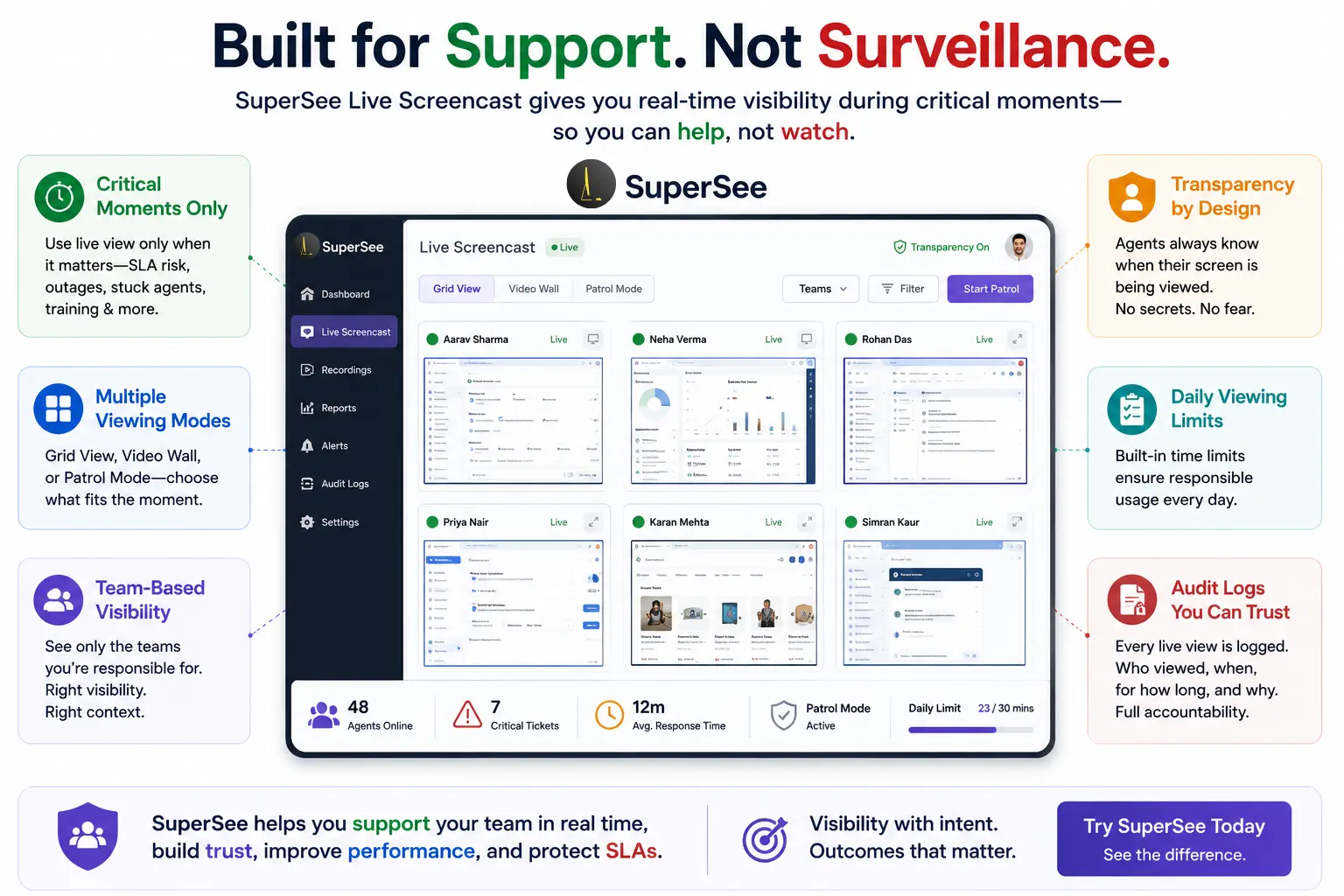
- Critical moments only – View only when SLAs are at risk, systems are down, or agents are stuck.
- Grid, Video Wall, and Patrol modes – Scan the whole team for system failures, not individual behavior.
- Auto-logout and Idle statuses – Identify system failures, not behavioral problems.
- Daily limits and audit logs – Built-in guardrails against abuse.
- Transparency-first design – Agents know when and why they are being viewed.
SuperSee is a Live Screencast that helps without hurting.
It gives you the visibility you need, without the trust-destroying baggage of traditional monitoring tools.
And it is available right now. Not coming soon. Not in beta. Live, working, and ready for your team.
The Path Forward: Responsible Live Screencast Use
Here is what BPO founders need to understand:
Live screencast is not inherently intrusive. The intent and implementation determine whether it is visibility or surveillance.
The right way:
- Use it during critical moments (SLA at risk, system outage, agent stuck).
- Be transparent—tell your agents when and why you are using it.
- Set limits—no all-day watching.
- Use it to support, not to punish.
- Focus on system failures, not individual behavior.
The wrong way:
- Watch constantly.
- Keep it secret.
- Use it to “catch” people.
- Replace management with surveillance.
The difference is intent. And intent is a choice.
SuperSee makes the right way easy.
FAQ
Q: What if my best employees quit because of a live screencast?
This is a valid fear. 1 in 9 employees have quit due to extreme monitoring. But the research also shows that when surveillance is used for development and communicated transparently, employees don’t resist. The difference is how you implement it. SuperSee is built specifically for the “right way”—support, not surveillance. Be transparent. Set limits. Focus on system failures, not people.
Q: How do I know if my live screencast is becoming surveillance?
If you are watching constantly, keeping it secret, using it to catch mistakes, or replacing management with surveillance, you have crossed the line. SuperSee’s design prevents this with daily limits, audit logs, and transparency features.
Q: What should I tell my team?
Be transparent. Explain that live screencast is for critical moments, SLA at risk, system outage, agent stuck. Tell them you will never use it to watch constantly or to punish them. Employees don’t always oppose monitoring, but they will always reject secrecy. SuperSee makes transparency easy.
Q: How is SuperSee different from other monitoring tools?
SuperSee is designed for support, not surveillance. It has built-in guardrails like daily limits, audit logs, and transparency features. It treats Auto-logout as a system failure, not a behavioral problem. It gives managers Grid, Video Wall, and Patrol modes to scan for system friction, not to watch individuals. And it works right now.
Q: Isn’t live screencast just surveillance?
It depends on how you use it. If you watch constantly, keep it secret, and use it to catch mistakes, it is surveillance. If you use it during critical moments, communicate transparently, and use it to help, it is visible. SuperSee is built for the second way.
Q: How often should I use live screencasts?
Only during critical moments, SLA is at risk, system outage, agent stuck, training, or when the agent requests help. Not all day. Not every day. SuperSee’s daily limits enforce this.
Q: Should I tell my agents when I am viewing their screen?
Yes. Transparency is essential. Agents should know when and why they are being viewed. No secrets. SuperSee shows exactly who is being viewed, live.
Q: What if my agents feel watched even when I am not watching?
This happens when trust is already broken. If agents feel watched constantly, you have already crossed the line. Rebuild trust by being transparent, using limits, and demonstrating that the tool is for support, not surveillance. SuperSee helps you do this.
Q: What should I look for in a live screencast tool?
Look for:
- Transparency – Agents know when and why they are being viewed.
- Limits – No all-day surveillance. Only critical moments.
- Audit trails – Every view is logged and accountable.
- Privacy – Personal content is never captured.
- Support-first design – The tool is designed to help, not to watch.
You have read the dilemma. You have seen the data. You have felt the tension.
You are not alone. Thousands of BPO founders and Support leaders are asking the same question: “How do I get visibility without losing my best people?”
Here is the answer:
Use live screencasts for critical moments. Use it to support, not to watch. Be transparent. Set limits. Focus on system failures, not individual behavior.
SuperSee is the Live Screencast that helps without hurting.
The solution is not coming. It is here. It works. And you can use it today.
Stop surveilling. Start supporting. Try SuperSee today.