
Key Takeaways
- Screenshots capture individual moments. SuperSee’s Work Replay reconstructs the complete workday.
- Investigate work using timeline, application, activity type, and time filters.
- Understand why work slowed instead of guessing what happened.
- Review work chronologically instead of searching through hundreds of screenshots.
- Coach employees with evidence instead of assumptions.
- Replace unnecessary follow up conversations with complete work context.
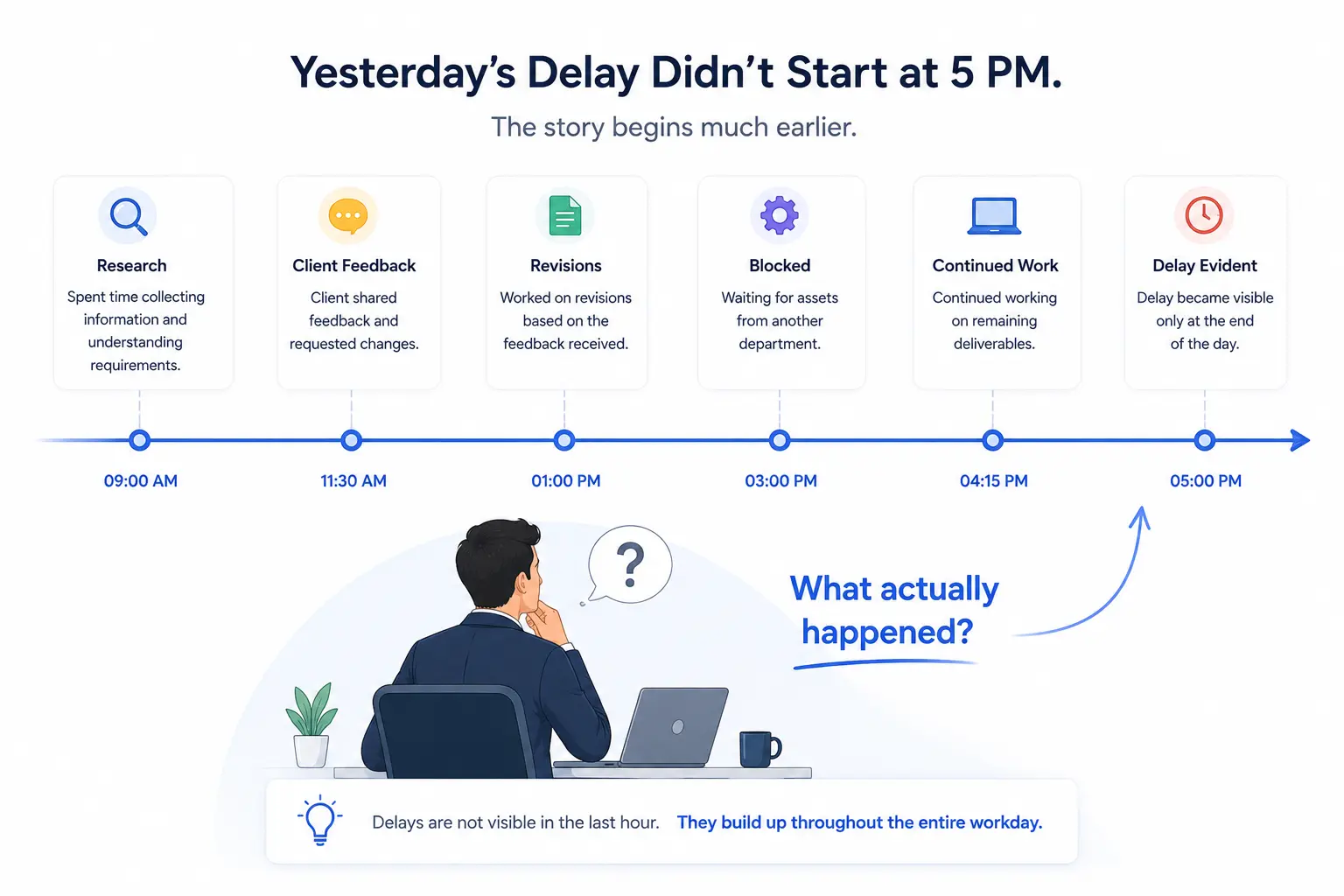
Yesterday’s Delay Didn’t Start at 5 PM. It Started Much Earlier.
Imagine this.
A client messages your project manager.
“We still haven’t received the final design.”
Your delivery dashboard says:
Task Status: In Progress
Attendance: Employee Logged In
Timesheets: 8.5 Hours Worked
Screenshots: Hundreds exist throughout the day.
Yet nobody can answer one simple question.
What actually happened?
Did the designer spend three hours on research? Were they waiting for client approval? Did they switch to another urgent project? Was Photoshop crashing? Or was the task genuinely delayed?
Every leader eventually reaches the same point.
They stop looking at reports.
They start asking people.
“Can you explain your day?”
“What happened after lunch?”
“Why did this task take so long?”
Those conversations consume valuable time for everyone involved. More importantly, they rely on human memory. Employees remember context differently; Managers interpret it differently.
By the end of the discussion, everyone has an opinion. Very few have evidence.
The real problem isn’t productivity.
The real problem is missing work context.
The Hidden Cost of Missing Work Context
Modern businesses collect more productivity data than ever before. Attendance records who logged in. Timesheets calculate hours. PM tools track task progress. Screenshot tools capture random moments.
Each tool answers part of the story.
None explains the complete journey.
Imagine reading only five pages from an entire novel. Those pages may be accurate, but you still won’t understand the story. Managing knowledge workers works exactly the same way.
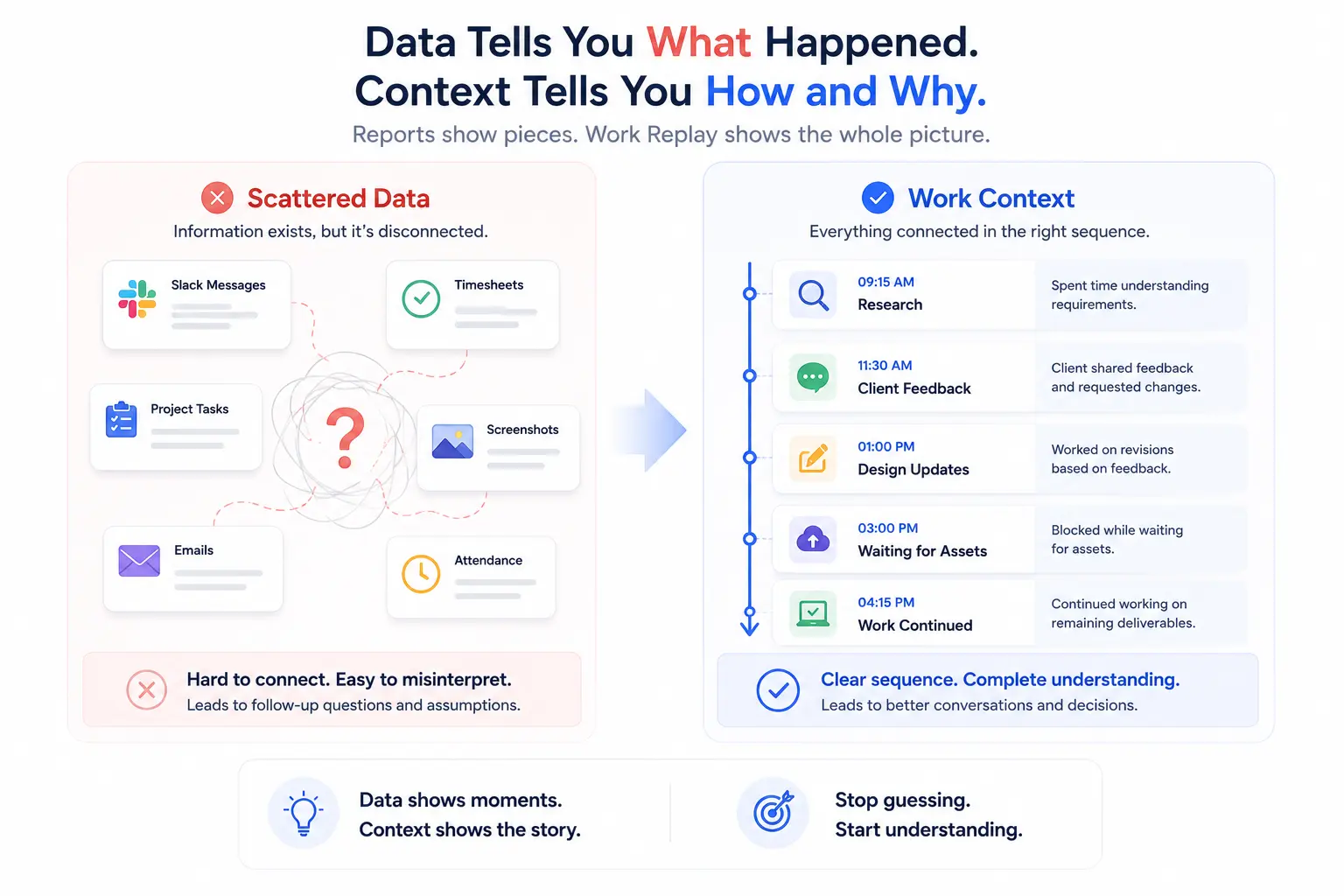
- One screenshot at 11:00 AM tells you almost nothing about what happened between 10:00 AM and 2:00 PM.
- One task marked “In Progress” doesn’t explain if work is moving, blocked, or waiting.
- One timesheet showing eight hours tells you nothing about how those hours unfolded.
This creates what experienced managers identify as The Context Gap.
The Context Gap is the space between knowing what happened and understanding how it happened.
That gap creates unnecessary meetings, repeated explanations, incorrect assumptions, delayed decisions, unfair performance conversations, and slow project reviews. Not because managers lack data, but because the data lacks context.
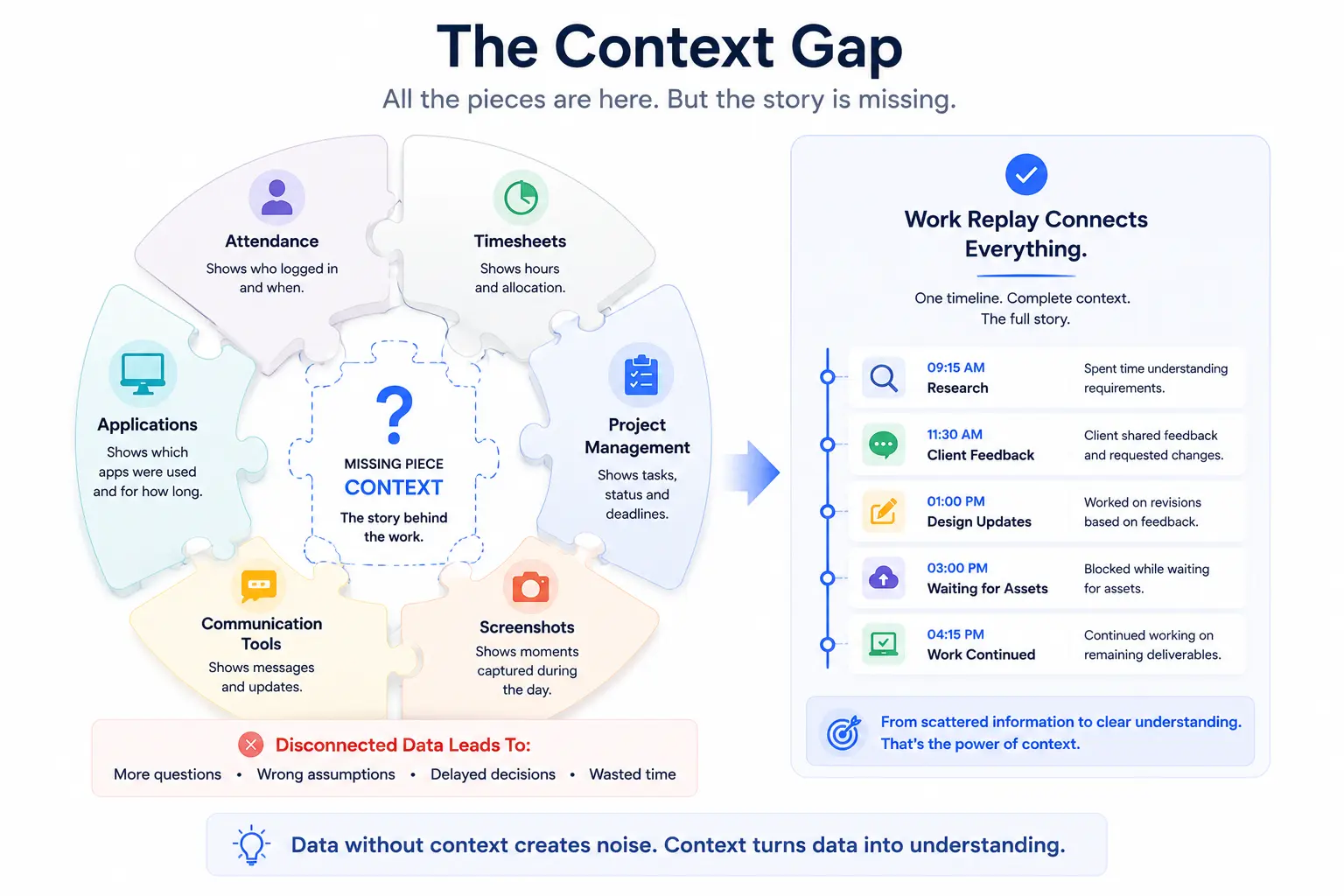
Existing Productivity Tools Show Pieces of the Puzzle
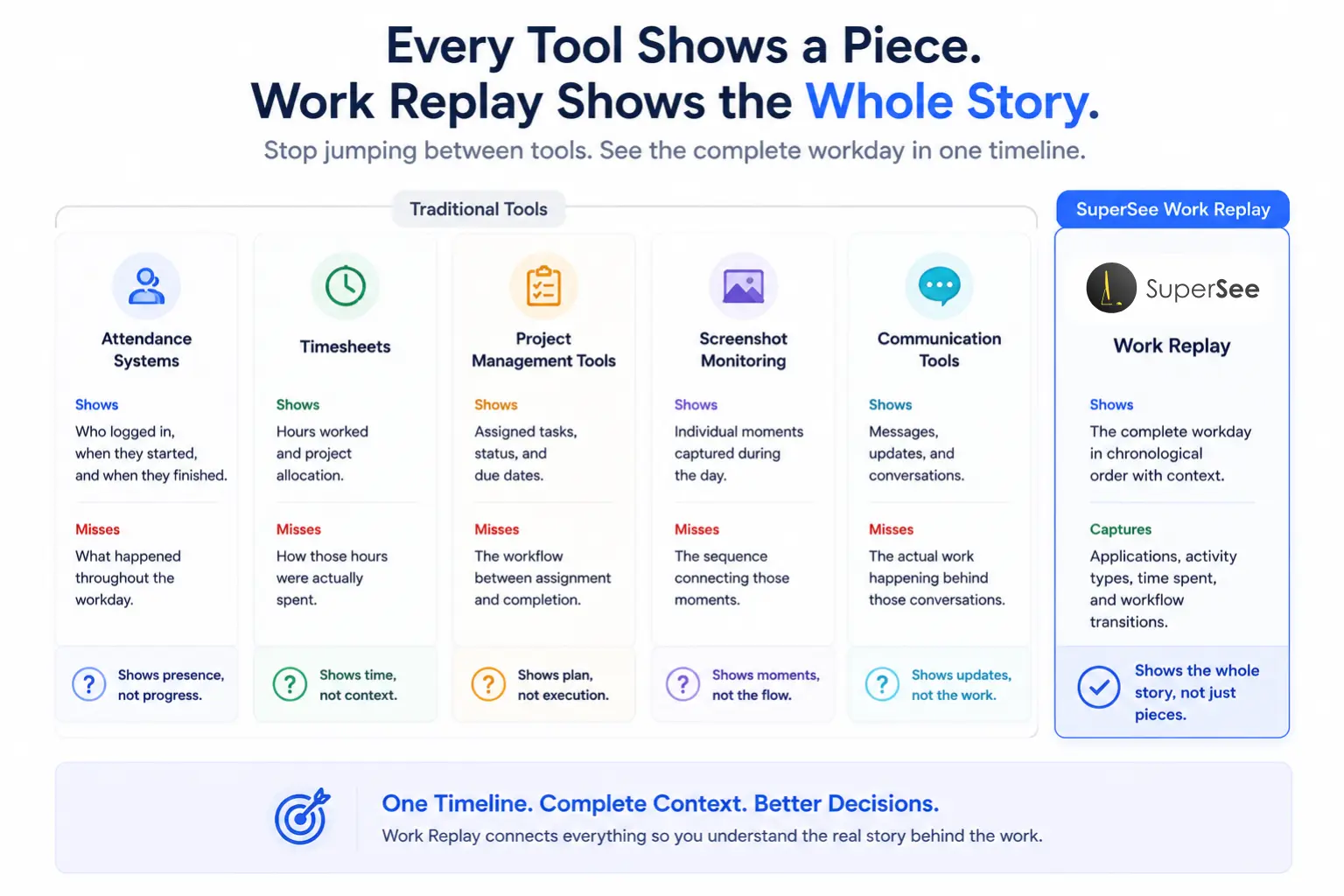
Every productivity platform is designed for a specific purpose. None are wrong; they are simply incomplete.
Attendance Systems
Show: Who logged in, when they started, and when they finished.
Miss: What happened throughout the workday.
Timesheets
Show: Hours worked and project allocation.
Miss: How those hours were actually spent.
Project Management Tools
Show: Assigned tasks, status, and due dates.
Miss: The workflow between assignment and completion.
Screenshot Monitoring
Show: Individual moments captured during the day.
Miss: The sequence connecting those moments.
Communication Tools (Slack/Teams)
Show: Messages and updates.
Miss: The actual work happening behind those conversations.
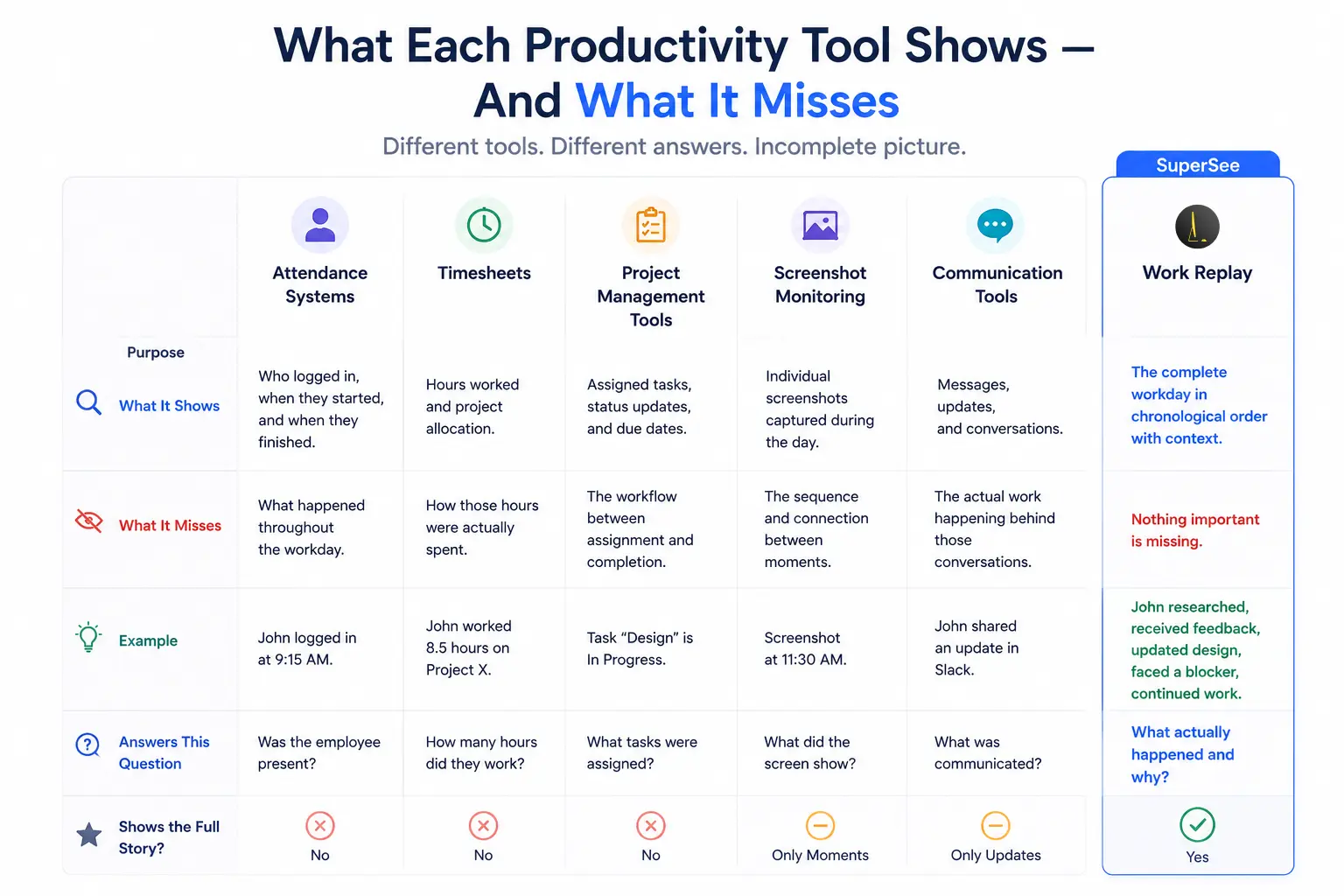
Every Tool Answers One Question. Work Replay Answers Another.
That is the operational difference. Most tools report activity. Work Replay reconstructs the journey.
Introducing Workday Reconstruction with SuperSee
This is where Work Replay changes the management conversation.
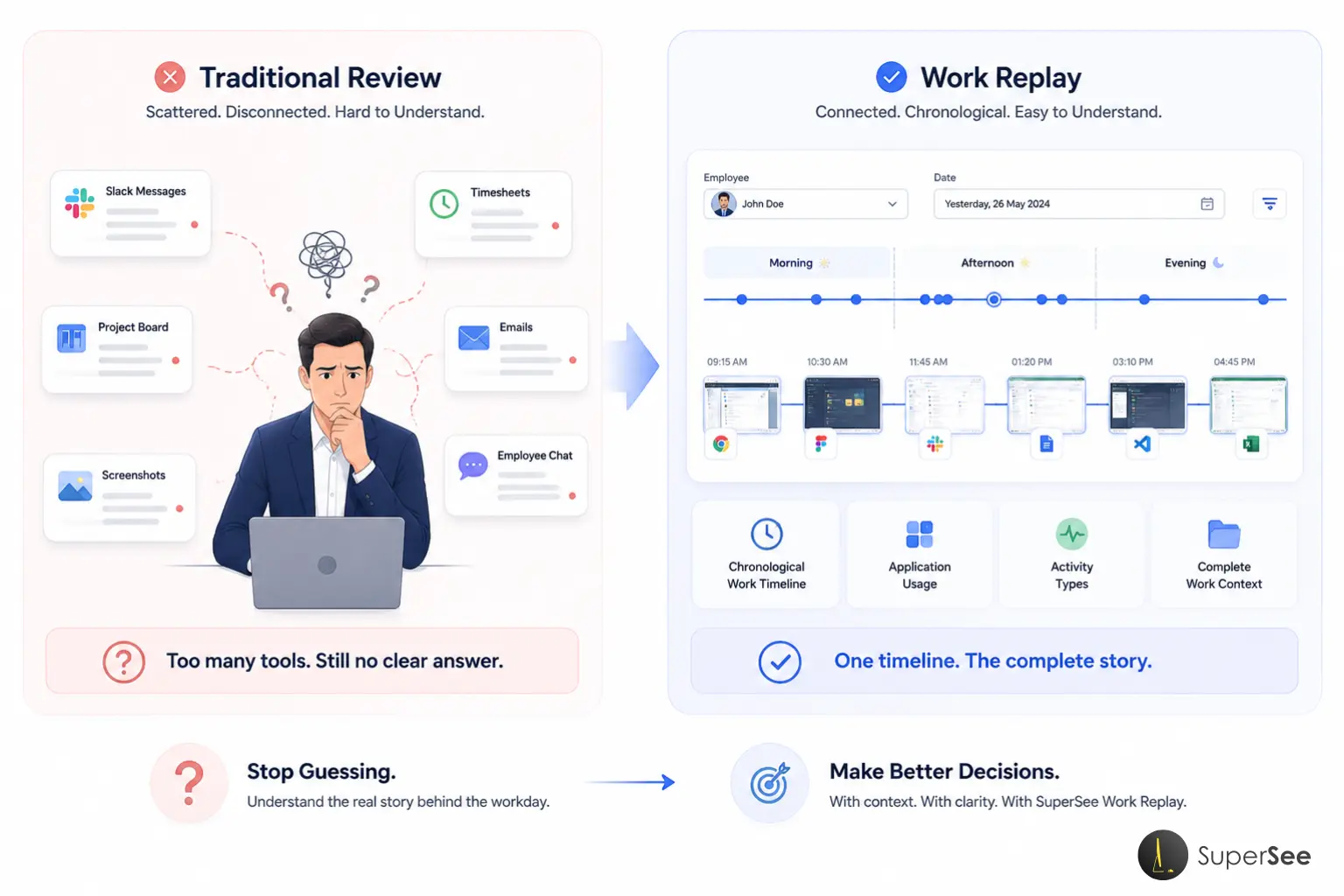
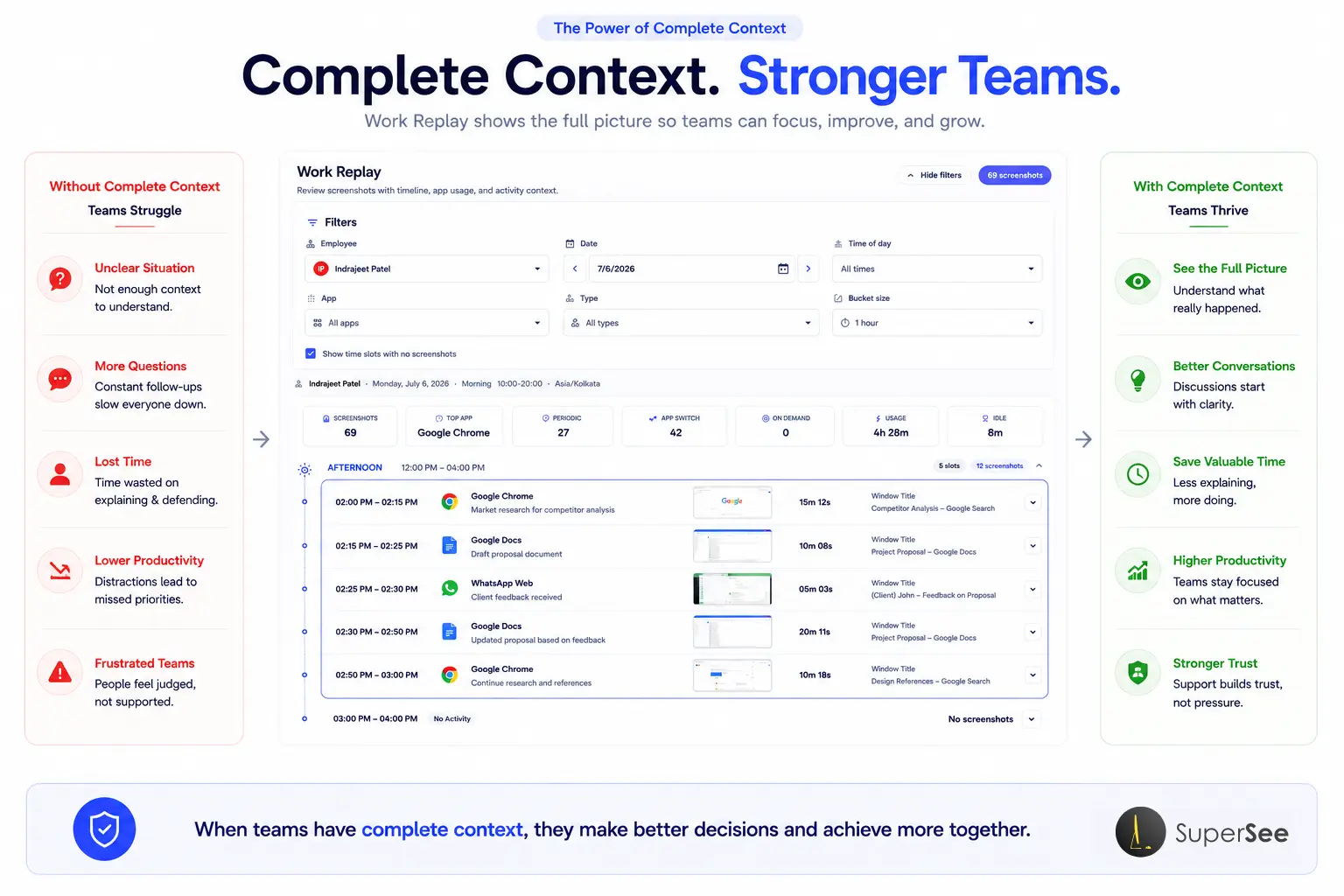
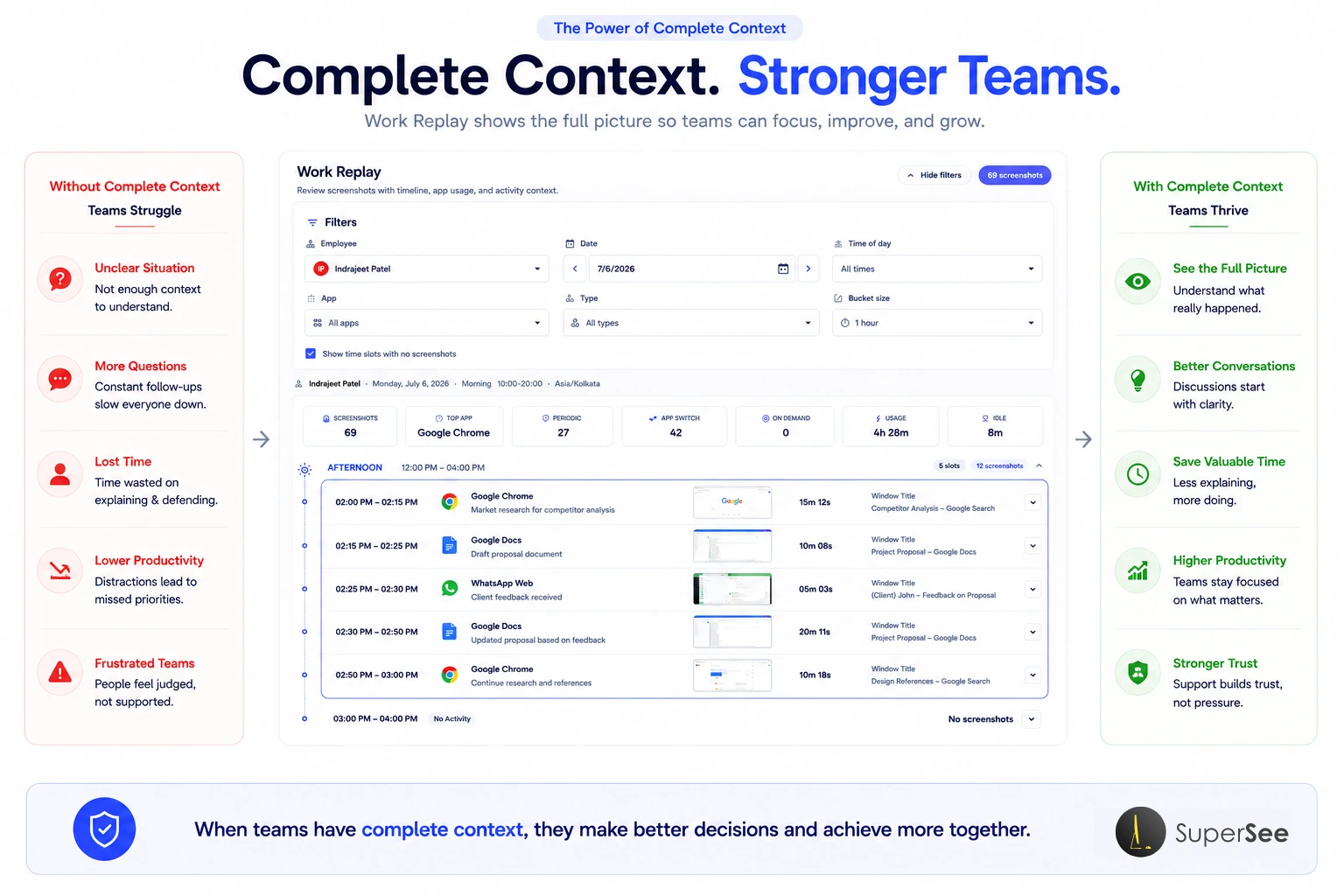
Instead of reviewing hundreds of disconnected screenshots, managers can reconstruct the entire workday from beginning to end. Think of it like reviewing a timeline instead of searching through a photo gallery.
The day becomes organized, structured, searchable, and understandable.
A manager simply selects:
- Employee
- Date
- Time of Day
- Application
- Activity Type
- Timeline Interval
Within seconds, the entire workday begins to tell a story:
Morning Research → Chrome → App Switch → Design → Periodic Screenshots → Review → Testing → Client Feedback.
Rather than asking an employee, “Can you explain what happened yesterday?”, Managers can now understand the sequence themselves.
Not to monitor people.
To understand work.
That distinction changes every coaching conversation, project review, and delivery discussion. Instead of assumptions, there is context. Instead of guesswork, there is evidence.
SuperSee’s Work Replay in Action: Reconstruct the Story Behind Every Workday
Let’s examine how Work Replay is actually used. Unlike traditional tools that leave managers scrolling through hundreds of images, Work Replay organizes an employee’s day into a structured timeline that can be explored from multiple perspectives.
The goal isn’t to watch employees; the goal is to answer operational questions faster:
- Why did this task take six hours?
- When did work stop?
- Was the employee blocked?
- Which application consumed the most time?
- How often did work switch between applications?
Instead of asking employees to reconstruct yesterday from memory, managers can reconstruct it from evidence.
Start With the Right Employee and the Right Day
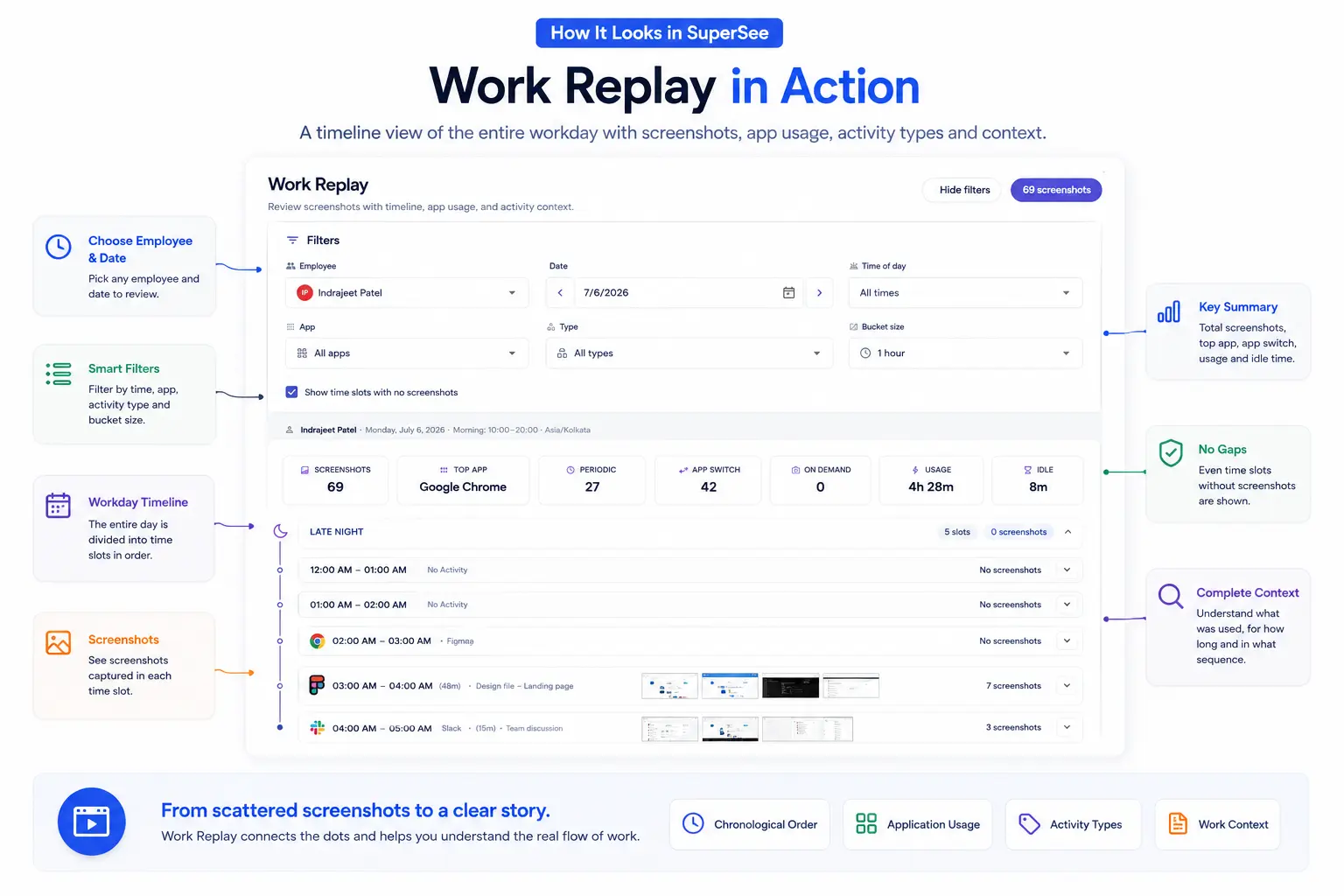
Every investigation starts with context. Simply choose the Employee and the Date. Instead of opening dozens of screenshots manually, Work Replay loads that employee’s complete work history for the selected day. Whether it is yesterday, last Friday, or an entire sprint, every workday can be accessed in seconds.
Narrow the Investigation With Smart Filters
Every workday is different. Sometimes you want the entire day; other times you are investigating a specific event.
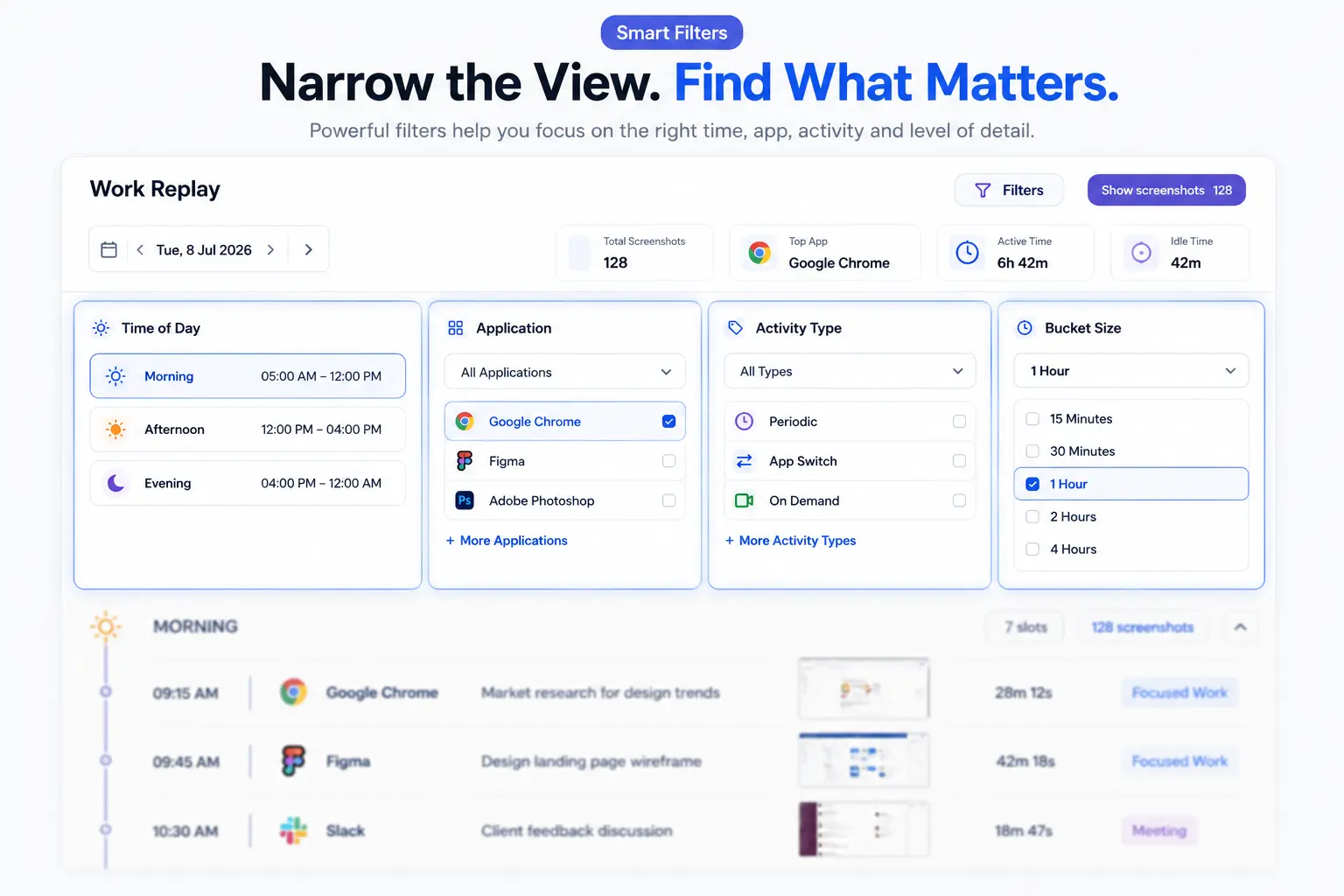
Time of Day
Rather than reviewing an eight-hour day from scratch, managers can jump to specific parts: Morning, Afternoon, Evening, Night, or Late Night.
Imagine a client says, “The delay happened after lunch.” Instead of reviewing the entire day, simply open Afternoon and immediately begin from the relevant timeline.
Application Filter
Knowledge workers constantly move between IDEs, design tools, and browsers. With the App Filter, Work Replay can isolate screenshots from a specific application like Google Chrome, Photoshop, Figma, Visual Studio Code, or Excel.
A delivery manager can review only browser activity for a web project.
A design lead can review only Photoshop sessions.
This dramatically reduces review time.
Activity Type
Not every screenshot represents the same type of work. Work Replay categorizes activity into meaningful events:
Periodic: Regular screenshots for overall workflow.
App Switch: Captured when an employee changes applications. This is crucial for investigating context switching. Frequent switching may indicate interruptions, research, or changing priorities.
On Demand: Screenshots captured manually during investigations or coaching sessions.
Zoom Into the Timeline With Bucket Size
Every investigation requires a different level of detail. Work Replay allows managers to adjust the timeline using Bucket Size (15 Minutes, 30 Minutes, 1 Hour, 2 Hours, 4 Hours).
Think of it like Google Maps. Sometimes you need the city view; sometimes you need the street view. Managers decide the level of detail based on the situation.
The Timeline Is Where Everything Comes Together
This is the heart of Work Replay. Instead of an endless gallery, the platform reconstructs the workday chronologically. The timeline automatically groups work into sections (Late Night, Morning, Afternoon, Evening). Each entry provides context including Timestamp, Application, Screenshot Type, Usage Duration, and Window Information. Instead of asking what happened at 2 PM, managers simply scroll to that point.
Daily Summary Before You Review
Before opening a single screenshot, managers receive a holistic overview:
- Total Screenshots: Activity coverage.
- Top Application: The primary working environment.
- App Switch Events: Frequency of context switching.
- Usage Time: Active work completed.
- Idle Time: Periods without activity, which may indicate lunch, meetings, or waiting for client approval, never to be viewed in isolation.
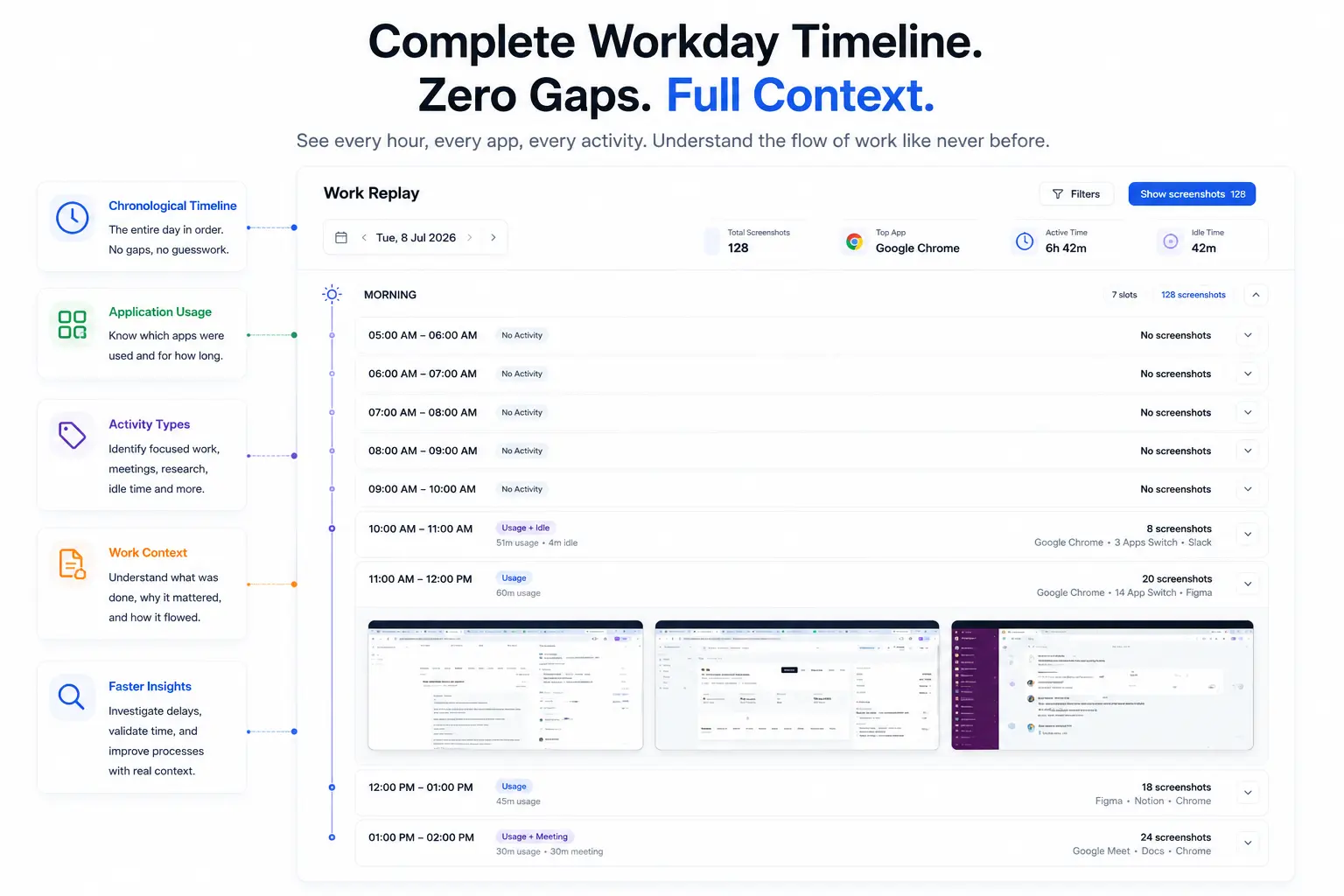
The Difference Between Reviewing Screenshots and Understanding Work- SuperSee
Imagine reviewing twenty-five screenshots manually. You would ask: “What came before this? What happened next? Why did the application change?”
Now imagine those same screenshots automatically organized into a chronological workday. The questions disappear. The sequence explains itself.
That is the difference between screenshot management and work reconstruction. One provides images; the other provides understanding.
Real World Scenarios
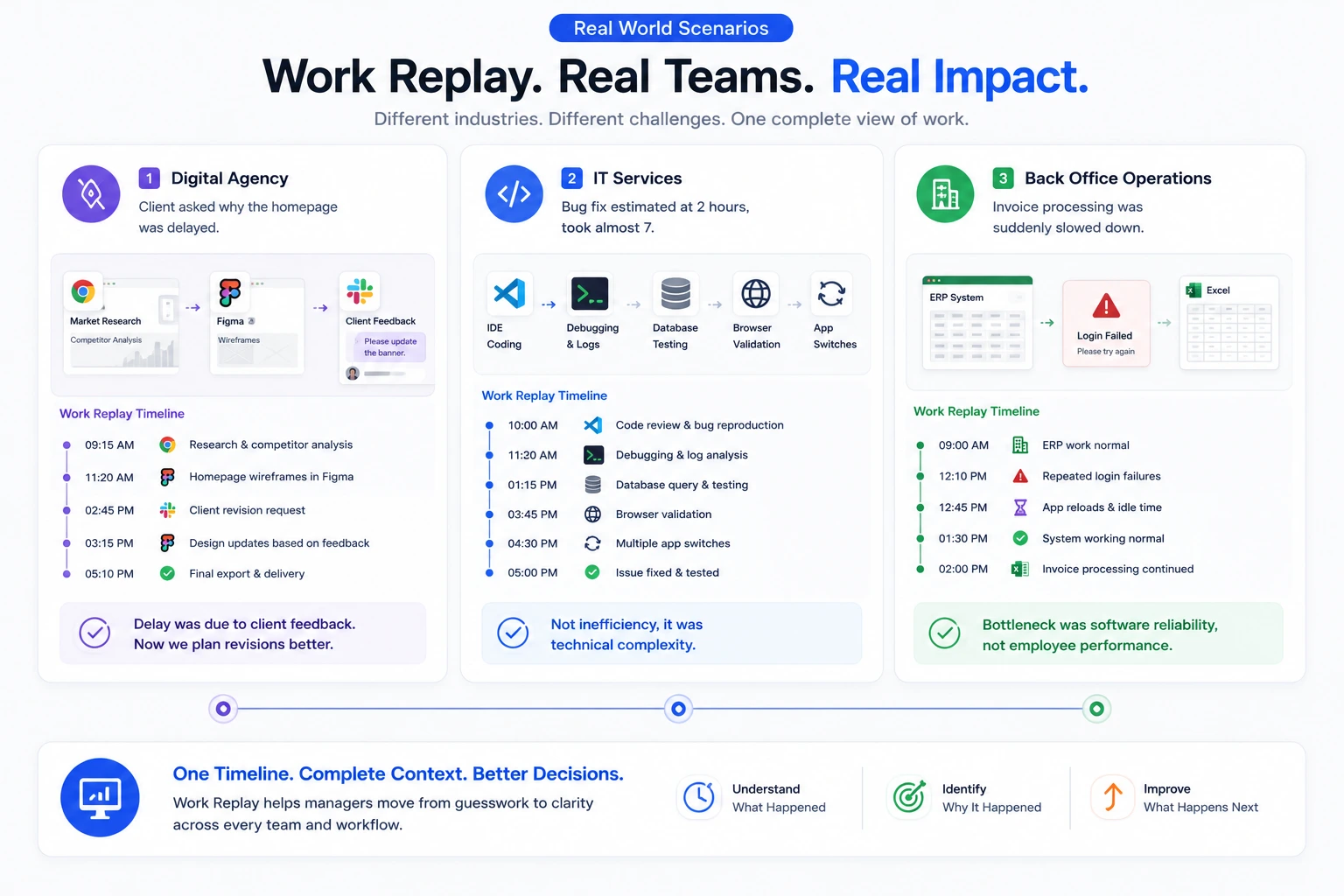
Scenario 1: Digital Agency
A client calls at 5:30 PM: “The homepage still isn’t ready.”
The delivery manager opens Work Replay.
Morning: Research.
Late Morning: Figma wireframes.
Afternoon: Client revision request arrives. Design updated.
Evening: Final export.
Within five minutes, the manager understands the timeline. The delay wasn’t inactivity; it was additional client feedback. The conversation changes from “Why are you late?” to “How do we manage revisions better next time?”
Scenario 2: IT Services
A bug fix estimated at two hours required almost seven.
The timeline reveals: Research → IDE Debugging → Database Testing → Browser Validation → Multiple App Switches.
The issue wasn’t productivity; it was technical complexity. Without Work Replay, this distinction is impossible to prove.
Scenario 3: Back Office Operations
Invoice processing suddenly slows. Managers assume inefficiency.
The timeline reveals: Morning (ERP normal) → Afternoon (Repeated login failures, app reloads, idle periods). The bottleneck wasn’t employee performance; it was software reliability.
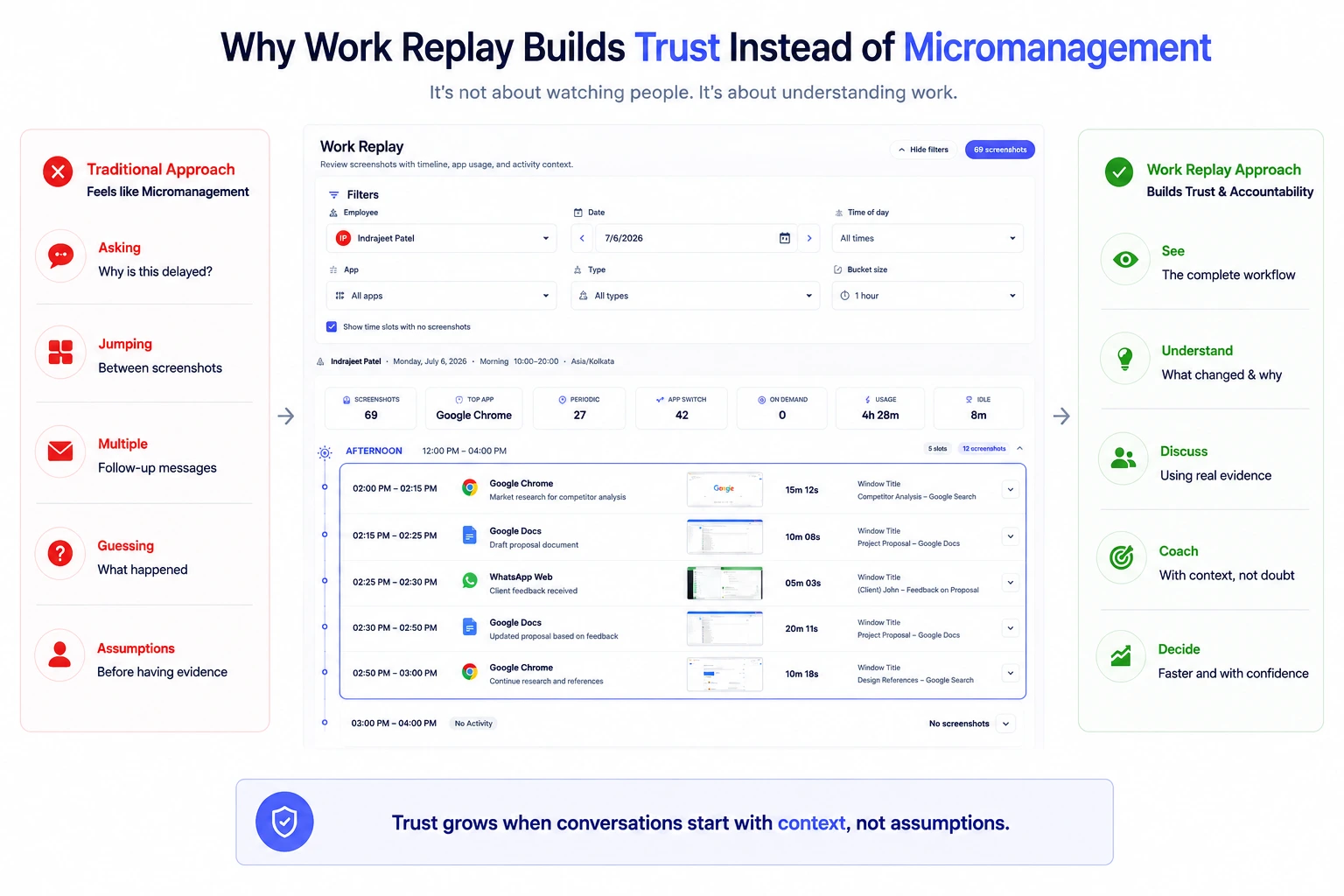
Why Work Replay Builds Trust Instead of Micromanagement
Employee monitoring often creates one immediate concern: “Will managers use this to watch people?”
Work Replay is designed differently. It doesn’t encourage constant observation; it helps understand work after something important happens.
Manager A: “Why were you on Chrome for two hours?” (Accusatory)
Manager B: “I noticed you spent two hours researching before development started. Was the client requirement unclear?” (Coaching)
Both looked at the same day. Only Manager B understood the context.
From Guesswork to Evidence-Based Management with SuperSee
Traditional management relies on memory. Employees explain yesterday; managers interpret. Both remember differently.
Work Replay removes uncertainty. Performance discussions become objective. Project reviews become faster.
Instead of asking, “Can you explain your day?”, managers ask, “I noticed the work paused after the client requested changes. What happened next?” That creates productive conversations instead of defensive ones.
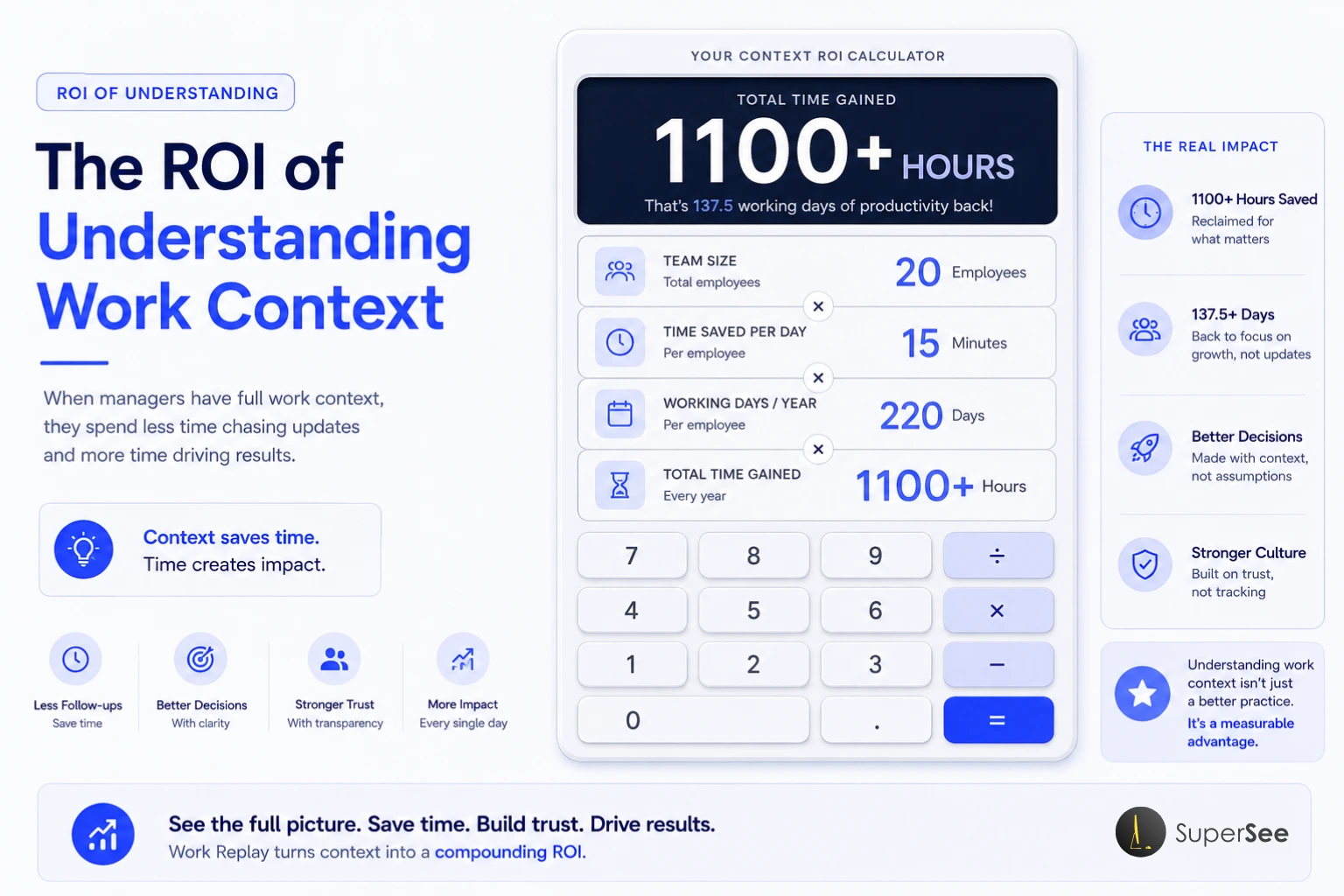
The ROI of Understanding Work Context
Most organizations measure output. Few measure the cost of missing context.
- Think about time spent on:
- Asking for project updates.
- Reviewing disconnected screenshots.
- Investigating delivery delays.
- Conducting status meetings.
Example Calculation:
- 20 knowledge workers.
- 15 minutes spent each day explaining/reconstructing work.
- 220 working days per year.
That equals:
- 300 minutes (5 hours) wasted daily.
- 1,100+ management hours wasted annually.
Those hours aren’t spent delivering projects; they are spent reconstructing work manually. Work Replay shortens those investigations because the workday is already organized.
Practical Use Cases for Work Replay
- Investigate Delayed Projects: Pinpoint where work slowed.
- Review Client Escalations: Reconstruct the timeline before responding to clients.
- Sprint Retrospectives: Review progress objectively.
- Design Reviews: Understand the evolution from research to delivery.
- Software Development: Review debugging, testing, and development flow.
- Back Office Ops: Identify interruptions in finance, insurance, or healthcare workflows.
- Employee Coaching: Use actual work examples in 1:1s.
- Process Improvement: Find repetitive workflows to simplify.
- Context Switching Analysis: Understand if interruptions are killing focus.
- Application Usage Reviews: Validate software spend.
- Project Handover: Onboard new managers quickly.
- Client Dispute Resolution: Review work history with evidence.
- Quality Assurance: Validate workflows during audits.
- Training New Employees: Show successful work patterns.
- Delivery Optimization: Identify bottlenecks before they become recurring.
SuperSee’s Work Replay vs Traditional Screenshot Monitoring
Traditional Screenshot Monitoring
Work Replay
Individual screenshots
Complete workday timeline
Manual review
Chronological reconstruction
Difficult to investigate
Organized by time, app, and activity
Hundreds of disconnected images
Structured work history
Focus on activity
Focus on work context
Explains moments
Explains the entire sequence
Frequently Asked Questions
Is SuperSee’s Work Replay a screen recorder?
No. It organizes captured work activity into a chronological timeline. It reconstructs the workday using screenshots, timestamps, and activity events—not continuous video.
Does the SuperSee’s Work Replay record every second?
No. It builds a structured timeline from captured events, making investigations efficient.
Can I review only one application?
Yes. Filter the timeline by specific applications like Chrome, Photoshop, or Excel.
Can I investigate only one part of the day?
Yes. Filter by Morning, Afternoon, Evening, Night, or Late Night.
What is App Switch?
It highlights moments when employees move between applications, helping managers understand context switching and workflow transitions.
What are Bucket Sizes?
They control the timeline interval (15 Min to 4 Hours), allowing you to choose the level of detail for the investigation.
How is this different from traditional screenshots?
Traditional screenshots show isolated moments. Work Replay connects them into a structured timeline.
Is it only for remote teams?
No. It benefits remote, hybrid, and in-office teams by providing consistent work context during reviews and coaching.
Can SuperSee’s it replace project management software?
No. PM tools show what is assigned. Work Replay shows how the work progressed. They complement each other.
Can managers use it for coaching?
Yes. Instead of assumptions, managers review actual workflows to identify blockers and provide meaningful guidance.
Which industries benefit most?
Digital Agencies, IT Services, Software Development, Customer Support, Back Office Operations, Finance, Design Studios, and Consulting Firms.
Final Thoughts
Most management conversations begin with the same question: “What happened yesterday?”
Employees explain. Managers interpret. Both rely on memory.
SuperSee’s Work Replay changes that process. Instead of reconstructing work through meetings, messages, or assumptions, managers can review an organized timeline that reveals how the day unfolded.
- Attendance tells you who worked.
- Timesheets tell you how long they worked.
- Project Management tells you what was assigned.
- Screenshots show individual moments.
SuperSee’s Work Replay connects those moments into a complete story.
For agencies, IT services, and back office teams, understanding that story leads to better decisions, faster investigations, fairer coaching, and more effective delivery management.
The goal isn’t to watch people. It is to understand work.
When managers have context, they ask better questions. When teams spend less time explaining yesterday, they spend more time improving tomorrow.
Replay Yesterday. Understand the Story with SuperSee
Every project leaves behind a timeline. Every delay has a sequence. Every successful delivery follows a workflow.
SuperSee’s Work Replay helps you reconstruct that journey in minutes instead of hours.
See how work progressed. Identify blockers faster. Coach with confidence. Lead with context instead of assumptions.
Start your SuperSee free 14 Days trial today and experience Work Replay in action.
About SuperSee
SuperSee is an employee monitoring and time-tracking software that helps organizations understand work, not watch workers. It tracks application usage, website activity, active time, and idle time across Windows, Mac, and Ubuntu/Linux devices.
Key features include:-
- Work Replay (workday reconstruction)
- Real-time activity monitoring
- Productivity analytics and reporting
- Privacy-first design (no keystroke logging, audio, or video)
- Employee-controlled start/stop monitoring
SuperSee is trusted by agencies, IT services, back office teams, and knowledge work organizations worldwide.