Real-time visibility for teams that need clarity, not guesswork.
150+ businesses 14-day free trial Setup in under 15 minutes
Employee Monitoring & Productivity

Know what work is actually happening across your team.

SuperSee gives managers real-time screenshots, live screen visibility, automated timesheets, and app tracking so decisions are based on proof, not follow-up messages.

Start Free Trial
150+ businesses trust SuperSee No credit card required Windows, macOS & Linux
App & Web Usage Analysis
SuperSee analytics dashboard
150+Businesses
14 DaysFree Trial
< 15 MinSetup Time
3 ModesScreenshot Capture
Trusted By Growing Teams

Operational visibility that leaders can act on.

From agencies to logistics and services teams, SuperSee helps managers see productivity patterns, understand activity, and respond faster without turning work into chaos.

LiveWork visibility
DailyInsight snapshots
InstantScreen access
Evidence-backedTimesheets
BusinessLine
A to Z Logistics Limited
S C Media House
Praxis360 Marketing Pvt. Ltd.
Blue Sync Technology
The Visibility Gap

Hours get logged. But real execution still disappears.

When teams are hybrid, remote, or spread across functions, managers often see reports after the fact, not the work patterns causing delays in the first place.

01

Hours logged are incomplete

Manual timesheets tell you what someone entered later, not what they actually worked on during the day.

02

Follow-ups do not scale

“Any update?” works for one person. It breaks down fast when managers are coordinating multiple teams and deadlines.

03

Pressure hides the real bottleneck

Without visibility, leaders can’t tell whether delays come from context switching, idle time, tool friction, or actual blockers.

See The Difference

Why work without visibility breaks under pressure.

Logged time alone cannot show what moved work forward, what stalled, or where managers need to step in. SuperSee turns scattered activity into operational clarity.

  • See what was actually worked on, not just how long someone stayed online
  • Understand productivity patterns across screenshots, apps, and live activity
  • Review evidence quickly when delivery slows down or context switching rises
Visibility changes the conversation.

Instead of asking for updates, managers can see whether the issue is distraction, idle time, system switching, or a real delivery blocker.

Feature Evidence

Clarity across productivity, screenshots, live work, and time analysis.

Every view is designed to help you manage better: identify drift earlier, compare work patterns faster, and stop relying on memory-based reporting.

Daily Insights Screenshots Live Screencast Timesheets Usage Tracking
Daily Insights

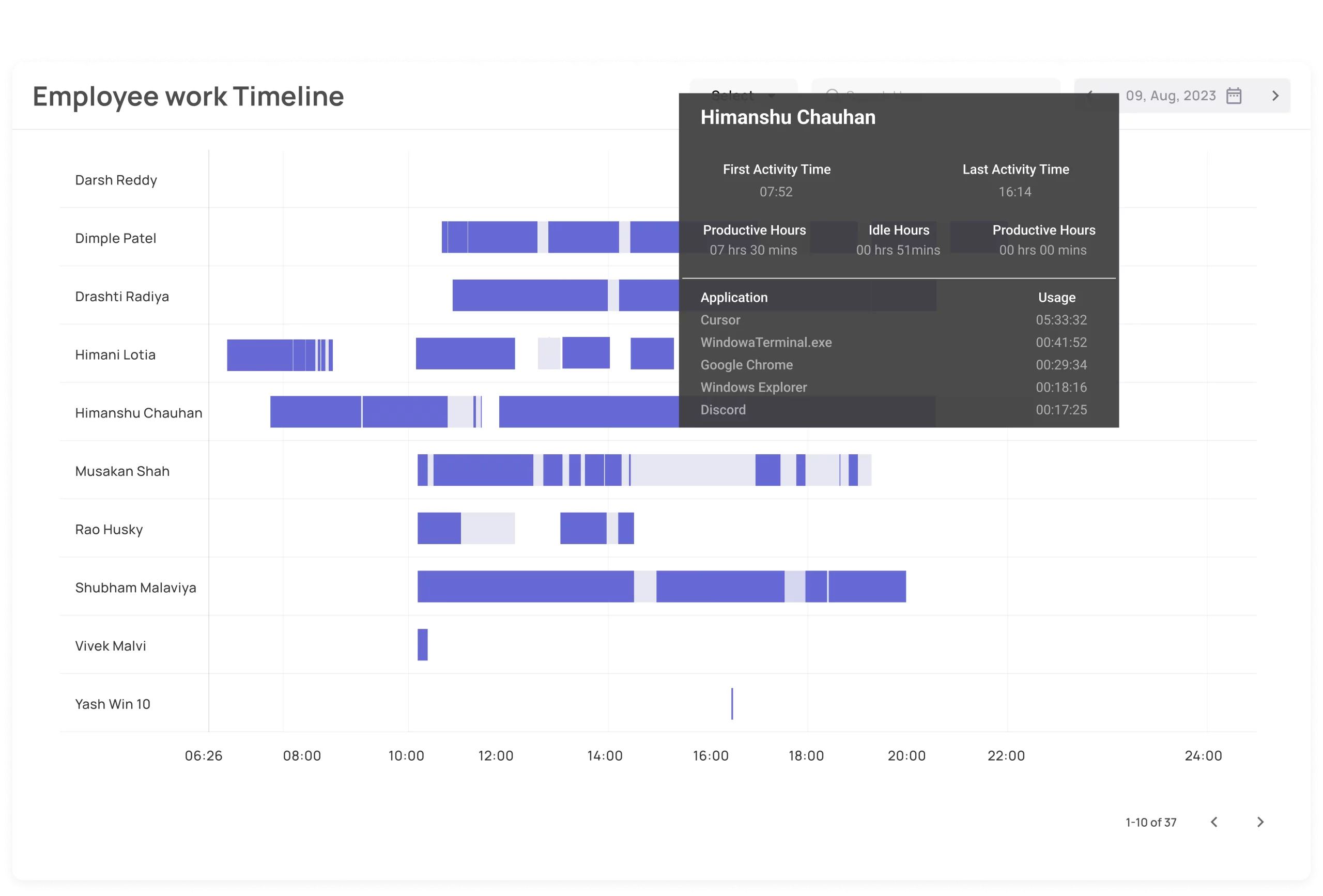
See exactly how productive your team was today.

One glance reveals productive hours, focus patterns, and workday gaps without opening spreadsheets or waiting for end-of-day updates.

  • Daily productivity score per employee
  • Color-coded productive, idle, and offline timeline
  • Compare across dates and teams in seconds
Employee productivity timeline
Screenshots

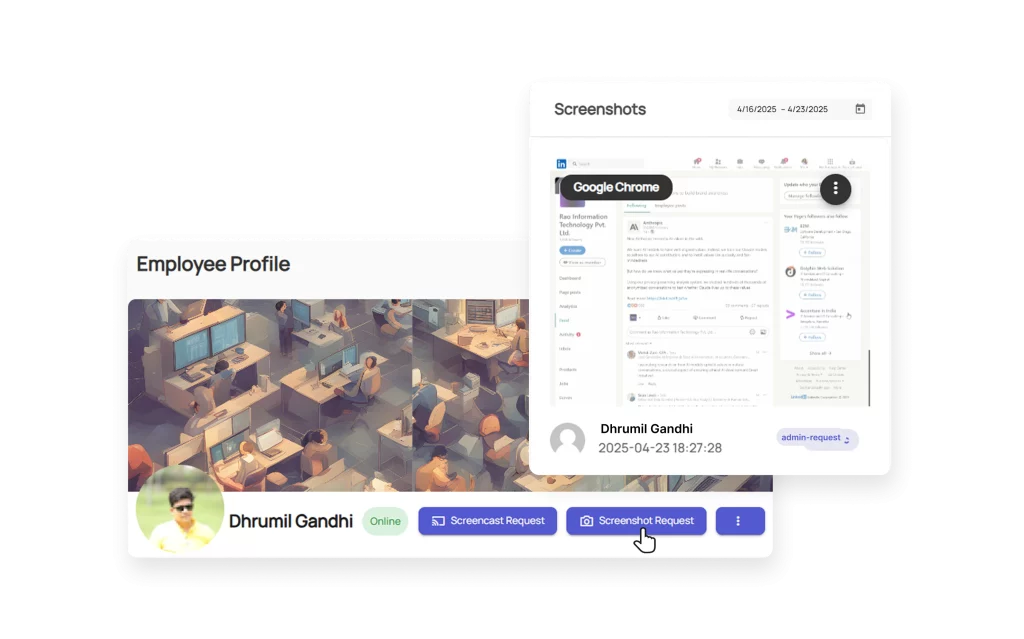
Capture evidence in the way your team actually works.

Periodic screenshots, screenshot on app change, and on-demand capture give managers proof without relying on assumptions. Optional webcam overlay remains available for each mode.

  • Capture every N minutes automatically
  • Trigger screenshots on app switch
  • Take an instant screenshot on demand
SuperSee screenshots feature
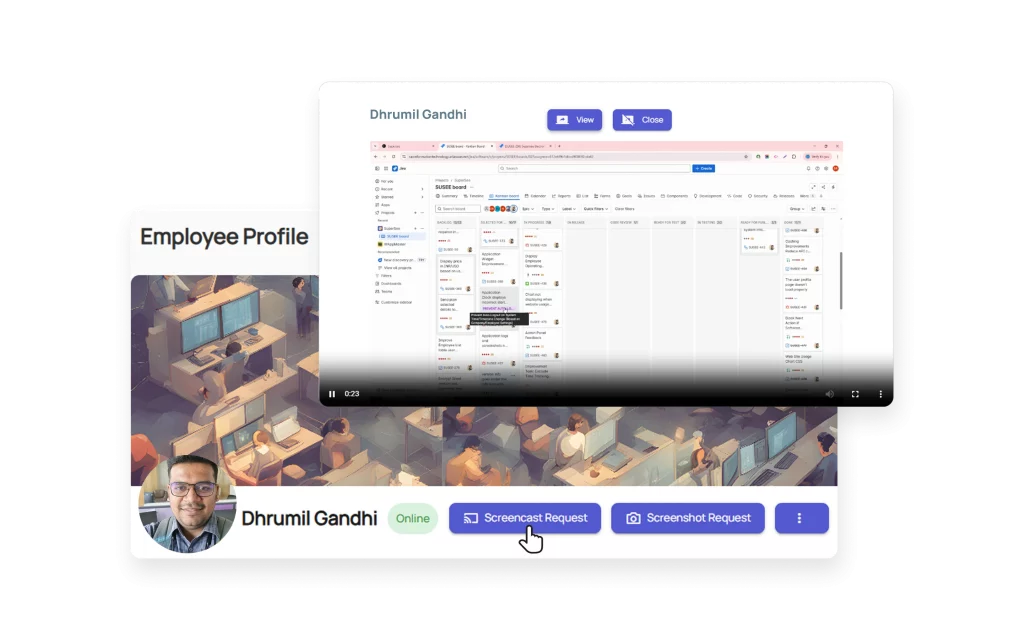
Live Screencast

Watch any employee screen in real time when it matters most.

For support desks, operations teams, and remote execution-heavy workflows, live visibility makes it easier to coach, verify, and unblock work immediately.

  • Open any employee screen instantly
  • Switch between team members from one dashboard
  • See actual execution without waiting for reports
SuperSee live screencast
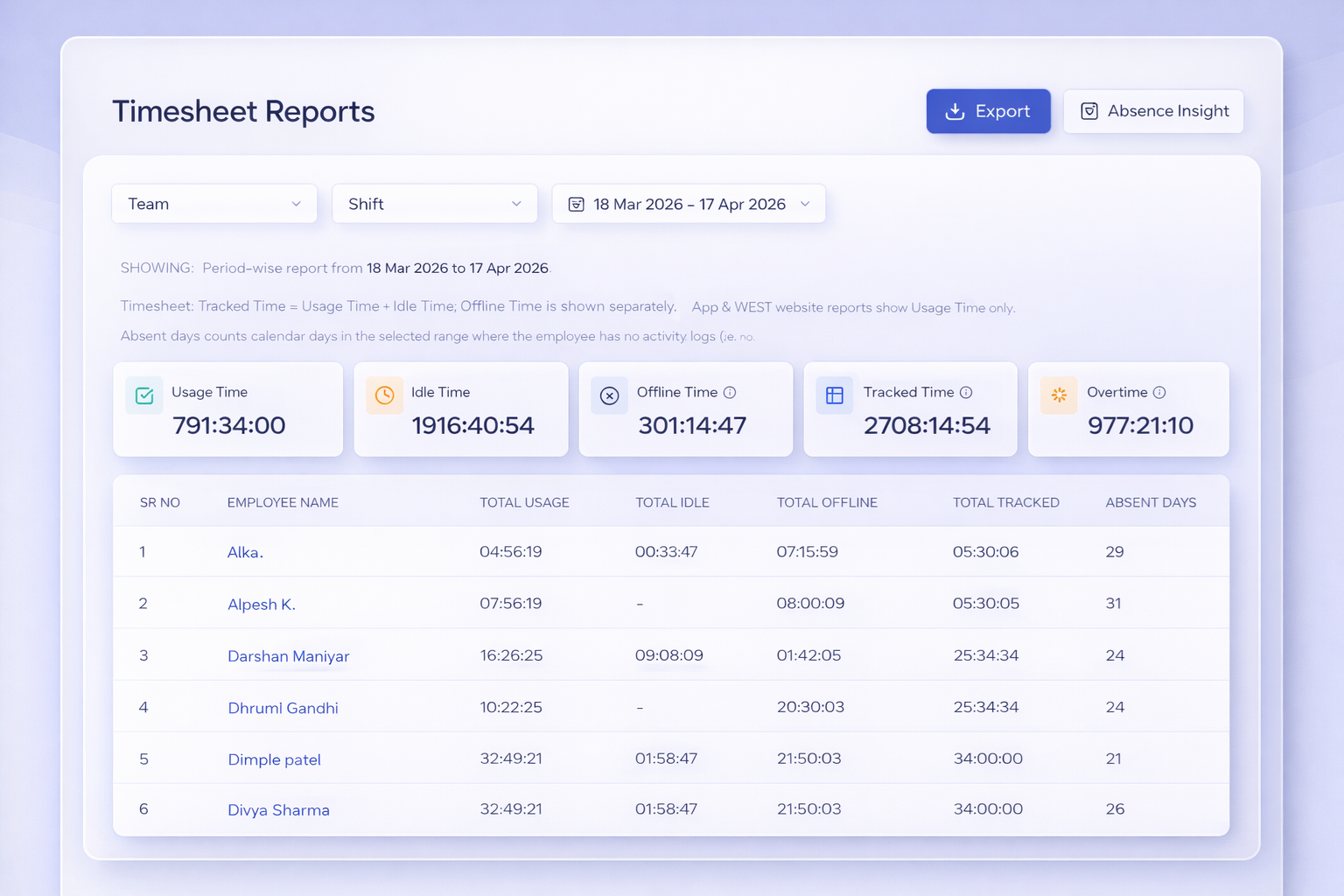
Timesheets

Timesheets that reflect work, not memory.

SuperSee turns real activity into evidence-backed timesheets so payroll, billing, and accountability do not depend on what people remember to enter later.

  • Auto-generated from screenshots and usage data
  • Idle time clearly separated from active time
  • Export-ready for payroll, billing, and compliance
Automated payroll timesheet
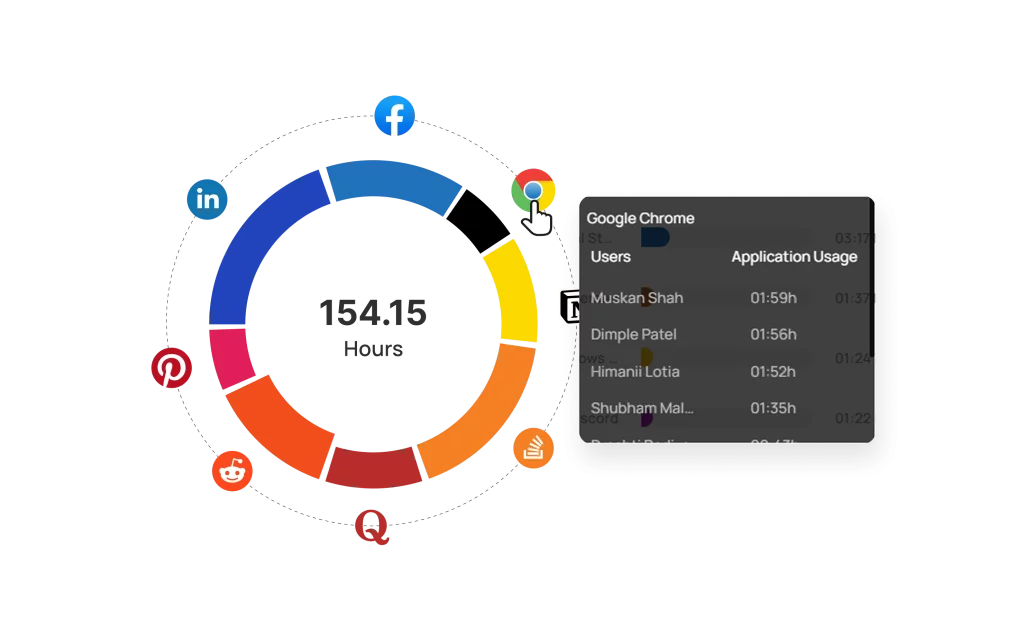
App & Web Usage

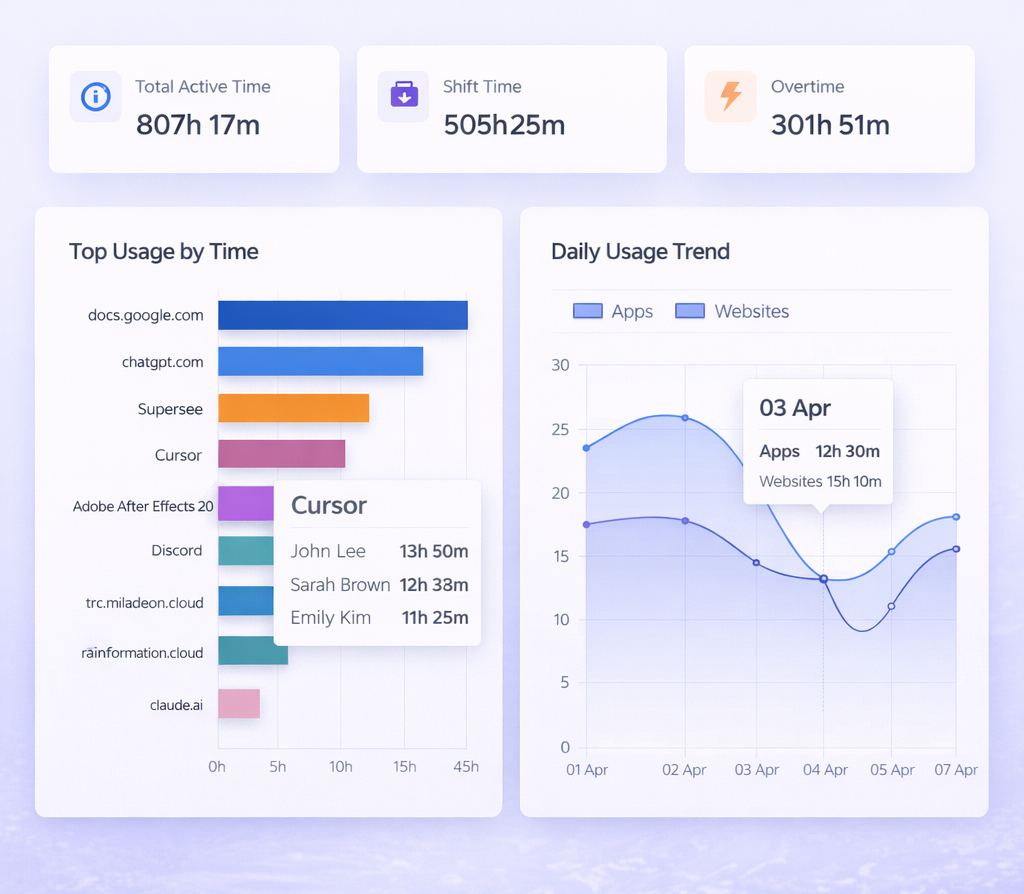
Know where time actually goes across tools and websites.

See how time gets distributed through the day, spot distracting patterns, and understand whether your team is spending time on the work that drives delivery.

  • Per-app time breakdown across the workday
  • Website usage visibility with productive context
  • Team-level and employee-level analysis
App and website tracking
Employee Work Patterns

See who needs support or acknowledgement with real-time data.

SuperSee is not about ranking people against each other. It helps managers spot work patterns, recognize focused execution, and support employees who are stuck, overloaded, or switching too often.

S
Focused ContributorConsistent delivery pattern
Focus Time4h 30m
Productive Work5h 45m
Context SwitchesLow
This employee shows sustained productive activity and low switching. SuperSee helps managers acknowledge good execution and protect their focus windows.
M
Support NeededInterrupted work pattern
Focus Time2h 10m
Productive Work3h 20m
Support Signals6 instances
The workday shows repeated switching and delay signals. SuperSee gives managers the context to ask better questions and support the person before deadlines slip.
Real-time manager insight

Use work patterns to recognize strong output, identify overload, and respond with support. The goal is better management conversations, not micromanagement or false guesses.

RecognizeFocused contributors
SupportInterrupted employees
ActBefore delivery slips
How It Works

From setup to insight in under 15 minutes.

No complex rollout. No developer required. Just set up the workspace, connect the team, and start seeing what work looks like in real time.

Step 1

Sign up

Create your SuperSee account and get your workspace ready in minutes. No technical setup or developer support needed.

Step 2

Add your team members & install agent

Invite employees, deploy the lightweight agent on Windows, macOS, or Ubuntu, and choose how monitoring works for each team.

Agent available for
Step 3

See real-time work immediately

Open the dashboard and instantly see live activity, screenshots, app usage, and timesheets from the moment your team starts working.

Reliability & Privacy

Built for teams that need clarity with control.

SuperSee keeps deployment lightweight, visibility immediate, and operational data available when managers need it - without adding friction to employee machines.

Offline Sync

Work data is captured even without internet and syncs automatically when the connection is restored.

Cross Platform

Works across Windows, macOS, and Ubuntu so distributed teams stay covered regardless of device mix.

Lightweight Agent

Minimal CPU and RAM usage keeps the agent quiet in the background so workstations stay responsive.

Status Visibility

See active, idle, offline, and absent employees immediately so managers can respond before delays compound.

Proof & Confidence

Used by growing teams that need faster answers.

SuperSee is chosen by teams that need faster delivery conversations, cleaner accountability, and better visibility across distributed work.

★★★★★

"SuperSee helped us understand workload without asking people for updates all day. We could spot who needed support and who deserved acknowledgement from real work data."

AO
Agency Operations Lead Client delivery team
★★★★★

"The biggest change was fewer false guesses. Instead of assuming someone was slow, we could see workload pressure, context switching, and where managers needed to unblock the team."

HR
HR & Admin Manager Distributed support team
★★★★★

"We improved workload efficiency without turning work into micromanagement. SuperSee gave us enough evidence to balance capacity, recognize focused work, and act before deadlines slipped."

CO
Company Owner Operations-heavy business
Pricing & Free Trial

Try SuperSee first. Choose pricing with clarity.

Give your team real-time visibility before making a long-term decision. The trial is built to help you evaluate screenshots, live visibility, app usage, timesheets, and workload signals in one place.

14-day free trial

No credit card. No complex setup.

Start with your real team, install the lightweight agent, and see productivity visibility from day one.

  • Full team trial access for 14 days
  • Setup support for managers and admins
  • Real-time dashboard, screenshots, usage, and timesheets included
  • Upgrade only when SuperSee fits your workflow
Simple active-user pricing Pricing is based on the number of employees you actively monitor, so growing teams can start lean and scale cleanly.
Custom quote
  • Small teamsIdeal for founders, agencies, and operations teams that need fast visibility without heavy rollout.
  • Growing teamsAdd more users as departments expand and keep productivity reporting consistent.
  • Multi-team workflowsUse role-based visibility, team-level reporting, and manager-friendly activity context.
  • Transparent supportTalk to us on WhatsApp for team-size pricing and rollout guidance before you commit.
FAQ

Common questions before you start your trial.

Straight answers on privacy, performance, setup, and how SuperSee fits into real team workflows.

Yes. SuperSee is built for transparent, policy-driven monitoring. Employees see exactly what's tracked through a visible agent indicator, and admins can configure consent flows. Ethical visibility - never spyware.

All data is encrypted in transit and at rest. Screenshots, activity logs, and timesheets are stored on secure cloud servers. Access is restricted to authorized managers only - employees cannot view each other's data.

No. The desktop agent is intentionally lightweight, with minimal CPU and memory usage, so it can run quietly in the background throughout the workday.

SuperSee captures activity data offline and syncs it automatically when the internet connection is restored. No data is lost due to network downtime - important for teams in locations with inconsistent connectivity.

SuperSee is designed for teams of all sizes - from 5 to 500+ employees. Pricing is based on the number of active users. Your 14-day free trial covers your full team with no credit card required. Visit the pricing page or chat with us on WhatsApp for a custom quote.

Free 14-day trial

Start seeing the work behind the hours.

Join growing teams using SuperSee to manage productivity with more confidence, cleaner reporting, and less guesswork.

No credit card required Setup in under 15 minutes Real-time visibility from day one
Real-time visibility for teams that need clarity, not guesswork.
150+ businesses 14-day free trial Setup in under 15 minutes
Employee Monitoring & Productivity

Know what work is actually happening across your team.

SuperSee gives managers real-time screenshots, live screen visibility, automated timesheets, and app tracking so decisions are based on proof, not follow-up messages.
Start Free Trial
150+ businesses trust SuperSee No credit card required Windows, macOS & Linux
App & Web Usage Analysis
SuperSee analytics dashboard
150+Businesses
14 DaysFree Trial
< 15 MinSetup Time
3 ModesScreenshot Capture
Trusted By Growing Teams

Operational visibility that leaders can act on.

From agencies to logistics and services teams, SuperSee helps managers see productivity patterns, understand activity, and respond faster without turning work into chaos.

LiveWork visibility
DailyInsight snapshots
InstantScreen access
Evidence-backedTimesheets
BusinessLine
A to Z Logistics Limited
S C Media House
Praxis360 Marketing Pvt. Ltd.
Blue Sync Technology
The Visibility Gap

Hours get logged. But real execution still disappears.

When teams are hybrid, remote, or spread across functions, managers often see reports after the fact, not the work patterns causing delays in the first place.

01

Hours logged are incomplete

Manual timesheets tell you what someone entered later, not what they actually worked on during the day.

02

Follow-ups do not scale

“Any update?” works for one person. It breaks down fast when managers are coordinating multiple teams and deadlines.

03

Pressure hides the real bottleneck

Without visibility, leaders can’t tell whether delays come from context switching, idle time, tool friction, or actual blockers.

See The Difference

Why work without visibility breaks under pressure.

Logged time alone cannot show what moved work forward, what stalled, or where managers need to step in. SuperSee turns scattered activity into operational clarity.

  • See what was actually worked on, not just how long someone stayed online
  • Understand productivity patterns across screenshots, apps, and live activity
  • Review evidence quickly when delivery slows down or context switching rises
Visibility changes the conversation.

Instead of asking for updates, managers can see whether the issue is distraction, idle time, system switching, or a real delivery blocker.

Feature Evidence

Clarity across productivity, screenshots, live work, and time analysis.

Every view is designed to help you manage better: identify drift earlier, compare work patterns faster, and stop relying on memory-based reporting.

Daily Insights Screenshots Live Screencast Timesheets Usage Tracking
Daily Insights

See exactly how productive your team was today.

One glance reveals productive hours, focus patterns, and workday gaps without opening spreadsheets or waiting for end-of-day updates.
  • Daily productivity score per employee
  • Color-coded productive, idle, and offline timeline
  • Compare across dates and teams in seconds
Employee productivity timeline
Screenshots

Capture evidence in the way your team actually works.

Periodic screenshots, screenshot on app change, and on-demand capture give managers proof without relying on assumptions. Optional webcam overlay remains available for each mode.
  • Capture every N minutes automatically
  • Trigger screenshots on app switch
  • Take an instant screenshot on demand
SuperSee screenshots feature
Live Screencast

Watch any employee screen in real time when it matters most.

For support desks, operations teams, and remote execution-heavy workflows, live visibility makes it easier to coach, verify, and unblock work immediately.
  • Open any employee screen instantly
  • Switch between team members from one dashboard
  • See actual execution without waiting for reports
SuperSee live screencast
Timesheets

Timesheets that reflect work, not memory.

SuperSee turns real activity into evidence-backed timesheets so payroll, billing, and accountability do not depend on what people remember to enter later.
  • Auto-generated from screenshots and usage data
  • Idle time clearly separated from active time
  • Export-ready for payroll, billing, and compliance
Automated payroll timesheet
App & Web Usage

Know where time actually goes across tools and websites.

See how time gets distributed through the day, spot distracting patterns, and understand whether your team is spending time on the work that drives delivery.
  • Per-app time breakdown across the workday
  • Website usage visibility with productive context
  • Team-level and employee-level analysis
App and website tracking
Employee Work Patterns

See who needs support or acknowledgement with real-time data.

SuperSee is not about ranking people against each other. It helps managers spot work patterns, recognize focused execution, and support employees who are stuck, overloaded, or switching too often.

S
Focused ContributorConsistent delivery pattern
Focus Time4h 30m
Productive Work5h 45m
Context SwitchesLow
This employee shows sustained productive activity and low switching. SuperSee helps managers acknowledge good execution and protect their focus windows.
M
Support NeededInterrupted work pattern
Focus Time2h 10m
Productive Work3h 20m
Support Signals6 instances
The workday shows repeated switching and delay signals. SuperSee gives managers the context to ask better questions and support the person before deadlines slip.
Real-time manager insight

Use work patterns to recognize strong output, identify overload, and respond with support. The goal is better management conversations, not micromanagement or false guesses.

RecognizeFocused contributors
SupportInterrupted employees
ActBefore delivery slips
How It Works

From setup to insight in under 15 minutes.

No complex rollout. No developer required. Just set up the workspace, connect the team, and start seeing what work looks like in real time.

Step 1

Sign up

Create your SuperSee account and get your workspace ready in minutes. No technical setup or developer support needed.

Step 2

Add your team members & install agent

Invite employees, deploy the lightweight agent on Windows, macOS, or Ubuntu, and choose how monitoring works for each team.

Agent available for
Step 3

See real-time work immediately

Open the dashboard and instantly see live activity, screenshots, app usage, and timesheets from the moment your team starts working.

Reliability & Privacy

Built for teams that need clarity with control.

SuperSee keeps deployment lightweight, visibility immediate, and operational data available when managers need it - without adding friction to employee machines.

Offline Sync

Work data is captured even without internet and syncs automatically when the connection is restored.

Cross Platform

Works across Windows, macOS, and Ubuntu so distributed teams stay covered regardless of device mix.

Lightweight Agent

Minimal CPU and RAM usage keeps the agent quiet in the background so workstations stay responsive.

Status Visibility

See active, idle, offline, and absent employees immediately so managers can respond before delays compound.

Proof & Confidence

Used by growing teams that need faster answers.

SuperSee is chosen by teams that need faster delivery conversations, cleaner accountability, and better visibility across distributed work.

★★★★★

"SuperSee helped us understand workload without asking people for updates all day. We could spot who needed support and who deserved acknowledgement from real work data."

AO
Agency Operations Lead Client delivery team
★★★★★

"The biggest change was fewer false guesses. Instead of assuming someone was slow, we could see workload pressure, context switching, and where managers needed to unblock the team."

HR
HR & Admin Manager Distributed support team
★★★★★

"We improved workload efficiency without turning work into micromanagement. SuperSee gave us enough evidence to balance capacity, recognize focused work, and act before deadlines slipped."

CO
Company Owner Operations-heavy business
Pricing & Free Trial

Try SuperSee first. Choose pricing with clarity.

Give your team real-time visibility before making a long-term decision. The trial is built to help you evaluate screenshots, live visibility, app usage, timesheets, and workload signals in one place.

14-day free trial

No credit card. No complex setup.

Start with your real team, install the lightweight agent, and see productivity visibility from day one.

  • Full team trial access for 14 days
  • Setup support for managers and admins
  • Real-time dashboard, screenshots, usage, and timesheets included
  • Upgrade only when SuperSee fits your workflow
Simple active-user pricing Pricing is based on the number of employees you actively monitor, so growing teams can start lean and scale cleanly.
Custom quote
  • Small teamsIdeal for founders, agencies, and operations teams that need fast visibility without heavy rollout.
  • Growing teamsAdd more users as departments expand and keep productivity reporting consistent.
  • Multi-team workflowsUse role-based visibility, team-level reporting, and manager-friendly activity context.
  • Transparent supportTalk to us on WhatsApp for team-size pricing and rollout guidance before you commit.
FAQ

Common questions before you start your trial.

Straight answers on privacy, performance, setup, and how SuperSee fits into real team workflows.

Yes. SuperSee is built for transparent, policy-driven monitoring. Employees see exactly what's tracked through a visible agent indicator, and admins can configure consent flows. Ethical visibility - never spyware.

All data is encrypted in transit and at rest. Screenshots, activity logs, and timesheets are stored on secure cloud servers. Access is restricted to authorized managers only - employees cannot view each other's data.

No. The desktop agent is intentionally lightweight, with minimal CPU and memory usage, so it can run quietly in the background throughout the workday.

SuperSee captures activity data offline and syncs it automatically when the internet connection is restored. No data is lost due to network downtime - important for teams in locations with inconsistent connectivity.

SuperSee is designed for teams of all sizes - from 5 to 500+ employees. Pricing is based on the number of active users. Your 14-day free trial covers your full team with no credit card required. Visit the pricing page or chat with us on WhatsApp for a custom quote.

Free 14-day trial

Start seeing the work behind the hours.

Join growing teams using SuperSee to manage productivity with more confidence, cleaner reporting, and less guesswork.

No credit card required Setup in under 15 minutes Real-time visibility from day one